Going live is no longer just about sending a video feed to YouTube or LinkedIn. Depending on your use case, you may need to invite remote speakers, customize the visual experience, stream to multiple platforms, interact with your audience, or send a professionally produced feed from OBS, vMix, or an external control room.
And not every live streaming platform is built for the same job.
Some focus on simplicity and multistreaming. Others are designed around video production, social content, large-scale distribution, or audience interaction.
Here are 10 live streaming platforms to compare in 2026.
1. Sparkup: For High-Quality, Interactive Live Streams That Are Easy to Produce
Pricing: Free plan available. Paid plans start at €35/month with annual billing.
Best for: Content creators and brands that want to produce professional, branded, interactive live streams without sacrificing broadcast quality.
Key features
- Multistreaming to LinkedIn, YouTube, Facebook, and other destinations
- Browser-based studio
- Logos, backgrounds, and overlays
- Speaker management
- Polls, Q&A, chat, quizzes, reactions, and word clouds
- On-screen comment display
- Unified chat
- Audience members can be invited on stage
- Audience video mosaic
- RTMP input
- Multi-feed streaming
- AI live translation
- Sub-second latency
- Streaming and recording up to 4K
- Engagement analytics
- Embeddable video player
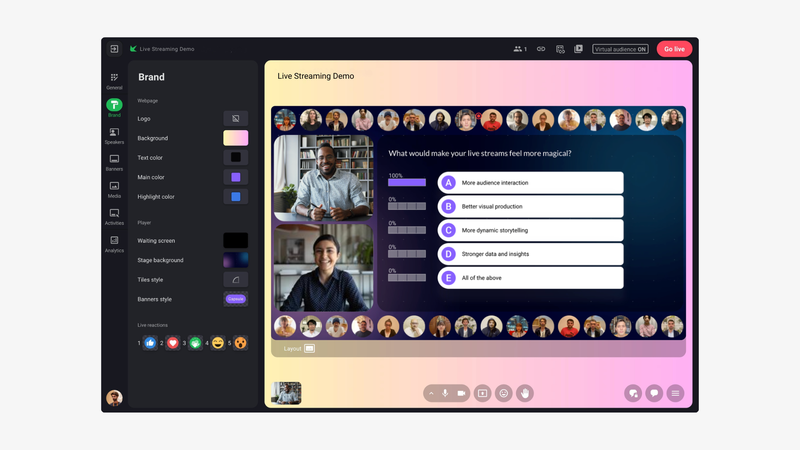
Sparkup overview
Sparkup is a European live streaming platform built for brands and content creators that want to combine broadcast quality, production simplicity, and audience engagement.
From a studio that runs directly in the browser, teams can manage speakers, switch layouts, display media, launch interactive features, and apply their branding without having to use OBS.
The platform can stream up to 4K with sub-second latency, helping preserve a truly synchronous experience for everyone taking part in the live session.
A truly interactive and customizable live experience for every viewer
Sparkup stands out primarily on the audience experience compared with platforms that are mainly designed to redistribute a video feed across social networks.
Polls, quizzes, Q&A, reactions, chat, and word clouds can all be built directly into the video experience. Viewers can also raise their hands and be invited to speak.
Sparkup can also provide multiple feeds within the same live experience and let each viewer choose which one they want to watch.
For example, you could offer different camera angles, a main program and an alternative feed, or a separate audio channel in another language.
A single live stream can therefore deliver different experiences depending on each participant’s preferences.
This approach is especially useful for international events, multi-stage conferences, or productions where multiple viewpoints need to be available at the same time.
Ultra-low latency also matters here.
A poll, a question, or an audience contribution quickly loses its natural feel if part of the audience is watching several seconds behind everyone else.
From a browser-based studio to an external production setup
Sparkup can be used entirely from the browser, but it can also receive an externally produced RTMP feed.
A team can therefore start with a webcam and screen sharing, then move to OBS, vMix, a hardware encoder, or a professional AV control room as production needs become more advanced.
Sparkup can also stream to multiple social platforms, with a unified chat that brings incoming comments together.
Sparkup’s 2026 product matrix also confirms browser access, different video quality levels, and RTMP input on the relevant plans.
Sparkup limitations
Sparkup covers both multistreaming to external platforms and hosting a branded live experience of your own.
Its broader feature set is most useful when a brand or creator wants to go beyond a simple video feed and combine production, branding, interactivity, low latency, and analytics.
For a very basic use case, such as occasionally streaming a webcam to one or two platforms without branding, interaction, or audience data, a lighter solution may simply be enough.
2. Restream: For Streaming Easily to Multiple Platforms at Once
Pricing: Free plan available. Paid plans start at $19/month with annual billing.
Best for: Creators and marketing teams that mainly want to stream the same live content across multiple social networks.
Key features
- Multistreaming
- YouTube, LinkedIn, Twitch, Facebook, and other destinations
- Browser-based studio
- Up to 5 simultaneous destinations on the Professional plan
- Full HD 1080p on the Professional plan
- Recording up to 4K
- Cross-platform chat
- Remote guests
- Custom RTMP
- Integration with OBS and other encoders
- Simultaneous horizontal and vertical streaming
- Stream monitoring
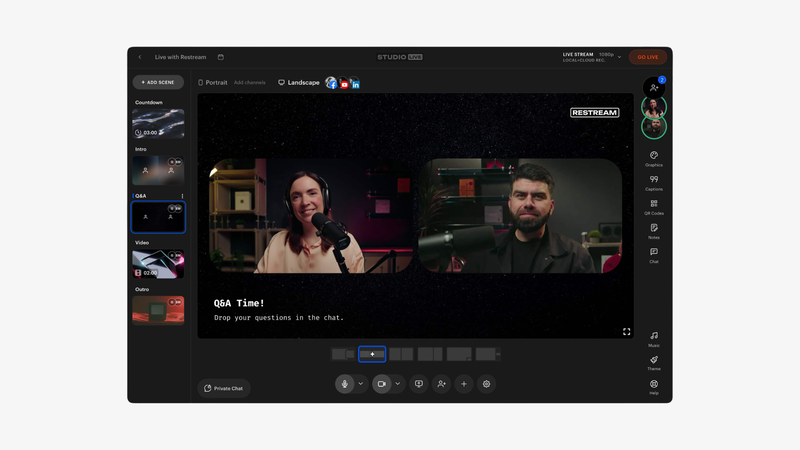
Restream overview
Restream built much of its reputation around a very simple problem: how do you go live in several places at once without sending multiple streams from your own computer?
You send one feed to Restream, and the platform redistributes it to multiple destinations.
The free plan currently supports two simultaneous channels, while paid plans progressively increase that number.
The Professional plan also adds Full HD 1080p streaming and 4K recording.
Multistreaming at the core of the product
Restream is especially useful for brands or creators whose audience is spread across several networks.
Comments from different platforms can be brought into a single interface, and Restream also lets you connect an external encoder such as OBS.
Its simultaneous vertical and horizontal streaming features are also useful when the same live stream needs to work across platforms with very different formats.
Restream limitations
The experience is still primarily built around distributing a live stream to third-party platforms.
If your goal is to create a branded environment where the audience gathers in one place, with richer interactivity, stronger customization, and detailed individual engagement data, Restream solves a different kind of problem.
3. StreamYard: For Producing Live Streams Easily From Your Browser
Pricing: Free plan available. The Core plan starts at $35.99/month with annual billing.
Best for: Creators, social media teams, and small teams that want polished live streams without technical expertise.
Key features
- Browser-based studio
- Guest management
- Multistreaming
- Up to 8 destinations depending on the plan
- Full HD 1080p
- Logos, backgrounds, and overlays
- Custom layouts
- On-screen comment display
- Unified chat
- Custom RTMP
- Simultaneous horizontal and vertical streaming
- Local recording up to 4K on Advanced
- AI clips
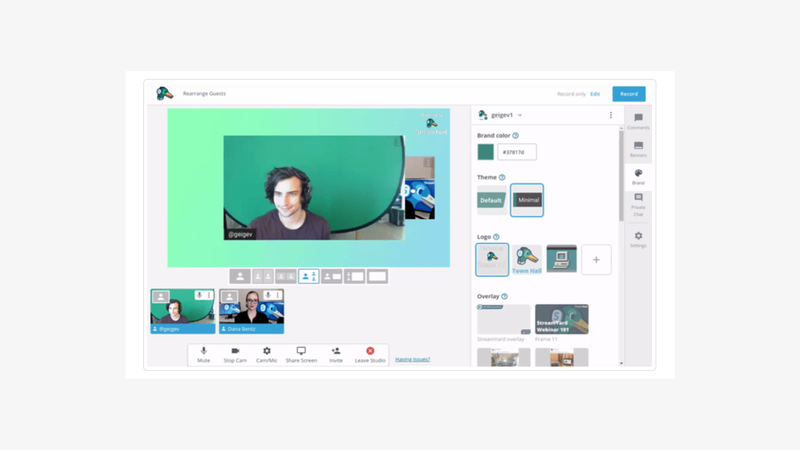
StreamYard overview
StreamYard is probably one of the most accessible solutions for anyone who wants to produce a live stream without learning OBS.
A single link is enough to invite speakers, and the host can then manage cameras, shared screens, overlays, comments, and streaming destinations directly from the browser.
The Core plan currently supports 1080p streaming to three destinations, while the Advanced plan increases that to eight destinations and adds local 4K recording.
Simplicity is a real strength
StreamYard works particularly well for interviews, video podcasts, social shows, and panel discussions.
It also makes it easy to display a comment from YouTube or LinkedIn directly in the live stream, creating a useful connection between the content and the communities watching on social platforms.
StreamYard limitations
It is important to distinguish recording quality from live streaming quality.
Local recordings can reach 4K on certain plans, but live streaming itself is currently offered in Full HD 1080p.
Interactivity is also still largely centered around chat and comments from destination platforms.
For formats that require voting, quizzes, structured Q&A, audience participation, or more advanced engagement analytics, other platforms go further.
4. Riverside: The Platform for Repurposing Your Content
Pricing: Free plan available. The Grow plan, which includes live streaming, starts at €34/month with annual billing.
Best for: Podcasters and teams that care more about replay quality and content repurposing than the live experience itself.
Key features
- Browser-based studio
- Full HD 1080p live streaming
- Multistreaming to multiple destinations
- Custom RTMP
- Omnichat
- Backstage speaker management
- Overlays and lower thirds
- Local recording up to 4K
- Separate audio and video tracks
- Built-in editing
- Transcription
- AI clip generation
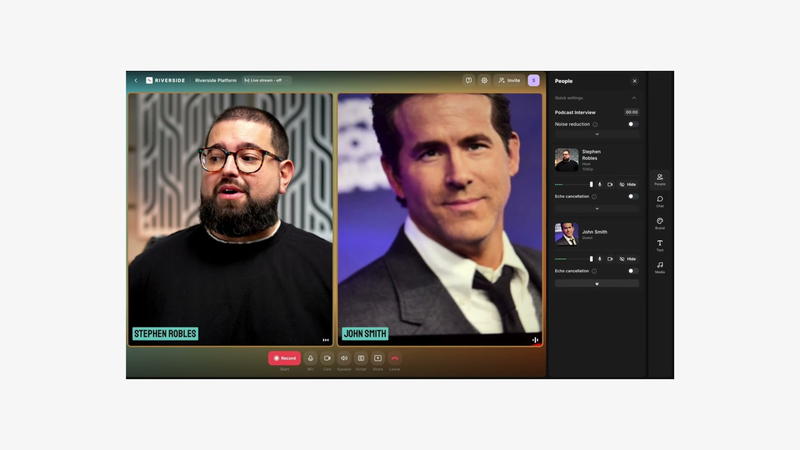
Riverside overview
Riverside historically comes from remote video and podcast recording, and that heritage is clear in its approach to live streaming.
Its main strength is that you can broadcast a show and then recover high-quality files for the replay, social clips, or a podcast.
The Grow plan currently includes 1080p live streaming, multistreaming to multiple destinations, Custom RTMP, omnichat, and backstage speaker management.
Local recordings can reach 4K.
Well suited to repurposing your live content
For a content marketing team, this workflow is particularly useful.
A one-hour interview can be streamed live, recorded on multiple tracks, transcribed, edited, and turned into several clips without leaving the same environment.
Riverside limitations
Riverside is first and foremost very strong at content creation and repurposing.
Live streaming is limited to 1080p even though local recordings can reach 4K.
The audience experience and interaction mechanics are also less central than on a platform designed primarily around audience participation.
5. OBS Studio: For Maximum Control Over Your Production
Pricing: Free and open source.
Best for: Streamers and producers who want fine-grained control over production and are comfortable with a steeper learning curve.
Key features
- Free and open source
- Windows, macOS, and Linux
- Unlimited scenes
- Multiple video sources
- Screen and window capture
- Capture cards
- Audio mixing
- Audio filters
- Transitions
- Plugins
- RTMP output to streaming platforms
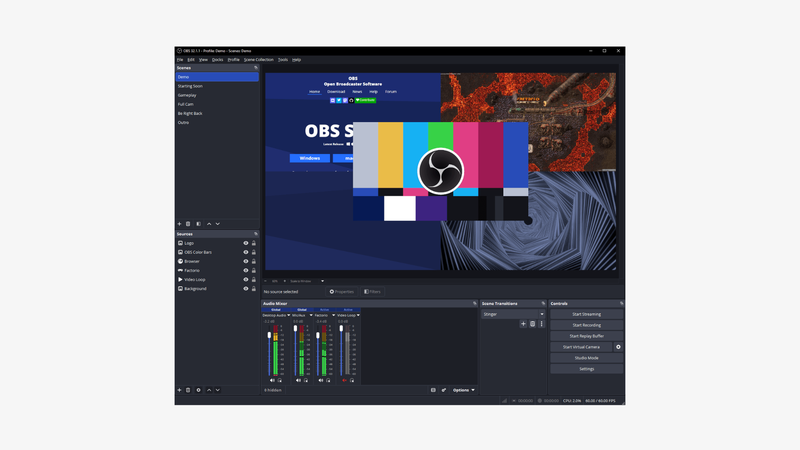
OBS Studio overview
OBS Studio is different from the other solutions in this list.
It is not an all-in-one cloud platform, but software installed on your computer that lets you build and encode your own video production.
It remains essential in live streaming because of the level of control it gives you over scenes, sources, transitions, and audio processing.
OBS is free and open source.
Almost unlimited flexibility
Webcams, cameras connected through capture cards, screen captures, browser sources, videos, images, and text: OBS lets you build highly customized productions.
That flexibility explains why it is widely used in gaming, streaming, and more technical live productions.
OBS Studio limitations
That freedom comes at the cost of simplicity.
The software needs to be installed, configured, and set up correctly.
Managing remote guests, cloud multistreaming, audience experience, and interactive features also requires additional tools.
OBS becomes extremely powerful when you know what you are doing, but it can be intimidating for a marketing or communications team that simply wants to launch a polished live stream quickly.
6. Vimeo: For Companies That Want to Host and Distribute Their Own Live Streams
Pricing: The Advanced plan with live streaming currently starts at €88/month, billed annually.
Best for: Companies that want a broader video infrastructure and greater control over how their video content is hosted.
Key features
- Live streaming
- Browser-based studio
- Multicam
- Audio mixing
- Branding
- RTMPS and SRT
- Multistreaming
- Embedded video player
- Chat, polls, and Q&A
- Event analytics
- Recording and video hosting
- SSO and enterprise features depending on the plan
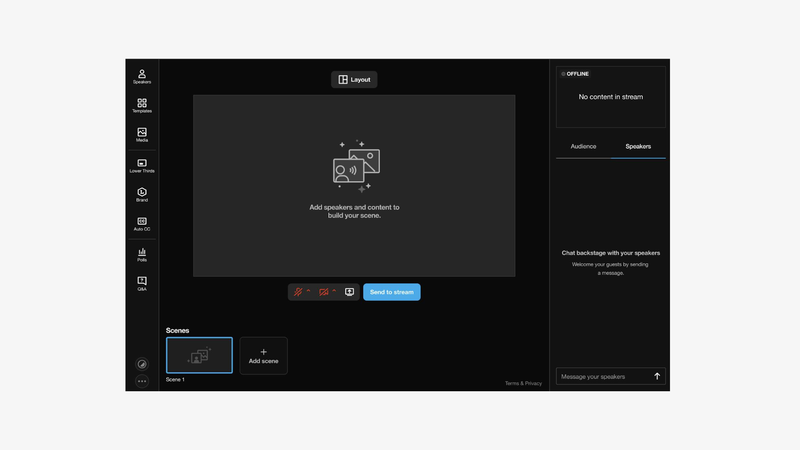
Vimeo overview
Vimeo has long since moved beyond simple video hosting.
Its live platform lets you use either its browser-based studio or an external production setup or encoder via RTMPS or SRT.
The Professional plan, formerly Advanced, currently includes live events, multistreaming, chat, polls, Q&A, and event analytics.
An approach centered on owning the video experience
Vimeo is particularly relevant when a company wants to stream on its own website or in its own environment rather than relying exclusively on YouTube or LinkedIn.
Its Enterprise plans also add security features, backup streams, and SSO.
Vimeo limitations
That level of depth may be more than a creator or small team needs if the only goal is to launch a live stream quickly across a few social networks.
Vimeo is closer to a complete video infrastructure than a simple social live streaming tool.
7. OneStream Live: For Scheduling and Distributing Large Volumes of Content
Pricing: Free plan available. Paid plans start at €15/month with annual billing.
Best for: Teams that stream frequently, use prerecorded content, or run 24/7 streams across many platforms.
Key features
- Multistreaming
- Up to 50 destinations depending on the plan
- Live studio
- OBS and vMix connection
- RTMP source on selected plans
- 1080p streaming
- Prerecorded content
- Playlists
- Optional 24/7 streaming
- Embedded player
- Custom web pages
- Video storage
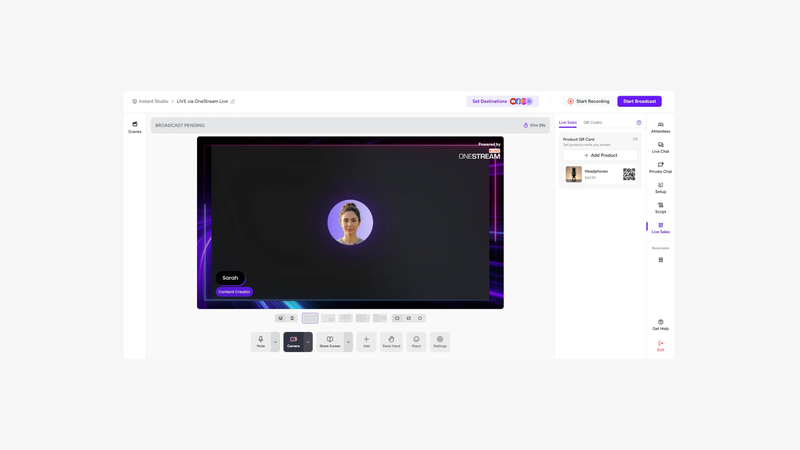
OneStream Live overview
OneStream Live is especially focused on distribution and automation.
The free plan already lets you stream to two destinations, while paid plans progressively increase that number to several dozen.
The platform also lets you connect OBS or vMix, schedule prerecorded content, and, on selected plans, create 24/7 channels.
Well suited to continuous distribution strategies
For a brand or media company that already has a large library of video content, it can be useful to schedule broadcasts without having to produce every live stream from scratch.
OneStream Live limitations
Its main strength lies in distribution, scheduling, and the number of destinations.
For highly produced shows or experiences where audience participation is part of the content itself, other tools offer a more advanced approach.
8. Castr: For Professional and Technical Streaming Workflows
Pricing: Plans start at $16.67/month with annual billing.
Best for: Video teams, media companies, and organizations with advanced requirements around protocols, CDN infrastructure, and resilience.
Key features
- RTMP, SRT, HLS, RTSP, and MPEG-TS
- Multistreaming
- Up to 30 destinations depending on the plan
- Embeddable player
- Multi-CDN
- Automatic recording
- Live-to-VOD
- Stream monitoring
- Adaptive bitrate depending on the plan
- Access control
- Paywall
- Failover ingest depending on the plan
- Low-latency playback on Ultra
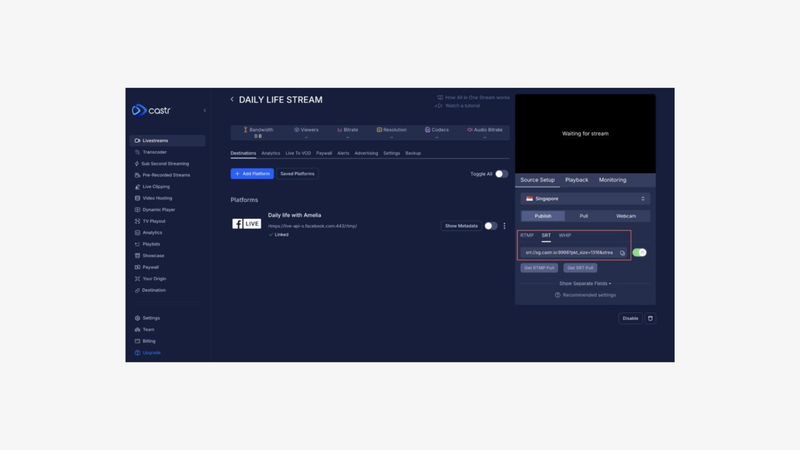
Castr overview
Castr is closer to a professional streaming infrastructure than a browser studio designed to launch a quick two-webcam interview.
A single RTMP or SRT feed can be sent to Castr and then redistributed to YouTube, Facebook, LinkedIn, Twitch, custom destinations, or an embedded player on your own site.
Depending on the plan, Castr currently supports up to 30 destinations, multiple ingest protocols, recording, monitoring, and more advanced transcoding or low-latency options.
A platform built for video operators
Castr becomes especially relevant when requirements get more technical: multiple simultaneous streams, SRT, adaptive bitrate, failover, access control, or OTT distribution.
Castr limitations
Its infrastructure-focused approach makes it less immediately accessible for someone looking for a very simple browser-based studio.
For a social media team that wants to invite two speakers and launch a LinkedIn Live in ten minutes, StreamYard or Restream will probably feel more natural.
9. Dacast: For Hosting and Monetizing Professional Live Streams
Pricing: No free plan. Paid plans start at around $39/month with annual billing.
Best for: Media companies, businesses, and organizations that want to stream on their own website with more control over the player, access, and monetization.
Key features
- Live streaming and video hosting
- White-label video player
- Streaming on your own website
- RTMP ingest
- Adaptive bitrate streaming
- Video analytics
- Access control
- Geographic restrictions
- Paywall and monetization
- Live recording
- CDN distribution
- Video API
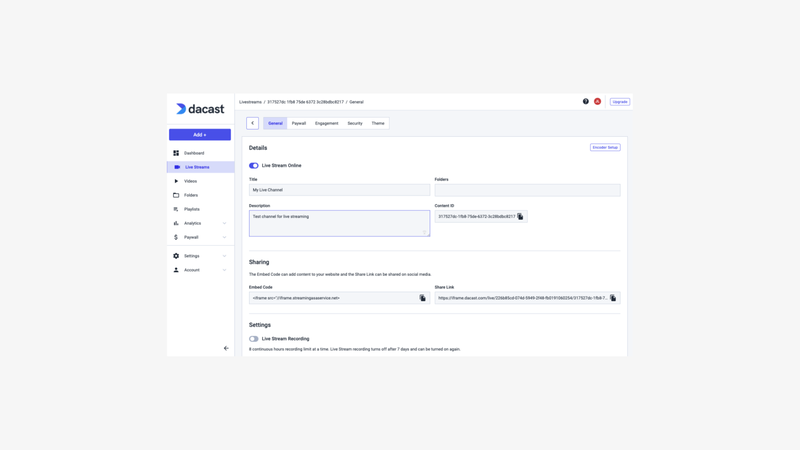
Dacast overview
Dacast is more focused on hosting and distributing live streams than producing them from a browser-based studio.
It allows companies to stream content directly on their own websites with a customizable player, without necessarily relying on YouTube, Twitch, or LinkedIn.
An approach centered on distribution control
Dacast is particularly interesting when an organization wants to retain control over its audience and distribution environment.
The player can be embedded on a website, access can be restricted, and content can also be monetized through paywall features.
This makes it suitable for media companies, paid events, conferences, sports broadcasters, or organizations that want to create their own streaming experience.
Dacast limitations
Dacast is not primarily designed for producing a live stream with multiple remote speakers.
To manage speakers, create layouts, or display interactions quickly during the live session, you will often need an external production tool such as OBS, Wirecast, or vMix.
10. Wirecast: For Advanced Live Productions
Pricing: No free plan. Wirecast primarily uses a paid license model rather than a traditional subscription.
Best for: Video producers who prioritize production control and have the technical skills to run a software-based control room.
Key features
- Multicam production
- Multiple video and audio sources
- Capture cards
- Screen capture
- Titles and lower thirds
- Overlays
- Transitions
- NDI
- Replay
- Audio mixing
- Multiple streaming destinations
- RTMP
- Local recording
- Advanced scene control
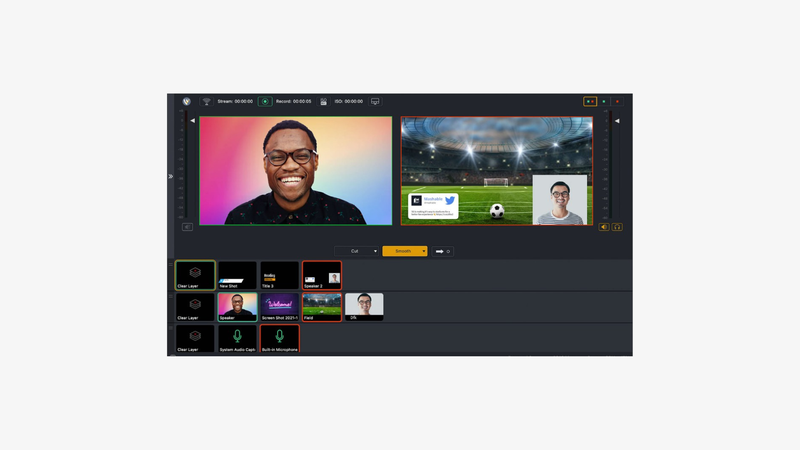
Wirecast overview
Wirecast is live production software for teams that want to go beyond what a browser-based streaming studio can offer.
Its workflow is closer to a software control room.
Producers can connect multiple cameras, manage different audio feeds, add titles, overlays, and transitions, then send the final program to one or more streaming platforms.
More accessible than a broadcast control room, but far more advanced than a browser studio
Wirecast sits in a category relatively close to OBS, with a commercial approach and a feature set strongly focused on video production.
It is a good fit for conferences, hybrid events, multicam shows, or productions where a technical team is actively directing the live broadcast.
Wirecast limitations
That level of power requires more preparation and technical expertise.
The software needs to be installed, sources configured, and the production prepared in advance.
It will therefore likely be overkill for a marketing team that simply wants to launch an interview or panel discussion from the browser.
Wirecast also does not manage the full audience experience on its own.
Registration, interaction, and analytics usually need to be handled by the platform receiving the stream.
How to Choose a Live Streaming Platform
The right tool depends much less on the total number of features than on the live workflow you want to build.
Actual Live Streaming Quality
There is an important distinction to watch for on pricing pages: “4K recording” and “4K live streaming” do not mean the same thing.
A platform may record local camera feeds in 4K while still streaming the live program in 1080p.
That is currently the case with StreamYard and Riverside on selected plans.
Sparkup, on the other hand, states that it can stream up to 4K.
Resolution is not everything, though.
Adaptive bitrate, stability, audio quality, and the ability to maintain that quality as the audience grows are equally important.
Latency
Latency is the delay between what happens in front of the camera and what the viewer sees.
For a mostly one-way broadcast, a few seconds of delay are often acceptable.
As soon as the live experience becomes conversational, that changes.
A speaker waiting for poll responses or inviting a viewer to speak needs reactions to come through almost immediately.
Low latency therefore becomes an experience criterion, not just a technical specification.
The Production Studio
Ask yourself one simple question: who is going to produce the live stream?
If the answer is a marketing or communications team, a browser-based studio can simplify the workflow dramatically.
StreamYard, Restream, Riverside, and Sparkup all let teams handle a large part of the production without specialized software.
OBS offers much more flexibility but requires more setup.
And for a true external control room, you should check whether the platform supports RTMP or SRT input.
Multistreaming
If your audience is on LinkedIn, YouTube, Twitch, or Facebook, streaming to multiple platforms at the same time can become essential.
Restream and StreamYard have made this a central part of their value proposition.
OneStream and Castr go even further in terms of the number of destinations available.
But the maximum number of destinations is not always the most important criterion.
Also check whether you can connect custom RTMP destinations, manage chats across platforms, and stream in multiple formats at the same time.
Audience Experience and Interactivity
There is an important difference between distributing a live stream and hosting a live experience.
In the first case, viewers usually watch directly on LinkedIn, YouTube, or Twitch and interact primarily through comments on those platforms.
In the second, the organizer has more control over the experience: custom pages, a proprietary player, polls, Q&A, voting, reactions, audience participation, and individual analytics.
The right model therefore depends on your objective.
If maximizing social reach is the priority, distribution will often matter most.
For a town hall, product launch, training session, or corporate event, controlling the audience experience may matter more.
RTMP, SRT, and External Encoders
A browser-based studio is enough for a wide range of formats.
But as soon as a production includes multiple physical cameras, a control room, OBS, vMix, a video switcher, or a hardware encoder, the ability to send an external feed becomes important.
RTMP remains extremely common.
SRT offers additional advantages for professional workflows where transport reliability is particularly important.
Vimeo and Castr support SRT workflows, while Sparkup, Restream, StreamYard, and OneStream support different forms of RTMP.
Which Live Streaming Platform Should You Choose?
For professional, interactive live streams that are easy to produce, Sparkup is particularly relevant when video quality, ultra-low latency, and audience participation all need to work together without adding complexity.
For streaming easily across multiple social networks, Restream is one of the most natural options.
For producing interviews and social shows as simply as possible, StreamYard remains highly accessible.
For recording, editing, and repurposing content after the live session, Riverside stands out for its high-quality local files and post-production tools.
For highly customized production with maximum technical control, OBS Studio remains a strong free option.
For hosting and distributing video in an enterprise environment, Vimeo offers a broader infrastructure with a player, security features, and professional workflows.
For scheduling large volumes of live or prerecorded content, OneStream Live is especially well suited.
For more technical streaming workflows, Castr offers more control over protocols, CDN infrastructure, and distribution.
For hosting your own live streams and potentially monetizing them, Dacast is particularly useful thanks to its white-label player and access-control features.
For advanced multicam production, Wirecast lets you build a true software-based control room with multiple sources, overlays, transitions, and streaming destinations.
FAQ
What is the best live streaming platform?
There is no single best live streaming platform for every use case.
Sparkup is well suited to interactive, low-latency live experiences, Restream to multistreaming, StreamYard to simple browser-based shows, Riverside to repurposing, OBS and Wirecast to more advanced productions, Vimeo and Dacast to owned hosting, and Castr to more technical streaming workflows.
Which platform should I use to stream to multiple social networks?
Restream, StreamYard, OneStream Live, Sparkup, and Castr can all distribute a live stream to multiple destinations.
Restream and StreamYard are particularly simple for social networks, while Castr and OneStream offer more destinations and more technical flexibility.
Which live streaming platform should a company choose?
Companies should look beyond simple multistreaming.
Video quality and stability, security, branding, low latency, analytics, audience experience, participant capacity, and integration with external production tools can all become important decision criteria.
Can you live stream in 4K?
Yes, but make sure the platform is referring to 4K live streaming and not just 4K recording.
Some solutions record sources in 4K while streaming the live program in 1080p.
Sparkup currently states that it supports streaming up to 4K.
What is the difference between OBS and a platform like StreamYard or Restream?
OBS is primarily production and encoding software installed on a computer.
StreamYard and Restream are cloud services that simplify guest management and distribution to multiple platforms.
The two approaches can also be combined.
What is RTMP?
RTMP is a widely used protocol for sending a video feed from an encoder or production software to a streaming platform.
For example, you can produce a live show in OBS or vMix and send the final program feed to a platform that distributes it to the audience.