
A word cloud sounds simple. You ask a question, people type answers, and the most common words appear bigger on screen. But when it lands well during a live event, it does something harder to engineer: it makes hundreds of people feel like they're thinking together in the same room.
Here's how to set one up, run it well, and actually get something useful out of it.
What a Live Word Cloud Actually Does
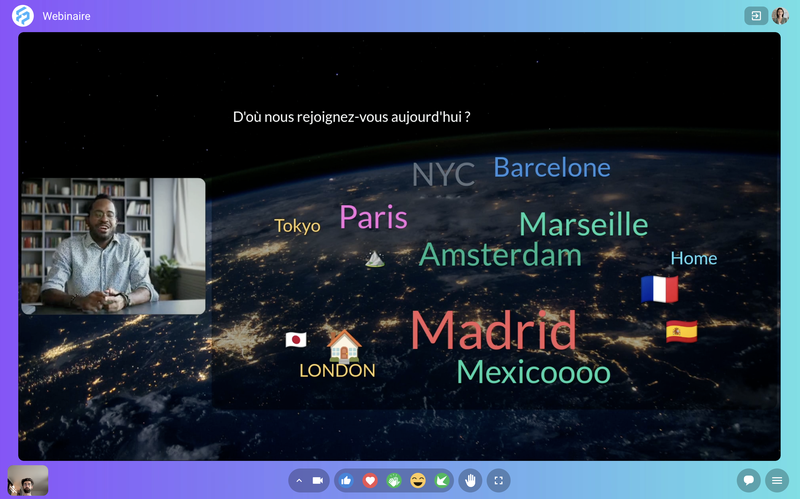
Unlike a poll with fixed answer choices, a word cloud is open-ended. Participants type whatever comes to mind, and words that appear most often grow larger. The visual updates in real time as responses come in.
That immediacy is the point. People see their input reflected on screen within seconds. It's not a survey they fill out and forget. It's a moment of shared expression that plays out in front of everyone.
This makes word clouds particularly effective at the start of a session, during a discussion break, or any time you want to surface collective sentiment without steering the answers yourself.
When to Use One (and When Not To)
Word clouds work best when the question is genuinely open-ended and the answer space is wide enough to be interesting. Good use cases include:
- Opening a session: "What's one word that describes how you feel about [topic]?" gives you an instant read on the room before you've said much.
- Gauging expectations: "What do you hope to take away from today?" helps you calibrate in real time.
- Capturing reactions: After a product demo or announcement, "What's your first reaction?" can surface responses you wouldn't have thought to include in a poll.
- Closing a session: "Sum up today in one word" is a quick, low-friction way to end on a participatory note.
They're less useful when you need precise data, want to compare percentages, or need respondents to choose between defined options. For those situations, a poll or quiz is a better fit.
Setting Up a Live Word Cloud
The mechanics are straightforward, but a few decisions affect how well it runs.
Choose a platform with native word cloud support
Some platforms treat word clouds as an afterthought. Others build them into the engagement layer so the visual appears directly in the broadcast without switching tabs or pulling in a third-party tool.
Sparkup includes word cloud as part of its real-time audience engagement suite, alongside polls, quizzes, Q&A, live chat, and emoji reactions. Everything runs in the browser with no download required, so participants on any device can contribute without friction.
Write a question that produces useful responses
The quality of your word cloud depends almost entirely on the question. Vague questions produce vague clouds.
Compare:
- "What do you think about remote work?" (too broad)
- "What's the biggest challenge with remote collaboration right now?" (more focused)
Single-word or short-phrase prompts work better than full sentences. Encourage participants to keep answers brief so the visual stays readable.
Decide when to reveal it
You have two options: show the word cloud building in real time as responses come in, or collect responses with the cloud hidden and reveal it all at once.
Real-time display creates energy. Participants watch their word appear on screen, which encourages more people to contribute. The tradeoff is that early responses can anchor the cloud before the full audience has weighed in.
A delayed reveal gives you a more complete picture before showing anything. It works better when you want the visual to land as a moment rather than a process.
Neither is wrong. Choose based on whether you want participation energy or a clean reveal.
Give people enough time
A common mistake is launching a word cloud and moving on too quickly. Thirty seconds is rarely enough. Sixty to ninety seconds gives latecomers time to notice the prompt and respond, and lets the cloud develop into something visually interesting rather than a handful of isolated words.
Narrate while it fills. Point out what you're seeing. "Looks like a lot of people are saying 'communication' and 'trust'" keeps the audience engaged and makes the data feel meaningful rather than decorative.
Running It During a Hybrid or Large-Scale Event
If you're running a hybrid event with both on-site and remote participants, a live word cloud is one of the more effective ways to make remote attendees feel included. On-site participants see the cloud on a screen in the room; remote participants see it in their browser. Both groups contribute to the same visual.
Sparkup's Immersive Studio mode is built for exactly this kind of scenario, displaying remote participants on an LED screen or studio backdrop so the event feels unified rather than split between two audiences. The word cloud and other engagement tools work across both groups simultaneously.
At scale, the same principle holds. When you're broadcasting to thousands of people, a word cloud gives the audience a way to participate that doesn't require moderating hundreds of individual chat messages. The aggregation does the work for you.
What to Do With the Results
Most people focus on the word cloud itself, but the underlying data is worth keeping.
If your platform includes post-event analytics, you can review which words appeared most frequently, how quickly responses came in, and how engagement compared across different moments in the session. That helps you understand what resonated and what to adjust next time.
Even without formal analytics, screenshotting the word cloud at its peak is useful. It's a genuine artifact of audience sentiment you can reference in follow-up communications, social posts, or internal reporting.
A Few Things That Go Wrong
The question is too narrow. If there's really only one right answer, you'll get a cloud with one giant word and nothing else. That's not a word cloud, it's a poll without structure.
Nobody knows it's happening. If participants are watching a video feed and the word cloud prompt appears in a sidebar they haven't noticed, response rates will be low. Announce it verbally. Put the question on screen. Tell people where to type.
The moderator ignores it. A word cloud that appears and disappears without comment from the host is a missed opportunity. Even a brief acknowledgment ("I can see a lot of you are thinking about X") closes the loop and makes participants feel heard.
Too many engagement tools at once. Running a word cloud, a poll, and a Q&A simultaneously fragments attention. Pick one at a time and give each its moment.
FAQs
What's the difference between a live word cloud and a regular poll?
A poll gives participants predefined answer choices and shows percentage breakdowns. A word cloud is open-ended: participants type any word or short phrase, and the most frequent responses appear larger. Word clouds are better for capturing sentiment, first impressions, or unexpected answers. Polls are better when you need structured, comparable data.
How many responses do you need for a word cloud to look good?
Even 20 to 30 responses can produce a readable word cloud, especially if there's some convergence around common words. With larger audiences, the visual gets richer. The key is giving people enough time to respond and making the prompt visible and clear.
Can remote and in-person attendees both contribute to the same word cloud?
Yes, on platforms that support hybrid events natively. Both groups submit responses through the same interface, and the cloud reflects everyone's input in real time. It's one of the more effective ways to create a shared experience across a split audience.
Should I show the word cloud building live or reveal it all at once?
It depends on the effect you want. Real-time display builds energy and encourages more people to participate as they watch the cloud grow. A delayed reveal works better when you want the visual to land as a single moment. For opening exercises, real-time usually works better. For a closing reflection, a reveal can feel more intentional.
What kinds of questions work best for a live word cloud?
Open-ended questions with a wide answer space work best. Ask for single words or short phrases. Good prompts include first impressions, expectations, challenges, or reactions to something just shown. Avoid questions with obvious single answers, as those produce flat, uninteresting clouds.
How do I stop the word cloud from being dominated by a few early responses?
Give the prompt enough time before commenting on what you see. Narrate the cloud as it develops rather than pointing to the dominant word immediately, which can anchor other participants. Some platforms also let you moderate or filter responses before they appear.
Do participants need to install anything to contribute?
On browser-based platforms, no. Participants open a link in any browser and type their response. No app download, no account creation. This matters for large events where even small friction reduces participation rates.
A live word cloud is a small thing that does a lot of work when you use it at the right moment with the right question. The setup takes minutes. The payoff is an audience that feels like part of the event, not just watching it.
If you want to see how it fits alongside polls, Q&A, and the rest of a live engagement toolkit, Sparkup is worth exploring.