Chat is available on most webinar platforms, but it is often treated as a secondary feature: you open it, wait for participants to write something, and maybe answer a few messages at the end.
That is probably the least interesting way to use it.
When well managed, chat can give the live session more rhythm, let participants react without interrupting speakers, and provide hosts with immediate signals about what interests, confuses, or engages the audience.
But for that to happen, chat needs to stop being treated as a simple panel next to the video. It should be part of the live flow.
Why Use Chat During a Webinar?
Chat offers a very simple form of participation: writing a few words requires much less effort than speaking in front of the whole audience.
It allows participants to:
- react to what has just been said;
- ask a question without interrupting the speaker;
- share their own experience;
- reply to other participants;
- highlight a point they would like to explore further;
- participate even if they do not want to appear on screen.
The main benefit is creating a constant feedback loop with the audience.
In a completely one-way webinar, speakers rarely know what viewers are actually thinking. With chat, they can immediately see when a topic generates questions, when an idea gets a reaction, or when an example deserves more attention.
When speakers respond to comments and questions, the event gradually shifts from a broadcast into a conversation.
Good Chat Should Not Sit Beside the Webinar
This is probably the most important point.
Displaying a “Chat” column next to the video is not enough to make a webinar interactive.
Chat becomes genuinely useful when what happens there influences the live session.
A participant asks a great question? The speaker can answer it right away.
A comment perfectly summarizes a challenge the audience is facing? The host can highlight it.
Several people react in the same way? That can become the starting point for a poll.
A participant shares a particularly relevant experience? They can potentially be invited to speak.
Chat should not be a parallel conversation that speakers ignore. It should be able to enter the program.
Prepare the Chat Before Going Live
A silent chat during the first ten minutes does not necessarily mean the audience is disengaged.
Participants simply do not always know what is expected of them.
It is therefore better to prepare a few prompts in advance than to hope the conversation starts spontaneously.
For example, you can plan:
- a welcome message before the live starts;
- a very simple first question in the opening minutes;
- a question related to the topic currently being discussed;
- a reminder encouraging participants to submit questions;
- a reaction prompt after a demo;
- an open question before a Q&A segment.
We recommend treating chat as part of the run of show, just like a video or a presentation.
A useful way to think about it is: when do we want to use chat, why, and what will we do with the responses?
Start the First Interaction Early
Avoid waiting until the end of the webinar to ask:
“Do you have any questions?”
By then, part of the audience may already have settled into passive viewing.
Start with something easy instead.
For example:
“Where are you joining us from today?”
or:
“Which of these three topics is the biggest challenge for you right now?”
The first question does not need to generate strategic insight. Its role can simply be to show participants that they are allowed, and encouraged, to contribute.
Once someone has posted once, the barrier to participating again becomes much lower.
Give People a Real Reason to Write in the Chat
“Feel free to participate in the chat” rarely works particularly well.
A specific prompt works better.
Instead of:
“What do you think?”
try:
“What is the biggest challenge you currently face on this topic?”
Or:
“If you had to choose one priority out of these three, which one would you pick?”
A good question should be simple enough to answer quickly, but interesting enough to make people want to read everyone else’s responses.
This is also where chat becomes useful for the speaker: comments reveal the audience’s real concerns and allow the presentation to be adjusted slightly during the live session.
Bring Chat Into the Video
One of the best ways to make chat valuable is to show participants that their contributions are genuinely being seen.
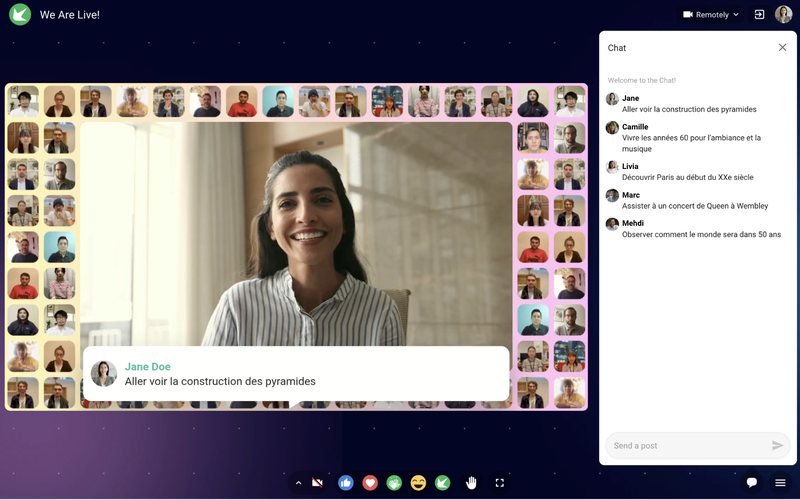
That can be as simple as the host reading a comment aloud, but it can also mean displaying the message directly in the video production.
The message is no longer visible only in a secondary panel. For a moment, it becomes part of the program itself.
That changes the audience’s perception significantly.
Participants understand that their contributions can influence what appears on screen and what the speakers talk about.
We recommend regularly bringing chat messages into the live experience so they have more weight in the event.
Use Chat Together With Polls and Q&A
Chat should not replace other interaction formats.
It works particularly well when combined with them.
Imagine a simple sequence:
- You launch a poll.
- The results appear.
- The speaker comments on them.
- You ask participants to explain their choice in the chat.
- The host selects two or three interesting responses.
- A question from that conversation is explored further in the Q&A.
One interaction feeds the next.
The result feels much less like a series of features and much more like a structured conversation with the audience.
Know the Difference Between Chat and Q&A
The two tools are complementary.
Chat is well suited to quick reactions, comments, conversations between participants, and short responses.
Q&A is more appropriate for questions that speakers are expected to answer.
Mixing both can quickly become difficult to follow, especially with a large audience.
A simple rule is to explain clearly:
“Use the chat to react and share your experience. Use the Q&A for questions you want the speakers to answer.”
That makes things easier for both participants and moderators.
Should You Moderate the Chat?
It depends heavily on the type of event.
There are two main approaches.
With pre-moderation, messages are approved before they are published. This gives you more control, but it can slow the conversation down considerably.
With post-moderation, messages appear immediately and the team only steps in if there is a problem.
For most professional webinars, the second approach creates a more natural conversation, as long as you have a moderator and clear rules in place.
It is useful to distinguish between an “action-based” approach, where every message needs approval, and a “reaction-based” approach, where the conversation stays open and the team intervenes only when necessary.
Assign Someone to Manage the Chat
The main speaker cannot present slides, look at the camera, manage timing, and follow fifty messages at once.
As soon as the audience becomes significant, assign someone specifically to the chat.
Their role can include:
- welcoming participants;
- restarting the conversation when needed;
- answering simple questions;
- spotting useful comments;
- passing important questions to the speaker;
- flagging recurring technical issues;
- moderating when necessary;
- identifying topics worth addressing live.
The moderator effectively becomes the link between the stage and the audience.
Do Not Try to Answer Everything
An active chat can quickly generate more content than the speakers can realistically handle.
That is not a problem.
The goal is not to reply to every message. It is to spot the useful signals.
Look especially for:
- questions that come up repeatedly;
- disagreements;
- strong reactions;
- particularly relevant examples;
- points that seem misunderstood.
A good host then turns those signals into material for the live session.
Invite a Participant to Speak
In some formats, the natural next step after a strong comment is simply to give its author the floor.
A participant shares a particularly relevant experience in the chat?
Instead of summarizing it yourself, you can invite them to explain it directly.
Think of this as a third step after writing and moderating the chat: bringing selected participants directly into the event.
This works particularly well for:
- roundtables;
- training sessions;
- internal communications;
- customer webinars;
- Q&A sessions.
The audience then understands very concretely that they are not just watching the live session. They can potentially become part of it.
What Can You Do With Chat Data After the Live Session?
Chat remains a useful source of information even after the broadcast ends.
Messages can help identify:
- the topics that generated the most questions;
- recurring objections;
- moments that triggered reactions;
- the most active participants;
- topics worth exploring in future content.
For a marketing team, some questions can become ideas for articles, webinars, or sales content.
For training, they can reveal concepts that need more explanation.
For internal communications, they can show which announcements generated enthusiasm, confusion, or concern.
The value of chat does not end when the “End live” button is pressed.
7 Best Practices for Managing Webinar Chat
If you only remember a few principles:
- prepare your first questions before the live starts;
- trigger the first interaction early;
- ask specific questions instead of “what do you think?”;
- bring selected messages into the program;
- combine chat, polls, and Q&A;
- assign someone to monitor and animate the conversation;
- use chat insights after the live session.
The most important thing is to show that what participants write can have an effect on what happens in the live session.
That is what turns a comment box into a genuine engagement tool.
How Sparkup Integrates Chat Into the Live Experience
Sparkup lets teams use chat as an integral part of the experience rather than as a simple panel next to the video.
Teams can combine chat with polls, quizzes, Q&A, reactions, and other interaction tools. Selected messages or questions can be highlighted in the live production, and a participant can be invited to speak directly from the audience.
This makes it possible to build sequences where audience contributions genuinely feed the conversation.
The goal is not to stack interactive features, but to make exchanges between speakers and viewers easier and more natural.
Sparkup chat can also be moderated, and a participant can be invited directly from the chat onto the stage so they can expand on their point.
FAQ
How Can You Encourage Participants to Write in the Chat?
Start with a simple, specific question early in the webinar. Then show that responses are being read and used by the host. The more participants see that their contributions affect the live session, the more likely they are to participate.
Should You Open the Chat From the Beginning of the Webinar?
In most cases, yes. You can even use it a few minutes before the start to welcome participants and begin a light conversation.
What Is the Difference Between Chat and Q&A?
Chat is well suited to quick reactions and conversations. Q&A is better for structuring questions intended for speakers, especially when they need to be moderated, prioritized, or answered later.
Should Every Message Be Moderated Before It Is Published?
Not necessarily. Pre-moderation gives you more control but slows the conversation down. For many professional webinars, immediate publishing combined with active moderation creates a more natural experience.
Who Should Manage the Chat During a Webinar?
Ideally, someone other than the main speaker. A moderator or co-host can follow messages, surface important questions, and keep the conversation moving while the speaker stays focused on presenting.