An interactive webinar is about more than adding a poll halfway through a presentation.
The best platforms let the audience ask questions, react, answer quizzes, take part in polls, chat with others, or even speak directly during the live session.
Some go even further by trying to recreate a sense of collective presence. Instead of seeing only a few speakers on screen and a counter showing how many people are connected, participants become visible and can genuinely feel part of the experience.
Sparkup is our top choice for this approach. The platform combines interactions built directly into the video experience, the ability to bring participants on stage, a video mosaic that makes the audience visible, and analytics to measure engagement after the session.
Livestorm is a good fit for an all-in-one marketing webinar workflow, ON24 for enterprise demand generation programs, BigMarker for highly customizable webinar experiences, Zoom Webinars for very large audiences, and Demio for simpler marketing webinars.
Key takeaways
- An interactive webinar is about more than offering chat and a couple of polls. The audience should be able to participate regularly throughout the live session.
- Sparkup stands out for creating a more human and participative experience, with features such as audience call-ins and a video mosaic that makes participants visible.
- Building interactions directly into the video makes the experience more fluid. Participants can react without having to open a separate module elsewhere in the interface.
- Interactions become even more valuable when they generate data. Sparkup and ON24, in particular, put a strong emphasis on engagement analytics.
What makes a good interactive webinar platform?
There are several levels of interactivity.
The first is what you now find almost everywhere: chat, a Q&A module, and a few polls.
That is useful, but it does not necessarily change the overall dynamic of the webinar.
You can easily have 1,000 people watching a webinar with three polls and still deliver a mostly one-way experience.
The next level is to make interaction part of the flow of the session.
The host regularly asks questions, reacts to answers, displays audience reactions, gives the floor to selected participants, and may even adapt the content based on what is happening in the room.
The most advanced experiences go one step further and try to recreate some of the dynamics of an in-person event.
Seeing the audience changes the way a live session feels
In a conference room, a speaker can immediately see the audience.
They pick up on smiles, reactions, hesitation, overall energy, and the people who want to contribute.
In a traditional webinar, almost all of that disappears.
You typically see the speakers, a few slides, and perhaps a number showing how many people are connected.
A feature like Sparkup's video mosaic changes that dynamic by making participants visible within the experience. Sparkup uses this approach to turn viewers into active participants and recreate a more human experience, even at scale.
The goal is not to have everyone speaking at once.
It is to give the audience a visible presence again.
Giving participants the opportunity to speak
Q&A is still a written interaction.
Speaking live is different.
When someone can raise their hand and then be invited directly into the live session, the boundary between speakers and audience becomes much less rigid.
Sparkup lets participants raise their hand and be invited to speak directly from their device.
This can be particularly useful for customer webinars, training sessions, thought leadership events, or internal events where discussion is part of the format.
Measuring what actually happened
Interactivity also produces signals.
Someone who watches for 55 minutes, answers several polls, and asks a question has not experienced the webinar in the same way as someone who leaves after five minutes.
A good interactive platform should therefore help you understand:
- who participated;
- for how long;
- which interactions they took part in;
- which topics generated engagement;
- and, where possible, when attention increased or dropped.
Sparkup can collect interaction and engagement data and analyze participant activity and attendance.
1. Sparkup: best for truly interactive webinars with deeper engagement analytics
Price: Free plan available. Webinar plans start at €79/month billed annually.
Best for: Marketing, communications, training, and event teams that want the audience to genuinely be part of the webinar while keeping production simple and professional and gaining detailed engagement insights.
Sparkup overview
Sparkup starts from a different premise than many webinar platforms: watching a live session is not the same as participating in one.
The platform is designed to reduce the distance between speakers and the people watching.
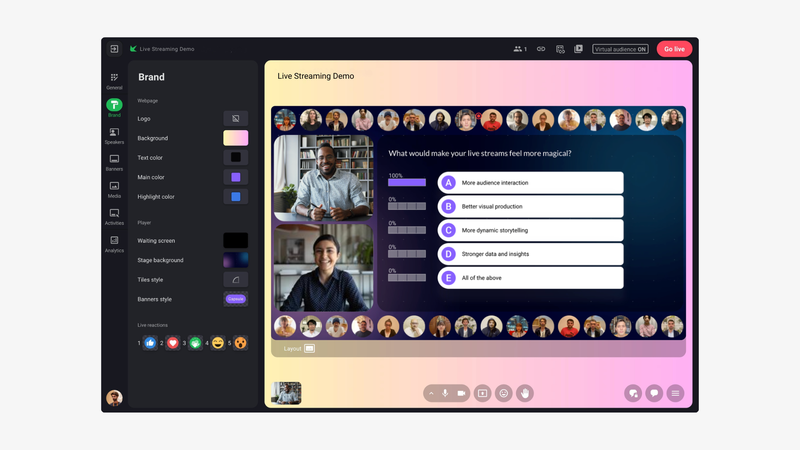
The expected interactive features are there: polls, quizzes, chat, Q&A, customizable reactions, and word clouds.
But Sparkup goes further by allowing a participant to raise their hand and then be invited to speak directly during the webinar.
The goal is to recreate some of the spontaneity you would normally get in a physical room.
Recreating a sense of presence with the video mosaic
This is probably the most distinctive part of Sparkup for an article focused on interactive webinars.
Sparkup can make participants visible in a large-scale video mosaic.
Instead of seeing only the speakers while hundreds of attendees remain invisible behind a participant counter, the audience becomes a visible part of the live experience.
Sparkup describes this as a way to put participants "in the front row" and create a more human, immersive experience. The mosaic can also be customized to match the brand identity.
This might sound like a visual detail.
In practice, it changes the way the webinar feels.
A speaker is no longer talking to "500 viewers."
They are talking to people they can actually see.
And participants can also see that they are taking part in a shared moment.
This is particularly relevant for town halls, customer webinars, training sessions, community events, and other formats where the feeling of being together matters.
Interactions built directly into the video experience
One of Sparkup's main strengths is that interactions are not hidden away in a separate menu or secondary interface. They are built directly into the video experience.
Polls, quizzes, reactions, and questions appear naturally during the live session without pulling participants away from what they are watching.
That makes interaction more immediate and fluid and gives the webinar a faster, more dynamic rhythm.
Participants can react to what is happening in the moment instead of having to search elsewhere in the interface for engagement features.
Sparkup can include:
- polls;
- quizzes;
- Q&A;
- chat;
- customizable reactions;
- word clouds;
- surveys;
- audience call-ins;
- CTAs;
- audience video mosaic.
Latency that supports real conversation
Interactivity works poorly when the audience is watching the video several seconds late.
Imagine asking:
"Raise your hand if you'd like to answer."
Then waiting seven seconds before half the audience even hears the question.
Sparkup therefore places a strong emphasis on low latency. The platform is positioned around sub-second latency and ultra-low-latency video for webinars.
That is not just a technical specification.
It directly affects how natural a poll, reaction, question, or audience contribution feels.
Measuring engagement, not just attendance
All of those interactions generate data.
Sparkup lets teams track engagement, attendance, and interactions to evaluate webinar performance and identify the most engaged participants.
For a marketing team, that means moving from:
500 registrants → 312 attendees
to a richer view:
312 attendees → watch time → polls → questions → reactions → most engaged participants
Interactivity becomes both a way to improve the experience and a way to better understand the audience.
Key Sparkup interactive features
- Polls with 5 question types
- Q&A with voting
- Live chat
- Customizable emoji reactions
- Word clouds
- Quizzes
- Audience call-ins
- Audience video mosaic
- Satisfaction surveys
- CTAs
- Engagement analytics
- Interaction data
- Browser-based webinar studio
- Custom branding
- Registration pages and forms
- Automated emails
- Replay
Why choose Sparkup?
Choose Sparkup when your goal is not simply to broadcast to an audience, but to create a shared moment with them.
It is particularly relevant when you want to recreate three things remotely that are normally associated with in-person events:
seeing the audience, hearing the audience, and feeling their reactions.
2. Livestorm: best for an all-in-one marketing webinar workflow
Price: Free plan available. Paid plans start at €2.50 per participant, with a minimum of 400 participants, which means a minimum annual commitment of €1,000 for 400 participant credits.
Best for: Marketing teams that want to manage registration, communications, webinars, engagement, and analytics from a single platform.
Livestorm overview
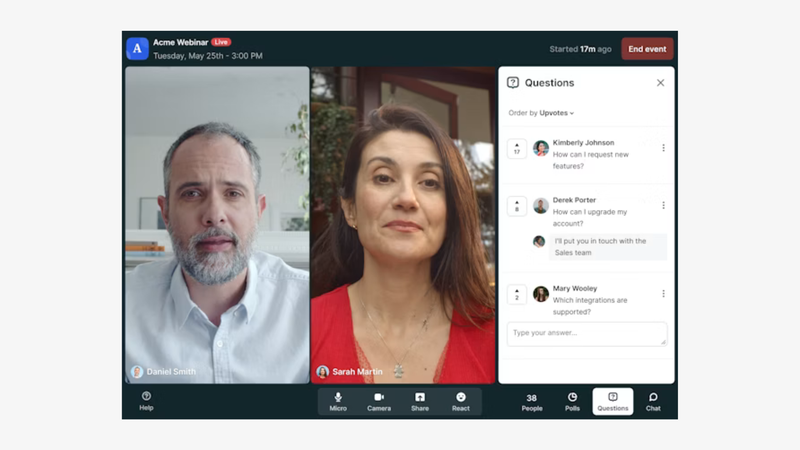
Livestorm is built around the entire webinar journey.
You can create the event, manage registrations, schedule emails, welcome participants directly in the browser, run the live session, and analyze the results afterward.
Interactivity is therefore part of a broader webinar solution.
Livestorm includes chat, Q&A, polls, reactions, and other tools designed to involve the audience, although the native engagement features remain relatively simple.
For teams that want to go further, Livestorm offers a marketplace with apps that can be connected to the platform, although the experience can be less fluid because participants may need to interact through additional tools.
Its main strength is the consistency of the overall workflow.
A marketing team can manage a large part of its webinar program from one environment without assembling several different tools.
Key Livestorm interactive features
- Chat
- Q&A
- Polls
- Reactions
- Raise hand
- Analytics
- Participant data
- Registration pages
- Automated emails
- Live sessions
- On-demand sessions
- CRM and marketing integrations
Why choose Livestorm?
Livestorm is particularly relevant when you prioritize a complete marketing webinar workflow and standard interactive formats are enough for your needs.
It is a good option for teams that want to centralize registration, email, webinar delivery, and follow-up in the same environment.
3. ON24: best for turning engagement into demand generation data
Price: No free plan. Custom pricing.
Best for: Large marketing teams that use webinars as a structured part of their demand generation strategy.
ON24 overview
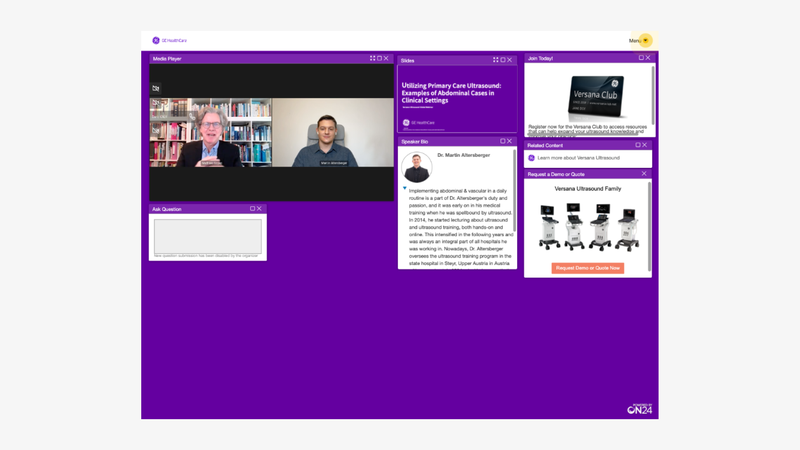
ON24 approaches interactivity primarily through the lens of first-party data.
The webinar generates interactions.
Those interactions become data.
And that data can then be used across marketing and sales programs.
This is particularly valuable for large organizations that run webinars regularly and want to connect those sessions to their nurturing workflows.
ON24 includes polls, Q&A, chat, CTAs, downloadable content, and other engagement formats.
Its main strength comes afterward, with analytics that help teams understand engagement at the account, segment, and participant level.
Key ON24 interactive features
- Polls
- Q&A
- Chat
- Surveys
- CTAs
- Downloadable resources
- Breakout rooms
- Engagement scoring
- Individual analytics
- Engagement heatmaps
- Personalization
- CRM integrations
- Nurturing workflows
Why choose ON24?
Choose ON24 when interaction needs to feed directly into your demand generation program.
The platform is particularly well suited to organizations that want to connect webinar engagement signals with their marketing and sales systems.
For a relatively simple one-off webinar, however, ON24 can be more complex than necessary.
4. BigMarker: best for building highly customizable webinar experiences
Price: No free plan. Custom pricing.
Best for: Companies that want a high degree of control over how participants interact with the webinar.
BigMarker overview
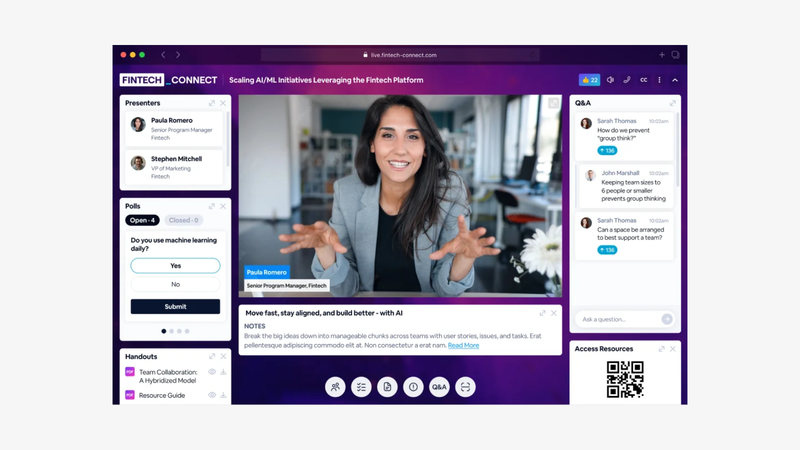
BigMarker offers a particularly broad set of engagement features.
Public and private chat, Q&A, upvoting, polls, quizzes, CTAs, surveys, and breakout rooms make it possible to build very different types of experiences.
Q&A voting is especially useful when several hundred participants are submitting questions.
Instead of leaving the moderator to choose every question manually, the audience can collectively surface the topics they care about most.
BigMarker also puts a strong emphasis on collecting data from these interactions.
Key BigMarker interactive features
- Public and private chat
- Q&A
- Question voting
- Polls
- Quizzes
- CTAs
- Surveys
- Breakout rooms
- Downloadable documents
- On-screen participation
- Analytics
- Marketing integrations
- Advanced branding
Why choose BigMarker?
BigMarker is particularly interesting when you want to build a rich webinar experience with many different engagement mechanisms.
That flexibility can also introduce more complexity than a platform designed to launch simpler webinars quickly.
5. Zoom Webinars: best for engaging very large audiences
Price: No dedicated free webinar plan. Starts at around €75/month for Zoom Webinars Plus billed annually.
Best for: Organizations that need to host very large audiences while keeping the main webinar interaction features.
Zoom Webinars overview
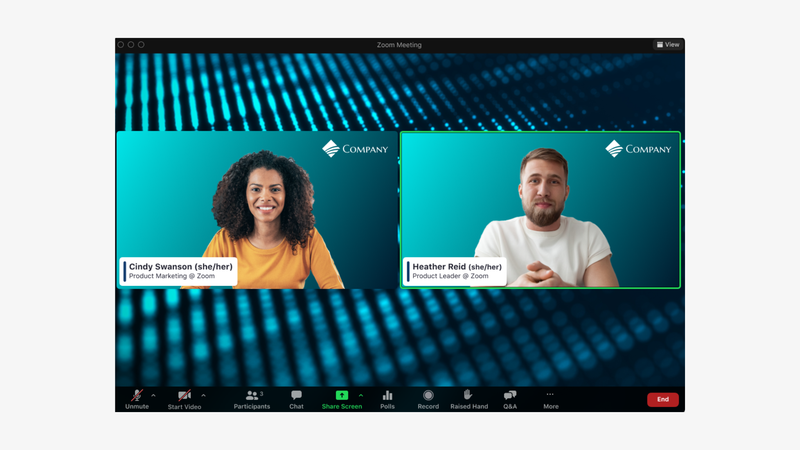
Zoom Webinars takes a more traditional approach to interactivity.
The platform includes chat, Q&A, polls, reactions, and other participation features.
Its main advantage appears when audience size becomes a major consideration.
For a large corporate broadcast, product launch, or event with thousands or tens of thousands of attendees, platform capacity becomes just as important as engagement functionality.
Zoom Webinars Plus also adds more advanced production tools for formats that require greater control over how the event is staged.
Key Zoom Webinars interactive features
- Chat
- Q&A
- Question voting
- Polls
- Surveys
- Reactions
- Reporting
- Backstage
- Simulive sessions
- Advanced production
- Large audience capacity
Why choose Zoom Webinars?
Choose Zoom when your main challenge is scale.
If you only need to run a webinar for a few hundred people, other platforms may offer a richer or more participative experience.
Once the audience becomes extremely large, the priorities change.
6. Demio: best for simple, interactive marketing webinars
Price: No free plan. Paid plans start at $45/month billed annually.
Best for: Small and mid-sized marketing teams that want to add simple engagement mechanics to their webinars.
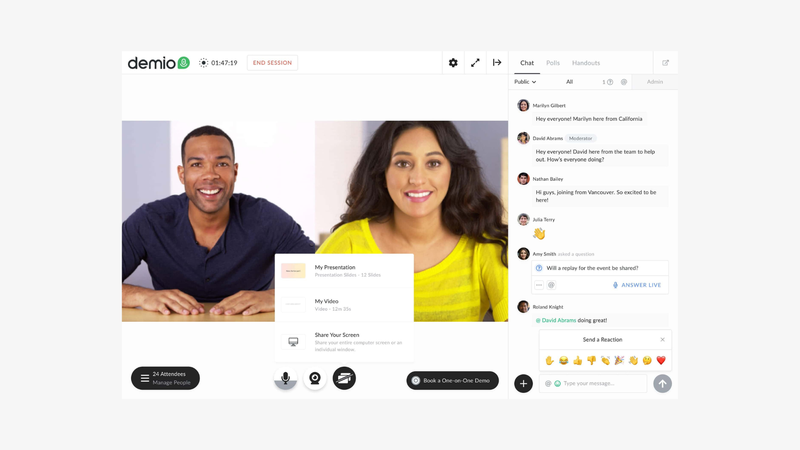
Demio overview
Demio deliberately keeps things simple.
The platform is designed for marketing webinars without the complexity of a larger event platform.
Teams get access to chat, polls, Featured Actions, and handouts.
That covers the essentials for a product demo, educational webinar, or lead generation campaign.
You can ask a question, share a resource, display a CTA, and track engagement without having to learn a complex production environment.
Key Demio interactive features
- Chat
- Polls
- Featured Actions
- Handouts
- Engagement analytics
- Live webinars
- Automated webinars
- On-demand sessions
- Branding
- Registration pages
- Marketing integrations
Why choose Demio?
Demio is particularly well suited to teams that want to avoid completely passive webinars without building a highly sophisticated event experience.
It is a sensible choice for marketing teams that prioritize simplicity.
Which platform should you choose for an interactive webinar?
The answer depends on what you mean by "interactive."
Choose Sparkup if you want the audience to become a visible and active part of the webinar, with interactions built into the video, audience call-ins, a video mosaic, and engagement analytics.
Choose Livestorm if you want a complete marketing webinar workflow with a simple layer of interactivity.
Choose ON24 if engagement data needs to feed an enterprise demand generation program.
Choose BigMarker if your priority is creating a particularly rich and customizable experience.
Choose Zoom Webinars if you need engagement features while hosting a very large audience.
Choose Demio if you simply want to make marketing webinars more participative without adding too much complexity.
What should you look for before choosing an interactive webinar platform?
Can the audience simply click, or can they genuinely participate?
This is probably the first distinction to make.
A reaction button or a poll creates an interaction.
But an audience that can ask questions, vote on other people's questions, raise their hand, speak live, or appear visually in the webinar creates a much more participative experience.
Think about the level of interaction you actually want.
Are interactions built directly into the video experience?
The more participants have to navigate between different menus or tools, the less natural the interaction feels.
Ideally, video, polls, questions, reactions, and results should all remain within the same experience.
That allows the audience to react immediately to what they are watching.
Can participants remain visible?
In a physical room, seeing the other people naturally contributes to the feeling of being present at an event.
In a traditional webinar, that dimension almost completely disappears.
A video mosaic can bring that sense of presence back and turn a group of anonymous participants into a visible audience.
For some formats, that can have more impact than adding another type of poll.
Can participants speak?
Writing a question and letting someone speak directly do not create the same dynamic.
If you run training sessions, customer webinars, community discussions, or internal events, the ability to raise a hand and join the speakers can become an important criterion.
Does latency allow for real interaction?
An interaction with several seconds of delay is still technically possible.
It simply loses much of its spontaneity.
If your format relies on reactions, questions, polls, or audience call-ins in real time, pay attention to video latency as well.
What data can you access after the webinar?
Do not just ask whether the platform offers polls.
Ask:
Who answered?
What did they answer?
How long did they stay?
What questions did they ask?
What interactions did they take part in?
Can I export or use that data elsewhere?
Analytics give interactivity a second life.
Is the platform still easy for speakers to use?
A highly interactive audience creates more things to manage.
Polls, Q&A, chat, reactions, and participants asking to speak can quickly overload the presenter.
The right platform should make it possible to manage that activity without breaking the flow of the webinar.
Frequently asked questions
What is the best platform for hosting an interactive webinar?
Sparkup is our top choice for teams that want to go beyond polls and create a genuinely participative experience. Participants can use chat, Q&A, polls, quizzes, reactions, and word clouds, but they can also raise their hand, speak live, and appear in a video mosaic with the rest of the audience.
How can you make a webinar truly interactive?
Spread interactions throughout the session instead of saving them for the final few minutes. Alternate between questions, polls, reactions, quizzes, and audience call-ins, then use the responses to shape the conversation. Interactivity works best when the speaker actually reacts to what the audience is doing.
Which platform lets you see participants during a webinar?
Sparkup can display connected participants in a video mosaic. The goal is to make the audience visible within the live experience and recreate a stronger sense of presence and proximity between speakers and participants.
Which platform lets participants speak during a webinar?
Sparkup lets participants raise their hand and then be invited directly into the live session from their device. That makes it possible to move beyond a written Q&A and create a real conversation with selected members of the audience.
Which platform offers the best engagement analytics?
ON24 is particularly well suited to enterprise organizations that want to turn engagement into first-party data for demand generation programs. Sparkup is especially relevant when you want to connect engagement data directly to what happened during the live experience.
Is Zoom suitable for interactive webinars?
Yes. Zoom Webinars includes chat, Q&A, polls, and reactions. It becomes particularly relevant when you need to combine those features with very large audience capacity.
Why is a video mosaic useful in a webinar?
Because it brings back something that often disappears remotely: the presence of other people.
Seeing the people who are connected helps speakers perceive their audience and helps participants feel that they are part of a shared moment rather than watching a video alone.