A presentation in French, English-speaking attendees, Spanish-speaking teams: how do you help everyone follow the same event? Sparkup introduces AI-powered live translation. Your presentations are automatically transcribed and translated into subtitles, allowing each participant to choose their preferred reading language.
At a glance
Live translation works directly within your Sparkup sessions. You select the languages to offer from more than 100 supported languages, and participants choose their subtitles in the video player. After the event, the transcript and translations are automatically refined for the replay.
Discover Sparkup live translation
Translated subtitles to help everyone follow the same event
When a presenter speaks, Sparkup converts their speech into text and translates it into the languages configured for the session. Subtitles appear over the video during the live event.
Participants can follow a presentation in a language other than the speaker’s while still hearing the original voice and viewing the presentation materials. Translation applies to the subtitles: it does not replace the audio with a dubbed voice.
This is useful when your audience shares an interest in the topic but has different levels of language proficiency. An employee may understand English in everyday conversations yet appreciate written support during a technical presentation or a strategic announcement.
Subtitles also support people who are deaf or hard of hearing. They help make spoken content more accessible, alongside readable presentation materials and an appropriate speaking pace.
How does live translation work in Sparkup?
Setup takes place within your usual session interface. The integration is built in, so no external configuration is required.
Enable translation and select your languages
In your session’s General tab, enable Live translation, then open its configuration panel. From there, you can select the languages to offer your audience.
The original transcription remains available, displaying text in the language spoken on stage. Participants can therefore use subtitles to follow a presentation more easily, even without translation.
Choose your languages based on the needs of your attendees. A meeting bringing together three regional offices will not necessarily need the same languages as a webinar open to international customers.
Prepare the spoken languages and specialist vocabulary
Sparkup automatically detects the language being spoken. You can also specify the languages expected on stage to improve processing.
If one presenter speaks French and another continues in English, the system detects the change and adjusts the transcription. This support for language switching helps accommodate events where speakers from different teams or countries take turns.
The glossary lets you enter proper names, acronyms, and specialist terms, separated by commas. Its purpose is to improve transcription accuracy for that vocabulary.
Before a product presentation, for example, you can add your product names and the acronyms your teams use. It is a simple way to give the system more context.
Each participant chooses their subtitles
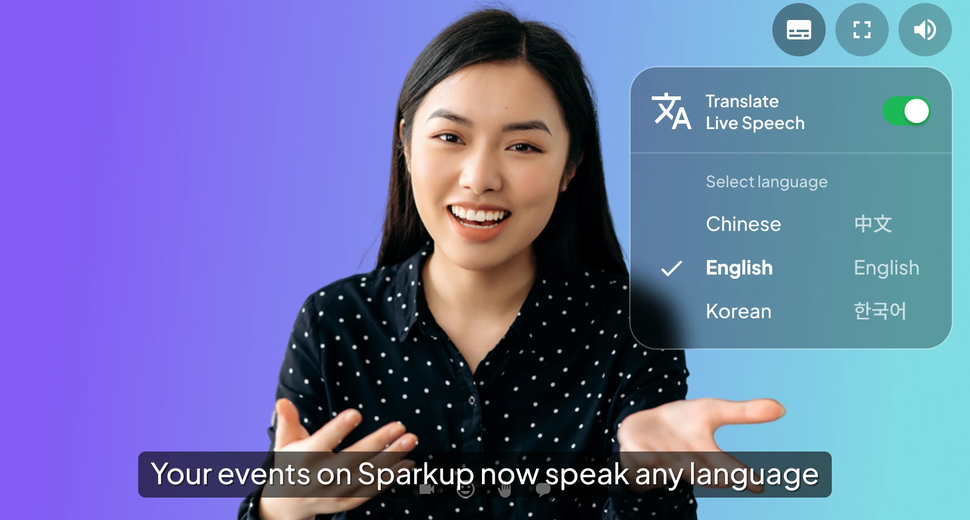
Once the feature is enabled, a subtitles button appears in the top-right corner of the video player. Each participant can show or hide subtitles and select from the available languages, including the original transcription.
The choice is individual. You prepare the options for the event, and each person decides which display helps them follow along.
Subtitles stay synchronized with the video, with low latency. Speaker identification also helps distinguish who is speaking, including when conversations involve interruptions.
To prepare your first session, explore the activation and configuration steps.
New possibilities for multilingual events
AI-powered live translation can support internal communications, webinars, and training sessions. In each case, the aim is to help people who speak different languages follow shared content.
Bring your teams together for the same presentation
A company town hall may bring together employees working across several countries. Translated subtitles give them additional support as they follow leadership announcements, explanations, and presentations.
Imagine a presentation outlining the priorities for the quarter: everyone sees the same materials at the same time while choosing a suitable reading language. Teams who are less comfortable with the presentation language have an additional way to understand the message.
Welcome an international audience to your webinars
A product demonstration or expert presentation may interest customers across several markets. Offering multilingual subtitles helps account for that diversity in the webinar experience.
You can prepare languages based on your registrants and announce their availability before the event. Participants then know they will be able to use written translation to follow the presentation.
Support training and onboarding
During training, participants often encounter new concepts, procedures, and specialist vocabulary at the same time. When the session takes place in a language they know less well, those challenges can add up.
Subtitles provide written support during explanations. The glossary helps you prepare specialist terms, while the replay allows participants to revisit sections that need more attention.
A replay that benefits from the full context of your event
Transcription and translation continue after the live session ends. Sparkup automatically refines the final transcript and regenerates translations using the complete video.
During the live event, text must be generated as people speak. After the event, processing can draw on the full session to improve the result.
You then receive:
- The final transcript.
- A replay version with subtitles for each configured language.
- Downloadable subtitle files for each language.
These resources extend access to your content. Someone who missed the event can watch the recording, a participant can revisit an explanation, and a team can reuse the subtitle files with its videos.
For content intended for long-term distribution, reviewing proper names, figures, and important wording remains good practice.
Built-in technology with a clear commitment to your data
Sparkup uses Gladia, a French provider specializing in AI-powered audio transcription and translation.
Your audio streams are used solely to generate transcription and translation. They are never used to train AI models. Processing takes place within the European regulatory framework of the GDPR.
The integration works directly within Sparkup, so you manage the feature from your session settings.
Learn more about data processing and the Gladia integration.
Sparkup live translation FAQ
Can participants use subtitles without translating the presentation?
Yes. The original transcription is available among the participant options. It allows them to read the spoken content in its original language without translation.
What happens if several languages are spoken during the live event?
Sparkup detects language changes and adjusts the transcription. If you know which languages will be spoken on stage, you can also specify them in the settings to improve processing.
Can the glossary enforce a specific translation for a term?
The glossary helps improve the transcription of the specialist terms you enter, such as proper names, acronyms, or industry vocabulary. It should not be treated as a dictionary that enforces a specific translation in each language.
Does AI translation replace a human interpreter?
Translated subtitles provide automated support for following a live event. Whether you need an interpreter depends on the context, languages, and level of precision required. For conversations where every nuance matters, assess which approach best suits your event.