
Getting people to see your marketing content is one challenge. Getting them to actively engage with it is another.
A prospect might visit your website, skim a product page, watch part of a video, and leave without taking any action. Even when the content is relevant, traditional formats don't always give people a reason to participate.
Interactive marketing changes that experience.
Instead of simply consuming information, your audience can explore a product demo, answer questions during a webinar, complete a quiz, interact with a presentation, or choose what to watch next.
For B2B marketers, these interactions can also reveal what prospects care about, what problems they're trying to solve, and how interested they are in your offering.
The challenge is choosing the right tool. An interactive webinar platform serves a very different purpose from a product demo builder or an online calculator.
We've selected six interactive marketing tools for 2026, each designed for a different type of audience engagement.
What are the best interactive marketing tools in 2026?
Here are six interactive marketing tools worth exploring, each designed for a different type of audience engagement.
- Sparkup: Best for interactive webinars and livestreams
Create studio-quality, branded webinars with real-time audience participation, including polls, quizzes, Q&A, and live video interactions.
- Guideflow: Best for interactive product demos
Let prospects explore your software through clickable, self-guided product demonstrations, without booking a meeting or creating an account.
- Outgrow: Best for interactive lead generation
Create calculators, quizzes, and assessments that provide personalized results while helping you capture and qualify leads.
- Typeform: Best for conversational forms and surveys
Collect information through engaging, personalized forms that adapt to your audience's answers.
- Genially: Best for interactive presentations and visual content
Turn presentations, infographics, and educational content into interactive experiences that visitors can explore.
- Tolstoy: Best for interactive video marketing
Create clickable video experiences that help viewers discover products and take action directly from video content.
These tools aren't necessarily direct competitors. They address different moments in the buyer journey, from attracting attention and explaining a product to capturing leads and measuring engagement.
1. Sparkup: Best for interactive webinars and live audience engagement
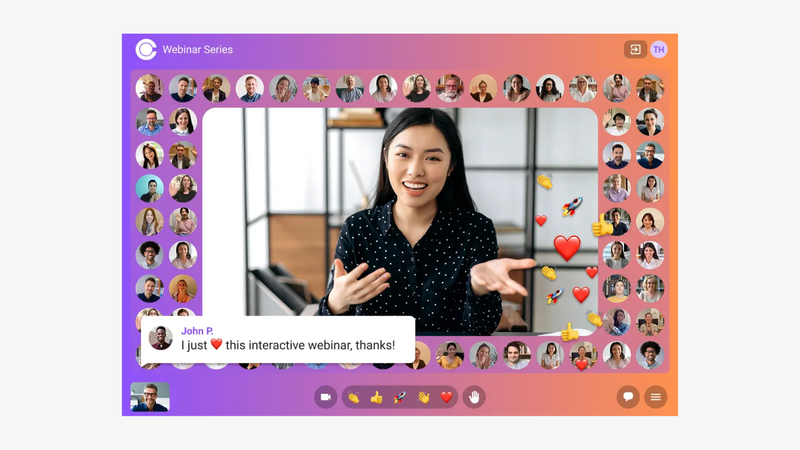
Sparkup is an interactive webinar and live streaming platform that helps businesses create professional, branded live experiences directly from their browser.
It's designed for marketing teams, SaaS companies, event organizers, and businesses that want to make webinars more engaging without dealing with complicated production software.
Unlike traditional webinar tools that focus primarily on broadcasting presentations, Sparkup puts audience participation at the center of the experience.
Participants can answer polls, join quizzes, submit questions, react, and even appear on screen through a video mosaic. These interactions are integrated into the live experience, helping presenters maintain the audience's attention without constantly switching between tools.
At the same time, Sparkup provides the production features needed to create professional-looking webinars, including customizable layouts, branded overlays, media sharing, and backstage controls for managing speakers.
Key features
- Interactive webinars: Run live polls, quizzes, word clouds, Q&A sessions, and reactions directly within the video experience.
- Browser-based production studio: Manage speakers, layouts, slides, media, and branding without installing software.
- Audience video mosaic: Bring participants on screen to create a stronger sense of presence and allow audience members to join the conversation.
- Custom registration experience: Create branded registration pages, collect participant information, and automate confirmation and reminder emails.
- Audience engagement analytics: Measure attendance, viewing time, participation, and individual responses to better understand audience behavior.
- AI-powered live translation: Make webinars accessible to multilingual audiences with live translated subtitles.
How marketers can use Sparkup
Imagine a SaaS company hosting a live product demonstration for 200 prospects.
Instead of spending 40 minutes presenting slides and saving questions for the end, the team could open with a poll asking attendees about their biggest challenge.
The presenter can then adapt the demonstration based on the results, answer questions throughout the session, and use a quiz to check whether the audience understands the product's value.
After the webinar, the marketing team can review engagement data to identify which topics generated interest and inform its follow-up campaigns.
This approach is particularly relevant for product demonstrations, lead generation webinars, customer education, and interactive thought leadership events.
What makes Sparkup stand out?
Sparkup combines three capabilities that marketers often need to manage separately: professional live video production, real-time audience participation, and engagement analytics.
It allows teams to deliver a polished webinar while collecting information about how individual attendees interact with the content.
Things to consider: Sparkup is primarily designed for live video experiences. If your goal is to create a self-guided product tour that prospects can explore independently at any time, a dedicated interactive demo tool like Guideflow is a more suitable choice.
Best for: B2B marketing teams, SaaS businesses, trainers, and event organizers looking to create interactive webinars, live product demonstrations, and branded online events.
2. Guideflow: Best for interactive product demos that engage and convert prospects
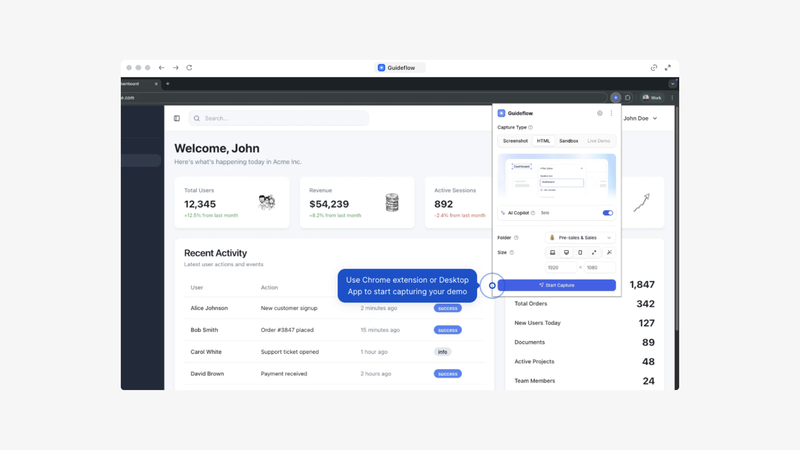
Guideflow is an interactive product demo platform that helps sales and marketing teams showcase their software through clickable, self-guided experiences.
Instead of asking prospects to book a meeting just to understand how a product works, Guideflow lets them explore a guided version of the product directly from a website, landing page, or shared link.
It's particularly useful for B2B SaaS companies, product marketing teams, and sales organizations that want to make their products easier to understand before a sales conversation.
Creating an interactive demo starts by capturing a product workflow. Guideflow can turn that workflow into a clickable experience that marketers can customize with tooltips, callouts, interactive steps, and calls to action.
The result is a guided product experience that prospects can explore at their own pace, without creating an account or accessing a live software environment.
Guideflow also supports demo personalization, allowing teams to tailor experiences to different buyer personas, industries, or use cases.
Key features
- No-code interactive demo creation: Capture product workflows and turn them into guided, clickable experiences without developer assistance.
- Customizable product walkthroughs: Add tooltips, highlights, interactive steps, and calls to action to explain important features.
- Personalized demo experiences: Adapt content and messaging to specific prospects, industries, or customer segments.
- Website and campaign embedding: Publish demos on product pages, landing pages, and marketing campaigns, or share them directly with prospects.
- Demo engagement analytics: Track interactions, completion rates, and drop-off points to understand which product features attract attention.
- Demo Centers: Organize multiple product demos and supporting sales content into a single branded experience for prospective buyers.
How marketers can use Guideflow
Imagine a SaaS company launching a new analytics feature.
The marketing team has created a landing page explaining the benefits, but prospects still struggle to understand what the feature actually does.
With Guideflow, the team can embed an interactive product demo directly into the landing page.
Visitors can click through the dashboard, explore key reports, and see how the feature works without signing up for a trial or scheduling a sales call.
The same demo can then be shared in outbound emails, product launch campaigns, and sales follow-ups.
Marketing teams can analyze which steps visitors complete and where they stop interacting, helping them improve the demo and understand which capabilities generate interest.
For sales teams, these demos also provide a practical way to introduce a product before a discovery call or give buying committees something concrete to explore afterward.
What makes Guideflow stand out?
Guideflow is especially relevant for companies selling software products that benefit from being experienced rather than simply described.
Its main strength is making product exploration accessible earlier in the buying journey.
Rather than relying entirely on videos, screenshots, or scheduled demonstrations, marketers can let prospects interact with a guided product experience on their own terms.
Guideflow also combines demo creation, personalization, distribution, and analytics, making it useful across multiple stages of the sales and marketing funnel.
Things to consider: Interactive product demos are excellent for explaining software workflows asynchronously, but they don't replace the conversation and spontaneity of a live webinar. For interactive product launches, live Q&A sessions, or demonstrations involving audience participation, a webinar platform is a better fit.
Best for: B2B SaaS companies, product marketing teams, and sales teams looking to create interactive product demonstrations, improve product understanding, and engage potential buyers before and after sales calls.
3. Outgrow: Best for interactive calculators, quizzes, and lead generation
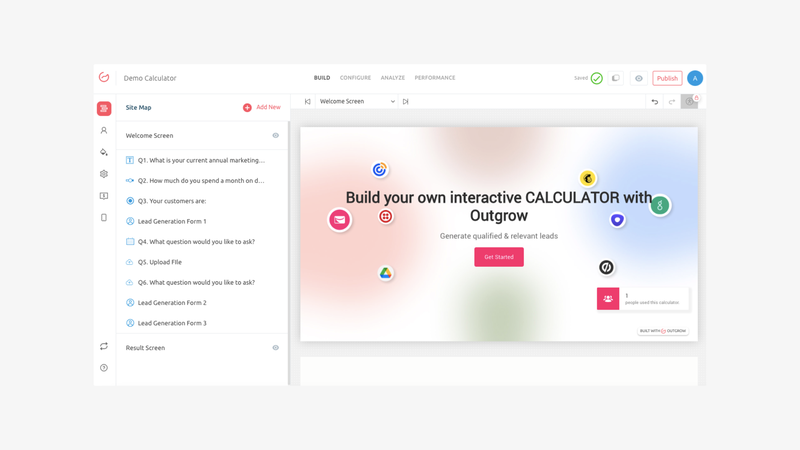
Outgrow is an interactive content platform designed to help marketers create calculators, quizzes, assessments, and other personalized experiences.
Its main value is helping businesses turn general interest into more specific, actionable information.
Instead of asking visitors to read a long landing page and fill out a contact form, marketers can invite them to complete an interactive experience that provides a useful result.
For example, a software company could build an ROI calculator that estimates how much time or money a prospect might save by adopting its product.
The visitor receives a personalized estimate, while the marketing team can learn more about the prospect's situation and needs.
Key features
- Interactive calculators for ROI, cost estimates, and savings projections.
- Quizzes and assessments with personalized results.
- Lead generation forms integrated into interactive experiences.
- Templates for building interactive content.
- Analytics for tracking participation and conversions.
How marketers can use Outgrow
Imagine a company selling customer support software.
Instead of offering another downloadable guide, the marketing team creates a calculator titled "How much does slow customer support cost your business?"
Visitors enter their monthly ticket volume, average resolution time, and estimated support costs.
The calculator generates a personalized estimate and can invite visitors to request a more detailed analysis.
This format creates a natural exchange: the visitor receives useful information, and the company gains context about the potential customer's needs.
What makes Outgrow stand out?
Outgrow works particularly well when a product's value can be demonstrated through numbers, personalized recommendations, or assessments.
It can turn abstract benefits into something more concrete for prospective buyers.
Things to consider: Calculators and quizzes require thoughtful content design. The usefulness of the experience depends on the quality of the questions, assumptions, and results. A calculator built around unrealistic estimates may undermine credibility rather than improve conversion.
Best for: Demand generation teams, B2B marketers, and companies looking to capture leads through personalized calculators, quizzes, and assessments.
4. Typeform: Best for conversational forms and interactive surveys
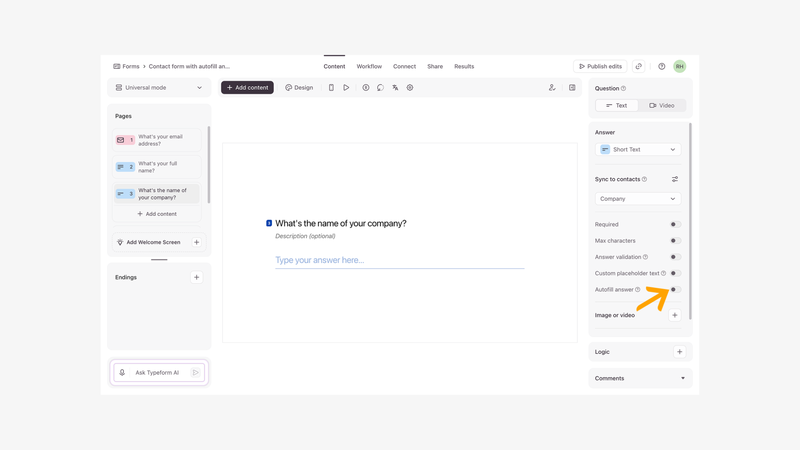
Typeform is a form and survey platform designed to make collecting information more conversational.
Instead of presenting visitors with a long list of fields, Typeform can display questions one at a time, creating a more focused experience.
For marketing teams, this approach is useful for lead qualification, customer research, feedback collection, and event registration.
Typeform also supports conditional logic, allowing questions to change based on previous answers.
This means marketers can build forms that adapt to the person completing them.
Key features
- Conversational forms and surveys.
- Conditional logic for personalized question paths.
- Custom branding and visual customization.
- Lead capture and qualification workflows.
- Integrations with marketing and CRM tools.
How marketers can use Typeform
Consider a B2B software company receiving leads from several industries.
Instead of using the same generic contact form for everyone, the team creates an interactive qualification questionnaire.
A visitor selects their industry, team size, and primary challenge. Based on those answers, the form presents relevant follow-up questions.
The marketing team receives more contextual information, and the prospect avoids answering questions that don't apply to them.
The same approach can be used for customer satisfaction surveys, event feedback, or research campaigns.
What makes Typeform stand out?
Typeform makes the process of answering questions feel more intentional and visually engaging than a traditional form.
Its conditional logic is particularly useful when different audience segments require different questions.
Things to consider: Typeform focuses on collecting information rather than delivering rich product experiences. For hands-on product exploration, interactive video, or live audience engagement, other tools on this list are more specialized.
Best for: Marketing teams that want to improve lead qualification, run customer surveys, and create branded, conversational forms.
5. Genially: Best for interactive presentations and visual storytelling
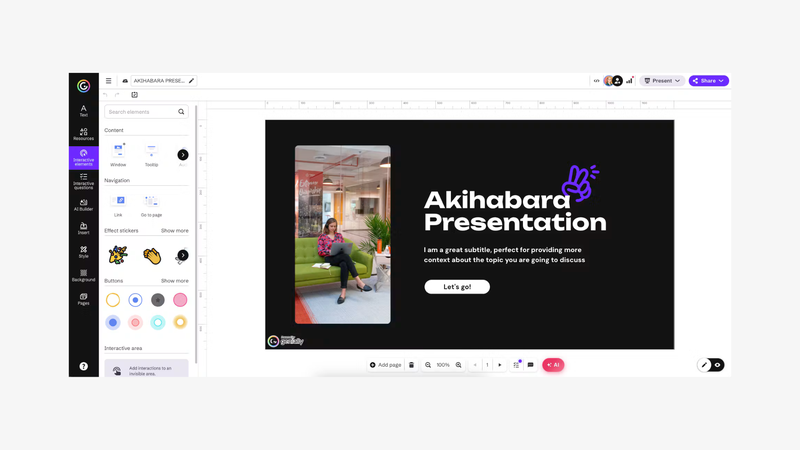
Genially is a visual content creation platform for building interactive presentations, infographics, and other multimedia experiences.
It allows marketers to add interactive elements to visual content so viewers can explore information rather than simply move through a sequence of slides.
For B2B marketing teams, this can be useful when explaining complex concepts, presenting research, or creating content that benefits from visual exploration.
Key features
- Interactive presentations and infographics.
- Clickable elements, hotspots, and animations.
- Templates for visual content creation.
- Multimedia integration.
- Shareable and embeddable interactive experiences.
How marketers can use Genially
Imagine a cybersecurity company explaining how different types of attacks affect an organization.
A traditional presentation might contain dozens of slides describing each risk.
With Genially, the marketing team can create an interactive visual of a company's IT environment.
Visitors can click different parts of the diagram to explore vulnerabilities, common scenarios, and recommended security practices.
The content becomes easier to navigate because readers can focus on the information most relevant to them.
What makes Genially stand out?
Genially is particularly well suited to information that benefits from visual exploration.
It gives marketers more freedom to create interactive educational content without building a custom website or application.
Things to consider: Interactive presentations require careful design. Too many animations or clickable elements can make content harder to understand. Genially is also less specialized in lead qualification and sales analytics than dedicated demand generation tools.
Best for: Content marketers, product marketers, and teams creating interactive presentations, visual explainers, and educational marketing materials.
6. Tolstoy: Best for interactive video marketing
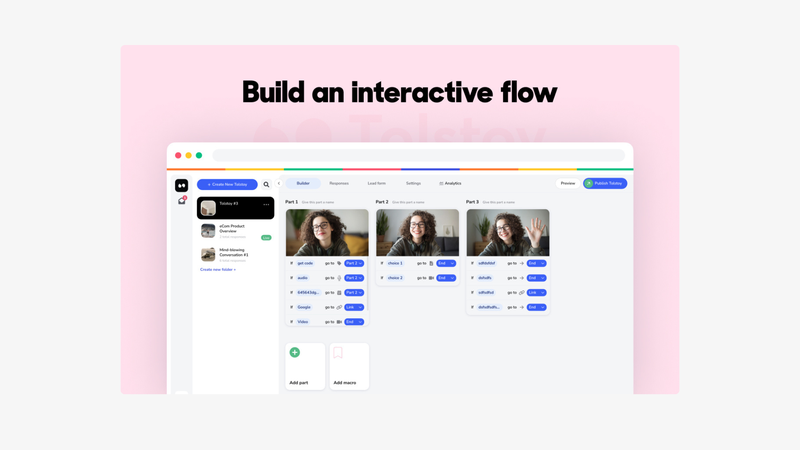
Tolstoy is an interactive video platform that helps brands create video experiences where viewers can take actions instead of simply watching.
It is particularly associated with video commerce and product discovery, making it relevant for brands that rely heavily on visual demonstrations and customer-facing video content.
Rather than treating every video as a linear experience, marketers can use interactive elements to help viewers explore products or move toward a relevant next step.
Key features
- Interactive video experiences with clickable elements.
- Shoppable video experiences for product discovery.
- Video widgets that can be embedded into websites.
- Video content management and distribution.
- Engagement and performance analytics.
How marketers can use Tolstoy
Imagine a brand launching a new product collection.
Instead of publishing a single promotional video and hoping viewers click through to a product page, the marketing team creates an interactive video experience.
Viewers can explore featured products, access additional information, and navigate toward the products that interest them.
This reduces the distance between watching content and taking an action.
For B2B marketers, a similar approach can be useful when presenting visually demonstrable products or creating video-based product discovery experiences.
What makes Tolstoy stand out?
Tolstoy connects video engagement with product exploration and conversion opportunities.
It is especially relevant for teams that want video content to play a more direct role in the customer journey.
Things to consider: Tolstoy's strongest use cases are closely associated with e-commerce and visually driven product marketing. B2B SaaS companies looking to demonstrate complex software workflows may find a dedicated interactive product demo platform more suitable.
Best for: E-commerce brands, product marketing teams, and businesses looking to create interactive or shoppable video experiences.
How to choose the right interactive marketing tool
The best choice depends on the type of interaction you want to create and what you expect visitors to do afterward.
Before comparing features, consider three questions.
1. What do you want your audience to do?
Different tools encourage different behaviors.
If you want people to participate in a live conversation, answer polls, and ask questions, an interactive webinar platform such as Sparkup makes sense.
If you want prospective buyers to explore your software independently, Guideflow is designed for that experience.
If you want visitors to calculate their potential ROI or receive a personalized recommendation, Outgrow is a more natural fit.
The interaction should serve a specific marketing objective rather than being added simply to make content look more engaging.
2. Where does the interaction happen in the buyer journey?
Interactive content can support several stages of the marketing funnel.
Buyer journey stageMarketing objectiveRelevant toolsAwarenessAttract attention and explain ideasGenially, TolstoyConsiderationEducate and engage prospectsSparkup, GuideflowEvaluationDemonstrate value and address needsGuideflow, Sparkup, OutgrowLead qualificationCollect useful prospect informationTypeform, OutgrowCustomer engagementEducate and involve existing audiencesSparkup, Genially
These categories overlap. A live product webinar, for example, might generate new leads while also helping existing prospects evaluate your product.
3. What data will help you improve your marketing?
Interactive marketing becomes more useful when teams can learn from audience behavior.
A form can reveal what a prospect needs. A calculator can provide context about their business. A product demo can show which features attracted attention. A webinar can reveal how participants responded to specific questions.
However, engagement data should be interpreted carefully.
Someone completing an interactive demo isn't automatically ready to buy. A webinar attendee answering several polls isn't necessarily a qualified lead.
The value comes from combining these signals with other information, such as company fit, expressed needs, and subsequent actions.
How to combine interactive marketing tools across your campaigns
You don't necessarily need to choose just one interactive marketing platform.
In many cases, combining a few specialized tools creates a more useful experience than trying to manage every interaction through a single platform.
Consider a SaaS company launching a new product feature.
Step 1: Attract attention with interactive content
The marketing team publishes an interactive infographic created with Genially, explaining the problem the new feature solves.
The goal is to help visitors understand the challenge and become interested in the solution.
Step 2: Let prospects explore the product
The campaign landing page includes a Guideflow interactive demo.
Visitors can explore the new feature independently and understand how it works before committing to a sales conversation.
Step 3: Organize an interactive product webinar
The company hosts a live product demonstration using Sparkup.
Attendees can ask questions, participate in polls, and see the product demonstrated in real time.
The team can also address objections and adapt the presentation based on audience feedback.
Step 4: Qualify interested prospects
After the webinar, visitors are invited to complete a short Typeform questionnaire or an Outgrow ROI calculator.
This helps the marketing team understand their needs and identify relevant next steps.
Step 5: Use engagement data to personalize follow-ups
The team reviews signals from the different experiences.
For example, a prospect who explored an advanced reporting workflow in Guideflow, attended the reporting webinar, and requested an ROI estimate may benefit from a targeted follow-up about reporting use cases.
This approach gives marketing and sales teams more context than relying exclusively on page views and form submissions.
What makes interactive marketing effective?
Adding a poll, quiz, or clickable element doesn't automatically make a campaign more successful.
The interaction needs to provide a clear benefit to the person participating.
Three principles are particularly important.
Make participation relevant. A webinar poll should help shape the conversation or reveal something useful. A product demo should highlight a workflow that matters to the buyer. An interactive calculator should answer a question the visitor genuinely has.
Keep the experience focused. Asking people to complete ten steps when three would be enough creates unnecessary friction. Each interaction should have a clear purpose.
Measure outcomes, not just clicks. Completion rates and interactions are useful, but they don't tell the whole story. Connect engagement data to meaningful results such as qualified leads, demo requests, opportunities, and customer conversions.
The goal is to make your marketing more useful to the audience while giving your team better information to act on.
Final thoughts
Interactive marketing covers a wide range of experiences, from live webinars and self-guided product demos to calculators, forms, presentations, and interactive video.
Each format solves a different problem.
Sparkup is suited to businesses that want to bring people together through interactive live video. Guideflow helps SaaS companies let prospective buyers experience their products independently. Outgrow and Typeform help collect information through personalized interactions, while Genially and Tolstoy make visual content more explorable.
The right starting point is the moment in your buyer journey where people need more than another piece of static content.
Choose a format that helps them participate, understand something, or make a decision. Then measure whether that experience actually moves them forward.
FAQ
What is interactive marketing?
Interactive marketing uses content and experiences that invite people to participate rather than passively consume information. Examples include interactive webinars, product demos, quizzes, calculators, surveys, and clickable videos. These formats can help marketers educate prospects, collect feedback, and better understand audience interests.
What are the best interactive marketing tools for B2B companies?
The right tools depend on your goals. Sparkup is designed for interactive webinars and live events, Guideflow for self-guided product demonstrations, Outgrow for calculators and quizzes, and Typeform for conversational forms. Genially and Tolstoy support interactive visual and video content.
Can interactive marketing help generate leads?
Yes. Interactive experiences can give prospects a reason to share information or take the next step. For example, a calculator can provide a personalized estimate, a webinar can encourage registrations, and a product demo can lead visitors toward a trial or sales conversation. Results depend on the relevance of the experience and the quality of the offer.
What's the difference between an interactive webinar and an interactive product demo?
An interactive webinar is a live event where attendees can participate through polls, questions, chat, and other real-time activities. An interactive product demo is typically a self-guided experience that lets prospects click through a simulated product workflow whenever they choose. Webinars are particularly useful for live discussion and shared experiences, while interactive demos are well suited to asynchronous product exploration.
Do interactive marketing tools replace traditional content?
No. Articles, videos, landing pages, and downloadable resources still serve important purposes. Interactive experiences work best when they add something traditional content cannot easily provide, such as personalized results, hands-on exploration, or real-time participation.
Which metrics should I track for interactive marketing campaigns?
Useful metrics include interaction rate, completion rate, time spent, lead conversion rate, demo requests, and qualified opportunities. The most relevant metrics depend on the format. For webinars, attendance and participation are important. For product demos, completion and CTA engagement can help reveal interest. For calculators and forms, lead quality and subsequent conversion matter more than completion alone.