The best StreamYard alternative depends on what you expect from your live streams.
For brands and creators that want to combine ease of production, video quality, multistreaming, and real audience interaction, Sparkup is our top StreamYard alternative. Restream is particularly well suited to multistreaming across multiple platforms, Riverside to turning live streams into reusable content, OBS Studio to teams that want maximum technical control, OneStream Live to scheduled and automated broadcasting, Ecamm Live to advanced production on Mac, and Streamlabs Talk Studio to creators looking for an affordable browser-based studio.
Key takeaways
- StreamYard is first and foremost a browser-based live streaming studio. It lets you host guests, customize the look of your stream, display comments, and broadcast to multiple platforms without installing software.
- Simplicity is its main strength. StreamYard makes it easy to produce interviews, video podcasts, and live streams without using production software like OBS.
- Its multistreaming capabilities depend heavily on the plan you choose. The Core plan currently supports up to 3 simultaneous destinations, compared with 8 on Advanced.
- Live streaming quality is capped at 1080p on individual plans, although Advanced adds local 4K recording.
- Sparkup is our top alternative for brands and creators that want to go further on quality and audience experience. The platform combines a browser-based studio, streaming up to 4K, sub-second latency, multistreaming, advanced interactivity, and engagement analytics.
Why look for a StreamYard alternative?
StreamYard does one thing very well: it makes it easy to produce a live stream from your browser and distribute it to major social platforms.
The interface lets you add guests, share your screen, display comments, use overlays, and manage different layouts without needing video production expertise.
For many creators, that is exactly what they need.
But once live streaming becomes a real content format for a brand, media company, or business, other criteria can become more important: streaming quality, customization, audience interaction, ultra-low latency, multi-feed broadcasting, engagement analytics, or integration with a professional production setup.
StreamYard strengths and weaknesses
StreamYard's biggest advantage is its simplicity.
You open the studio in your browser, invite your guests with a link, and can start producing a live stream without installing or configuring an encoder.
The platform also includes everything you would expect from a modern social live studio: logos, overlays, backgrounds, video clips, on-screen comments, recording, and multistreaming.
StreamYard is therefore particularly well suited to interviews, video podcasts, social shows, and relatively simple live streams.
The limitations become more noticeable as production requirements grow.
The Core plan is limited to three simultaneous destinations, compared with eight on Advanced. Live streaming is available in Full HD 1080p, while the 4K capability on Advanced applies to local recording.
Interaction also relies heavily on comments coming from social networks. If you want to integrate polls, quizzes, Q&A, audience call-ins, or measure audience engagement in more detail, other platforms go further.
Finally, StreamYard is still primarily built around sending a single video program to multiple destinations. More advanced needs around personalized viewer experiences, multiple simultaneous feeds, or hybrid production may justify another solution.
How much does StreamYard cost?
StreamYard currently offers a free plan, which includes the essential studio features but keeps the StreamYard logo, limits streaming and storage, and allows up to six people on screen.
For individual users, the two main paid plans are:
- Core: $35.99/month billed annually, or $44.99 month-to-month
- Advanced: $68.99/month billed annually, or $88.99 month-to-month
Core adds features such as 1080p streaming, watermark removal, three multistreaming destinations, ten people on screen, custom RTMP, and additional layouts.
Advanced adds local 4K recording, eight simultaneous destinations, an additional camera, and up to fifteen people backstage.
Business plans are also available with custom pricing.
The 7 Best StreamYard Alternatives in 2026
1. Sparkup: for high-quality, interactive live streams that are easy to produce
Price: Free plan available. Paid plans start at €35/month with annual billing.
Best for: Content creators and brands that want to produce professional, branded, interactive live streams easily without sacrificing streaming quality.
Sparkup overview
Sparkup is a live streaming platform designed for brands and content creators that want to combine streaming quality, ease of production, and audience engagement.
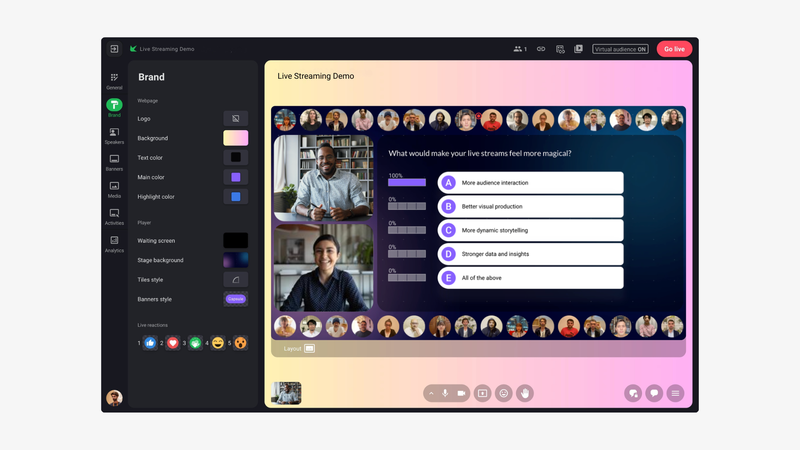
From a studio that runs directly in the browser, teams can manage guests, switch layouts, display content, launch interactive features, and apply their visual identity without needing to use OBS.
The platform can stream up to 4K with sub-second latency, helping preserve a genuinely synchronous experience for everyone in the live session.
That makes it an interesting StreamYard alternative for teams that like the simplicity of a browser-based studio but want more room to grow as their productions become more ambitious.
A truly interactive live experience that can be personalized for each viewer
Sparkup stands out most clearly on the audience experience.
Polls, quizzes, Q&A, reactions, chat, and word clouds can be integrated directly into the video experience. Viewers can also raise their hand and be invited to speak live.
The experience is no longer limited to a video feed with a column of comments alongside it.
These interactions also generate data that can be used to analyze audience engagement and better understand how viewers participated in the live stream.
Sparkup also makes it possible to offer multiple feeds within the same live experience and let each viewer choose which one they want to watch.
For example, you can offer different camera angles, a main program and an alternative feed, or several language versions of the same event.
This is particularly useful for international events, multi-stage conferences, or productions where several viewpoints need to be available at the same time.
Ultra-low latency also matters here.
A poll, question, or live audience contribution quickly loses its natural feel if part of the audience is seeing the stream several seconds late.
From a browser-based studio to an external production setup
Sparkup can be used on its own directly from the browser, but it can also receive an external production feed via RTMP.
A team can start with a webcam, a few speakers, and screen sharing, then connect OBS, vMix, a hardware encoder, or a full audiovisual production setup as the production becomes more ambitious.
That avoids having to switch platforms as production requirements grow.
Sparkup can also stream to different social platforms and centralize incoming comments in a unified chat.
Key Sparkup features
- Multistreaming to LinkedIn, YouTube, Facebook, and other destinations
- Browser-based studio
- Logos, backgrounds, and overlays
- Speaker and guest management
- Polls, Q&A, chat, quizzes, reactions, and word clouds
- On-screen comments
- Unified chat
- Audience call-ins
- Audience video mosaic
- RTMP input
- Multi-feed streaming
- AI-powered live translation
- Sub-second latency
- Streaming and recording up to 4K
- Engagement analytics
- Embeddable video player
StreamYard vs Sparkup
- Both offer a browser-based studio, making it possible to produce a live stream without relying on OBS.
- Sparkup goes further on interactivity, with polls, quizzes, Q&A, reactions, word clouds, and audience call-ins built directly into the experience.
- Sparkup adds a real engagement analytics layer, while StreamYard remains more focused on production and distribution.
- Sparkup can stream up to 4K, while StreamYard's individual plans currently stream live in 1080p.
- Sparkup can offer multiple feeds to viewers, opening up more advanced formats for multi-stage or multilingual events.
2. Restream: for streaming to many platforms at the same time
Price: Free plan available. Standard currently starts at $19/month, while Professional starts at $49/month.
Best for: Creators and brands whose main priority is distributing the same live stream simultaneously across multiple platforms and channels.
Restream overview
Restream is probably one of StreamYard's most direct competitors.
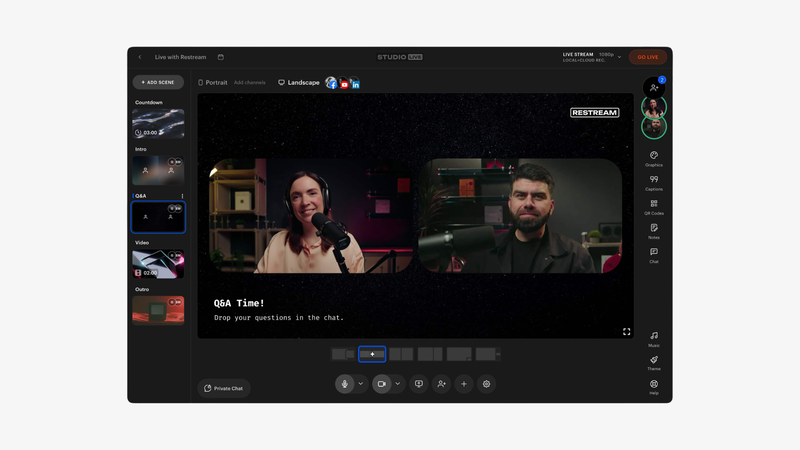
Like StreamYard, it offers a browser-based studio where you can invite guests, customize your show, and stream it to multiple platforms.
But Restream's core strength is particularly tied to multistreaming.
The free plan currently supports two simultaneous channels. Standard increases that to three, Professional to five, and Business to eight, with additional destinations available on Enterprise.
Restream also lets you connect an external encoder such as OBS to its infrastructure so the stream can be redistributed without increasing the load on your production internet connection.
Professional adds Full HD and 4K recording, as well as simultaneous horizontal and vertical streaming, which is useful when the same program needs to work on YouTube and vertical-first platforms.
Key Restream features
- Browser-based live studio
- Multistreaming
- Up to 8 destinations on Business
- Custom destinations on Enterprise
- Cross-platform chat
- Guest channels
- Full HD
- Recording up to 4K
- Horizontal and vertical streaming
- OBS and encoder connectivity
- Stream monitoring
- Website video player on Business
- Co-producer mode
- Team workspaces
StreamYard vs Restream
- Restream is more focused on multistreaming and distribution.
- Both offer a browser-based studio, making them accessible without technical expertise.
- Restream makes it easy to integrate an external encoder as your production setup becomes more advanced.
- StreamYard remains particularly simple for managing guests and producing conversational formats.
- Restream generally makes more sense when the number and variety of destinations are the main decision criteria.
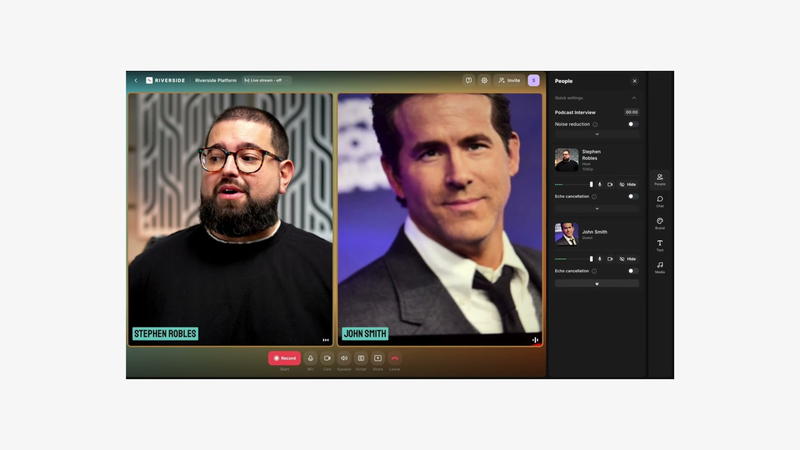
3. Riverside: for turning every live stream into reusable content
Price: Free plan available. Pro starts at $24/month billed annually, while Grow, which includes more advanced live streaming features, is $34/month billed annually.
Best for: Podcasters, creators, and marketing teams that want high-quality recordings and want to turn their live streams into clips and other content.
Riverside overview
Riverside did not originally come from the multistreaming market.
The platform first became known for high-quality remote recording for podcasts and video interviews.
That is exactly what makes it interesting as a StreamYard alternative.
Where StreamYard starts with live streaming and then adds recording, Riverside starts with high-quality content capture and then adds live streaming.
Its Grow plan now allows Full HD 1080p streaming to an unlimited number of supported destinations, including YouTube, Facebook, LinkedIn, X, and Twitch, as well as custom RTMP destinations.
The biggest advantage comes after the live stream.
Riverside lets you work with separate tracks, transcribe conversations, edit video using text, and automatically generate clips.
Key Riverside features
- Browser-based studio
- Recording up to 4K
- Separate audio and video tracks
- Full HD 1080p streaming
- Multistreaming to multiple destinations
- Custom RTMP
- Omnichat
- Overlays and lower thirds
- Backstage guest management
- Text-based editing
- Automatic transcription
- Magic Clips
- AI editing and repurposing tools
StreamYard vs Riverside
- Riverside is stronger on recording and post-production.
- Separate tracks make editing after the live much easier.
- Riverside includes more transcription, editing, and repurposing tools.
- StreamYard remains more focused on social live streaming itself.
- Choose Riverside if the live stream is also a recording session designed to produce multiple pieces of content afterward.
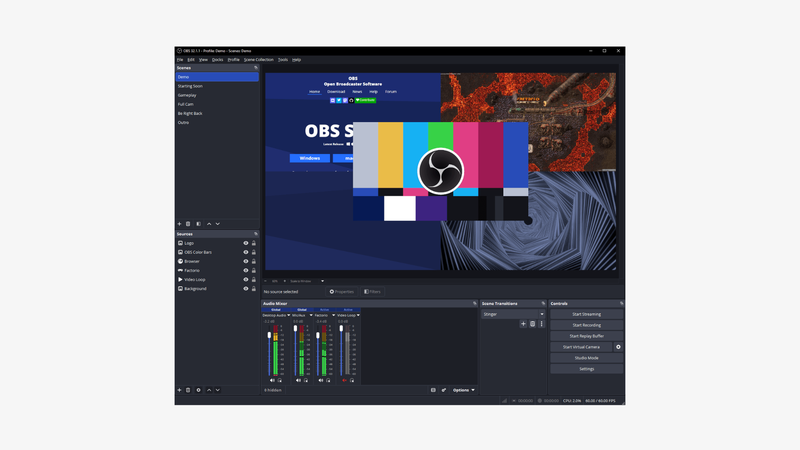
4. OBS Studio: for complete control over production
Price: Free and open source.
Best for: Producers, streamers, and technical teams that want precise control over every source, scene, transition, and streaming setting.
OBS Studio overview
OBS Studio is very different from StreamYard.
It is not a browser-based SaaS platform, but a full video production application installed on Windows, macOS, or Linux.
In return, it offers a much higher level of control.
You can create an unlimited number of scenes and mix webcams, capture cards, screen captures, media files, browser sources, images, text, and other content.
OBS also includes a full audio mixer, custom transitions, hotkeys, Studio Mode for preparing scenes before sending them live, and a very extensive plugin and scripting ecosystem.
The downside is obvious: the learning curve is steeper.
Simply inviting a remote guest or running a collaborative show usually requires more tools and configuration than with StreamYard.
Key OBS Studio features
- Free and open source
- Unlimited scenes
- Mixing of multiple video and audio sources
- Capture cards
- Browser sources
- Custom transitions
- Advanced audio mixer
- Audio filters
- Studio Mode
- Multiview
- Hotkeys
- Plugins and scripts
- API
- Windows, macOS, and Linux
StreamYard vs OBS Studio
- OBS offers much more control over video production.
- OBS is completely free.
- Its scenes, sources, and plugin system make highly customized productions possible.
- StreamYard is much easier to learn and use.
- Remote guest management is far more natural in StreamYard.
- Choose OBS if production flexibility matters more than simplicity.
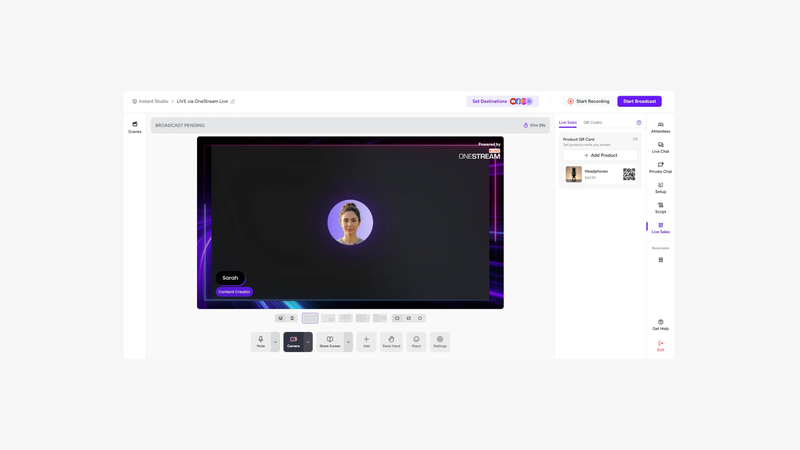
5. OneStream Live: for scheduling and automating broadcasts
Price: Free plan available. Paid plans currently start at $15/month for Basic, $39 for Standard, and $49 for Professional.
Best for: Teams and creators that regularly stream live or pre-recorded content to multiple platforms and want to automate scheduling.
OneStream Live overview
OneStream Live covers traditional live streaming, multistreaming, and pre-recorded video broadcasting.
The free plan currently allows streaming to two destinations in 720p. Basic increases that to five destinations.
One of OneStream's main strengths is its focus on scheduling.
You can prepare events and automate broadcasts, making it particularly useful for channels that publish content regularly without necessarily having a producer sitting behind the studio every time.
The platform also includes storage and bandwidth options, which makes it feel more like a broader distribution infrastructure than just an interview studio.
Key OneStream Live features
- Free plan
- Multistreaming
- Pre-recorded video streaming
- Stream scheduling
- Live studio
- Up to 24-hour streams depending on the plan
- Cloud storage
- Web player
- Team management
- Multiple destinations
- Add-ons for additional capacity and storage
StreamYard vs OneStream Live
- OneStream is more focused on automation and scheduling.
- It is better suited to workflows that include a lot of pre-recorded content.
- StreamYard is more naturally designed for live conversations and interviews with multiple guests.
- OneStream becomes more attractive when recurring and automated broadcasting matters more than the studio experience.
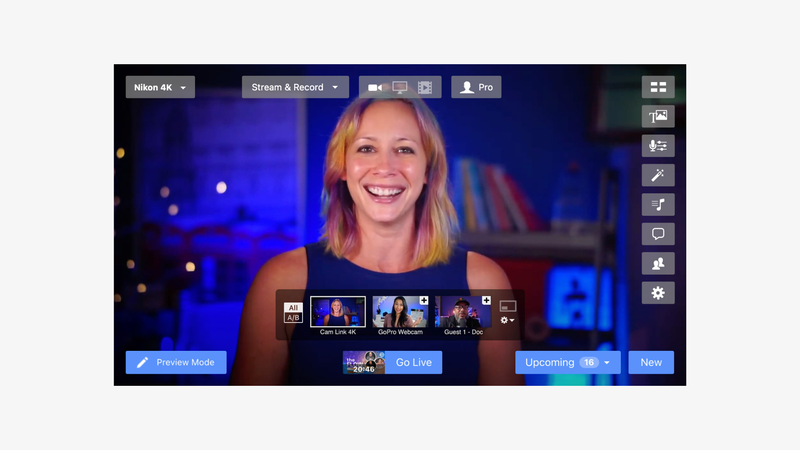
6. Ecamm Live: for advanced production on Mac
Price: No permanent free plan. A trial is available, and Ecamm Live plans currently start at $16/month.
Best for: Creators and producers on Mac who want more visual and technical control without going all the way to a fully professional production setup.
Ecamm Live overview
Ecamm Live sits somewhere between StreamYard and OBS.
It remains much more approachable than a fully customized software production setup while offering more production options than a standard browser-based studio.
Ecamm lets you build scenes, manage overlays, integrate different sources, display comments, work with capture devices, and use tools such as Stream Deck.
The Pro plan adds streaming and recording up to 4K, separate audio and video tracks, a virtual camera and microphone, and various professional output options.
There is one major limitation, however: Ecamm Live only works on Mac.
Key Ecamm Live features
- Custom scenes and overlays
- Multistreaming
- Comment management
- Screen sharing
- Capture cards
- NDI
- Pre-recorded videos
- PTZ camera control
- Stream Deck integration
- 1080p on Standard
- Up to 4K on Pro
- Guests with Ecamm Interview
- Separate audio and video tracks
- Virtual camera and microphone
- External monitoring
StreamYard vs Ecamm Live
- Ecamm gives you more control over production and video sources.
- Ecamm Pro supports streaming and recording up to 4K.
- Separate tracks make post-production easier.
- StreamYard is easier for non-technical teams to use.
- StreamYard works from any compatible browser, while Ecamm requires a Mac.
- Choose Ecamm if you regularly produce on Mac and want a more advanced production environment.
7. Streamlabs Talk Studio: for a simple, affordable StreamYard alternative
Price: 7-day free trial. Standard currently costs $7.50/month billed annually, while Pro costs $12/month billed annually.
Best for: Creators who want a browser-based studio similar to StreamYard but with a lower entry price.
Streamlabs Talk Studio overview
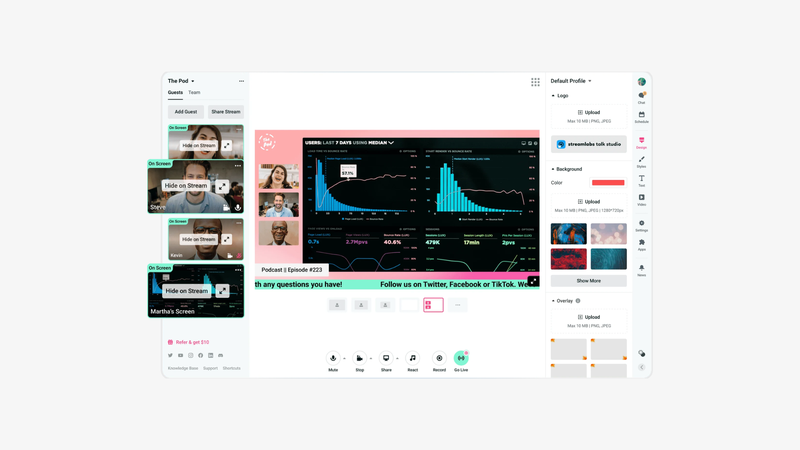
Streamlabs Talk Studio is probably the alternative that feels most similar to StreamYard in day-to-day use.
Everything happens in the browser.
You can invite guests, share your screen, customize the live stream with themes, logos, and overlays, then broadcast directly to major platforms.
Standard currently supports 720p streaming to one destination with up to five guests.
Pro increases quality to 1080p, supports up to eleven guests, and allows multistreaming to an unlimited number of destinations.
The product also integrates with the wider Streamlabs ecosystem, which can be useful for creators already using its other tools.
Key Streamlabs Talk Studio features
- Browser-based studio
- Remote guests
- Screen sharing
- Unlimited branding
- Logos, backgrounds, and overlays
- Multiple cameras
- Local recording
- Custom RTMP
- Co-hosting
- 1080p on Pro
- Unlimited multistreaming on Pro
- Up to 11 guests on the current Pro plan
- Disconnect protection
StreamYard vs Streamlabs Talk Studio
- Both products offer a very similar browser-based experience.
- Talk Studio is significantly cheaper on its current individual plans.
- Talk Studio Pro supports multistreaming to unlimited destinations, compared with eight on StreamYard's individual Advanced plan.
- StreamYard offers a more established environment specifically designed around guest-based shows and social live streaming.
- Talk Studio is especially worth considering when budget and destination count are the top priorities.
Which StreamYard alternative should you choose?
The best alternative depends more on your workflow than on the raw number of features.
Choose Sparkup if you like the simplicity of a browser-based studio but want to go further with video quality, interactivity, ultra-low latency, and engagement analytics.
Choose Restream if your top priority is distributing the same live program across many platforms.
Choose Riverside if your live streams need to become high-quality podcasts, clips, and video content afterward.
Choose OBS Studio if you want maximum control over every technical aspect of production and are comfortable with a steeper learning curve.
Choose OneStream Live if a large part of your strategy depends on scheduled or automated broadcasts.
Choose Ecamm Live if you work on Mac and want more production capabilities than a standard browser-based studio.
Choose Streamlabs Talk Studio if you want an alternative that feels very close to StreamYard but with a lower entry price.
What should you look for before choosing a StreamYard alternative?
What video quality do you actually need?
1080p is more than enough for many social live streams.
But if your live stream also needs to become a premium video, be displayed on an event screen, or be reused in other productions, 4K may become relevant.
Also make sure you distinguish between streaming quality and recording quality. A platform may advertise 4K while still limiting its live output to 1080p.
How many platforms do you want to stream to at the same time?
YouTube and LinkedIn may be enough today.
Tomorrow, you may want to add Facebook, Twitch, TikTok, or several channels owned by different partners.
Compare the number of simultaneous destinations included in each plan, not just whether a platform offers a "multistreaming" feature.
Do you just want to receive comments or actually involve your audience?
There is a real difference between displaying a YouTube comment on screen and building a truly interactive live experience.
If your format relies on polls, quizzes, questions, reactions, or audience call-ins, look at how those interactions are integrated into the experience and what data you can access afterward.
How far do you want to go with production?
For a two-camera interview, a browser-based studio is more than enough.
For a multicam production with a control room, capture cards, NDI sources, encoders, and monitoring, you need tools that can receive or manage an external production workflow.
What do you want to do with the recording after the live stream?
If every show needs to become ten clips, a podcast episode, and several social videos, separate tracks and editing tools may be more valuable than one extra overlay.
Is your team technical?
OBS can do a huge amount.
That does not mean OBS is the best tool for a marketing team that wants to launch a live stream in fifteen minutes.
The right tool gives you the level of control you need without turning every broadcast into a technical project.
Frequently asked questions
What is the best StreamYard alternative?
Sparkup is our top StreamYard alternative for brands and creators that want to keep the simplicity of a browser-based studio while going further on quality, interactivity, and audience experience. Restream is particularly strong for multistreaming, while OBS is a better fit when technical control is the priority.
What is the best free StreamYard alternative?
OBS Studio is completely free and open source, but it requires more technical setup. Sparkup, Restream, and OneStream Live also offer free plans that let you get started without a paid subscription.
What is the easiest StreamYard alternative to use?
Sparkup and Streamlabs Talk Studio are both particularly accessible from the browser. Sparkup is a strong option when you want to combine that simplicity with more interactivity and higher streaming quality, while Talk Studio is closer to StreamYard's traditional operating model.
What is the best StreamYard alternative for multistreaming?
Restream is one of the most specialized platforms for multistreaming, with capacity increasing across plans and infrastructure that supports external encoders. Sparkup is a relevant alternative when you want to combine multistreaming with production capabilities and a richer audience experience.
Which StreamYard alternative offers the best video quality?
Sparkup can stream and record up to 4K depending on the plan and workflow. Ecamm Pro also supports streaming and recording up to 4K, while Riverside places particular emphasis on 4K recording for post-production.
Which StreamYard alternative should you choose for a video podcast?
Riverside is particularly strong when recording quality and post-production are the main priorities, especially thanks to separate tracks and editing tools. Sparkup is a better fit when the video podcast is designed as a truly interactive live show.
StreamYard or OBS: which should you choose?
StreamYard is much easier for quickly producing a live stream with multiple guests. OBS, on the other hand, gives you far more control over scenes, sources, transitions, audio, and hardware. For a non-technical team, StreamYard will usually be faster. For a highly customized production, OBS offers much more freedom.