Choosing a webinar platform is mostly a question of use case. A marketing team looking to generate leads does not have the same needs as a company running highly interactive roundtables, town halls, or live streams across multiple channels.
Some platforms excel at simplicity. Others stand out for video production, data collection, automation, or managing webinar programs at scale.
Here are 8 webinar platforms to compare in 2026, with their real strengths, limitations, and the situations where each one makes the most sense.
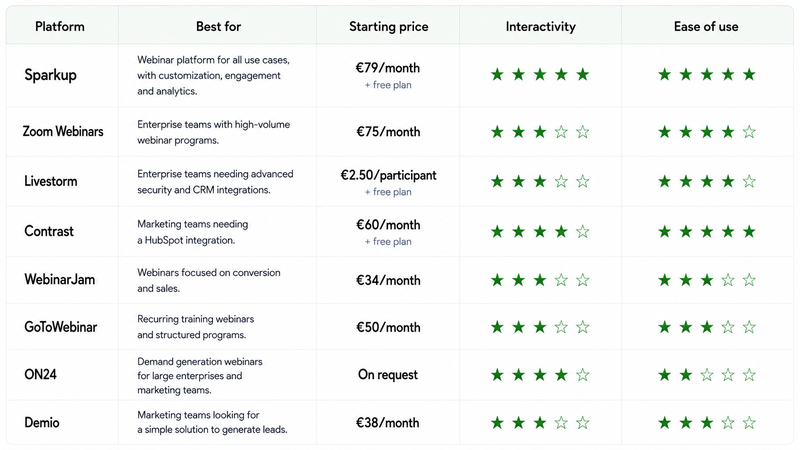
8 best webinar platform
Looking for the best webinar software for your next event? Here are our top picks.
1. Sparkup: for professional, interactive webinars that are easy to produce
Pricing: Free plan available. Webinar plans start at €79/month, billed annually.
Best for: Companies that want to easily produce professional, engaging, and measurable webinars without needing to become live production experts.
Key features
- Custom registration pages and forms
- Automated reminder emails
- Branding with colors, backgrounds, and banners
- Polls, quizzes, Q&A, chat, and emoji reactions
- Speaker management
- Audience members can join the stage
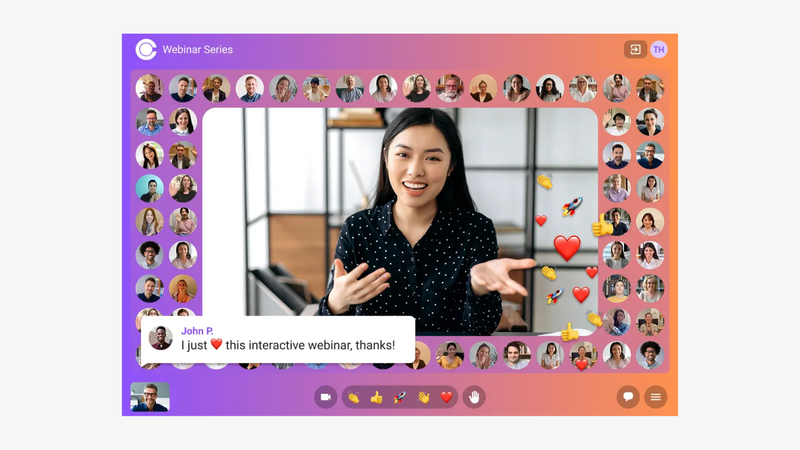
- Video wall displaying connected participants
- Automatic webinar recording
- AI-powered live captions and translation
- Multistreaming and RTMP input
- Participation and engagement analytics
Sparkup overview
Sparkup is a European webinar platform designed to create professional and highly interactive experiences without making production more complex.
The platform makes it easy to manage every step of a webinar, from registration to the live session, from a browser-based studio. Teams can manage speakers, customize the branding, dynamically display content, and involve the audience directly in the experience. The result is a professional, branded, fluid, and dynamic webinar without requiring advanced production skills.
Sparkup is particularly relevant for marketing webinars, product demos, training sessions, internal communications, and virtual events where the goal is not only to deliver content, but also to maintain attention, understand audience reactions, and measure what actually generated interest.
An approach centered on participation and engagement data
This is probably one of the clearest differences compared with tools originally built around video conferencing.
Sparkup lets teams integrate polls, quizzes, Q&A, chat, reactions, and audience participation directly into the video experience. Participants can raise their hand and be invited on stage, while connected attendees can also be displayed in a video wall to create a stronger sense of presence and proximity.
Sparkup goes beyond simply adding a poll or a Q&A session. These interactions also generate useful data. During the webinar and after it ends, Sparkup provides engagement and participation data for the overall audience and individual attendees.
This helps teams understand who engaged, when they engaged, and which topics or content triggered that engagement.
For marketing, training, or communications teams, this means going beyond basic metrics such as registrations and attendance. A poll response, a Q&A question, a reaction, or a live contribution becomes a signal that helps explain what caught someone's attention and why.
Sparkup also provides customizable registration pages, data collection forms, confirmation emails, and reminders, allowing teams to connect information collected before the event with engagement data generated during the live session.
The platform supports events from 2 to 10,000 participants, as well as AI-powered live caption translation and restreaming to LinkedIn, YouTube, X, or custom destinations.
For teams that need a more advanced setup, Sparkup can also receive a 1080p RTMP production feed.
Sparkup limitations
If you only need to occasionally run a simple presentation for a small group, with no particular branding, audience interaction, or engagement analysis requirements, a standard video conferencing tool may be enough.
Sparkup becomes more relevant when you want to keep webinar production simple while improving the visual experience, audience participation, and your understanding of what actually happened during the live session.
2. Livestorm: for marketing teams that want to connect webinars to their stack
Pricing: Free plan available. Paid plans start at €2.50 per participant, with a minimum of 400 participants, meaning roughly €1,000 for an annual quota of 400 participants.
Best for: Enterprise marketing teams that want to integrate webinars with their CRM and marketing automation stack, with strong security and governance requirements.
Key features
- Custom registration pages and forms
- Automated emails
- Live, on-demand, and prerecorded webinars
- Polls, chat, and Q&A
- Participation analytics
- Integrations with HubSpot, Salesforce, Pardot, and other marketing tools
- Enterprise security and governance features
- Multilingual support
- Advanced integrations and analytics on Enterprise plans
Livestorm overview
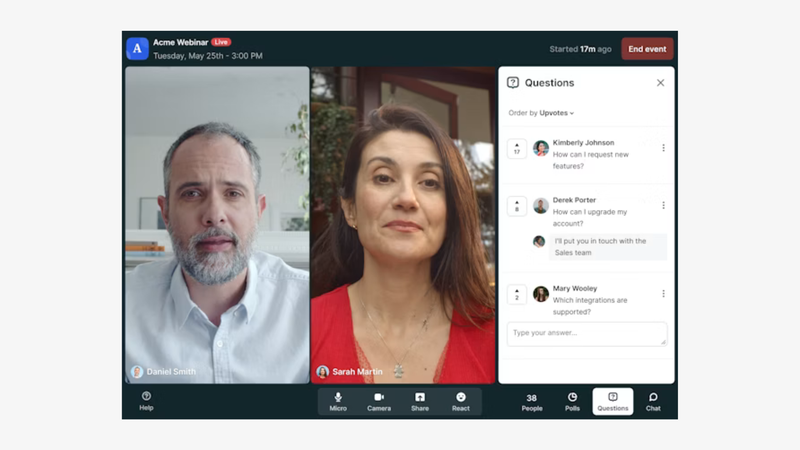
Livestorm is a webinar platform particularly geared toward marketing teams that want to manage online events within an environment connected to their existing tools.
The platform covers the main stages of the webinar journey, from registration to the live event and post-event analysis, with a strong focus on CRM and marketing automation integrations.
Livestorm connects with tools such as HubSpot, Salesforce, and Pardot, making it easier to feed registration and participation data into existing marketing workflows.
This makes it particularly relevant for teams that use webinars as a genuine lead generation and qualification channel rather than as standalone events.
A platform designed for enterprise marketing environments
Livestorm includes customizable registration pages, automated emails, forms, analytics, and standard engagement tools such as polls, chat, and Q&A.
Its main strength, however, is its ability to fit into an already structured marketing ecosystem. Webinar data can feed CRM records, marketing automation platforms, and nurturing workflows.
The platform also places strong emphasis on security and compliance, with features designed for the requirements of large organizations.
This makes Livestorm particularly suited to enterprise marketing teams dealing with more demanding IT, security, and governance requirements.
Livestorm limitations
Its strong marketing focus may matter less to teams primarily looking for a highly visual live experience or more advanced live production capabilities.
Livestorm remains very effective for organizing and scaling marketing webinars, but teams that want staging, audience participation, or the visual live experience to play a central role may prefer a platform more focused on those areas.
3. Zoom Webinars: for high-volume webinar programs
Pricing: No dedicated free webinar plan. Zoom Webinars Plus starts at around €75/month, billed annually.
Best for: Organizations looking for a familiar, robust platform capable of managing high webinar volumes and large audiences.
Key features
- Registration management
- Chat, Q&A, polls, and reactions
- Host and panelist management
- Backgrounds and branding elements
- Webinar recording
- Performance reports
- Prerecorded content on selected plans
- Backstage and advanced scenes with Zoom Webinars Plus
- Support for very large audiences
Zoom Webinars overview
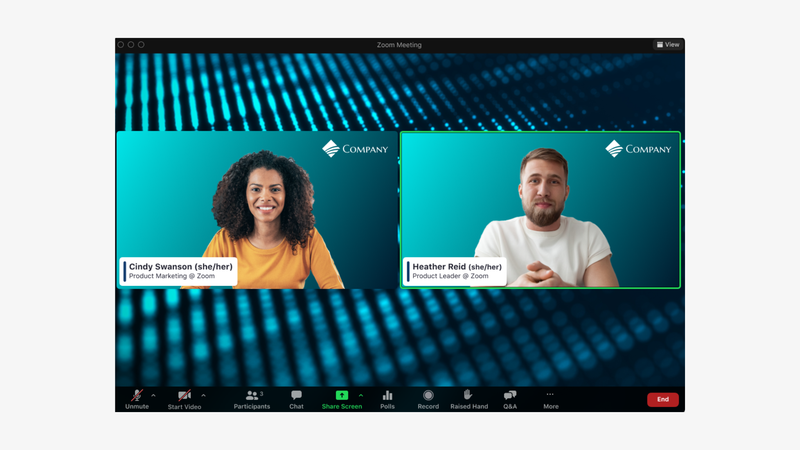
Zoom Webinars takes much of the experience companies already know from Zoom Meetings and adapts it to a more presenter-led format, where hosts and panelists present to an audience that is primarily there to watch.
The platform includes registration, chat, Q&A, polls, and reactions. Hosts can also customize certain visual elements of their events.
Its main advantage is obvious: Zoom is already familiar to a huge number of organizers and participants, so there is very little change in habits required.
A solution built to scale
Zoom offers several Webinar licenses, ranging from a few hundred attendees to much larger deployments.
Its documentation currently lists licenses capable of supporting up to one million view-only attendees.
That makes it a credible option for announcements, conferences, and events with very large audiences.
Zoom has also expanded its webinar product with more branding, production, and analytics features, so it should no longer be viewed simply as a larger version of a Zoom meeting.
Zoom Webinars limitations
Zoom is still structured around two main roles: the people presenting and the people watching.
Chat, Q&A, and polls enable interaction, but teams that want audience participation to become a central part of the live experience may prefer a platform designed more specifically around that dynamic.
The same applies to teams that want to turn a webinar into a highly branded live program with a stronger visual identity.
4. GoTo Webinar: for scaling recurring webinar programs
Pricing: No free plan. Paid plans start at around €50/month, billed annually.
Best for: Companies that regularly organize webinars, training sessions, and recurring events.
Key features
- Registration pages
- Automated reminder and follow-up emails
- Polls and Q&A
- Post-webinar reports and analytics
- Live and prerecorded webinars
- Simulive
- Cloud recordings depending on the plan
- AI-generated transcripts and summaries depending on the plan
- Breakout rooms on selected plans
GoTo Webinar overview
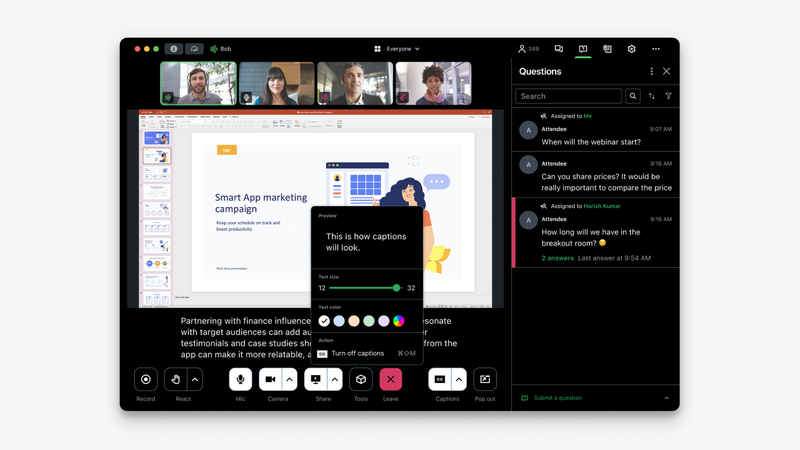
GoTo Webinar is one of the long-standing tools in the market and remains strongly oriented toward recurring webinars, training sessions, and structured events.
The platform handles registrations, automated emails, polls, Q&A, reports, and analytics.
Depending on the plan, it also adds custom branding, cloud recordings, transcripts, AI summaries, and breakout rooms.
It also supports prerecorded and simulated events. Recorded webinars can retain elements such as polls, Q&A, surveys, and downloadable documents.
A solution designed for repeatable workflows
This is where GoTo Webinar remains particularly useful.
A company running several demos, training sessions, or customer webinars every month needs more than just a video room. It needs to manage registration, reminders, the live session, recording, and follow-up in a repeatable way.
GoTo Webinar covers that workflow well.
Current plans support different audience capacities, with traditional webinars supporting up to 3,000 participants and larger broadcasting options available in some configurations.
GoTo Webinar limitations
GoTo Webinar follows a more traditional workflow than some newer platforms.
The desktop application must still be installed for certain uses, adding an extra step compared with fully browser-based solutions.
The organizer workflow can also feel fragmented. There is no single production studio bringing preparation and live management together in one interface.
Some elements used during the webinar, such as polls or content, need to be configured beforehand in the back office, while the live session itself is managed from another interface.
This can mean more back-and-forth for organizers and speakers.
The participant experience is also fairly traditional, and customization of the live page is more limited than on platforms designed around a fully branded webinar experience.
Finally, GoTo Webinar provides reporting and post-event data, but it is less focused on using real-time engagement signals during the session.
Teams that want to understand who is reacting, to what, and use those signals immediately to better understand their audience may find other platforms more suitable.
5. WebinarJam: for conversion and sales-focused webinars
Pricing: No free plan. Paid plans start at around €34/month, billed annually.
Best for: Entrepreneurs, consultants, and trainers using webinars as a sales channel.
Key features
- Registration pages
- Automated emails and SMS
- Chat and polls
- Commercial offers displayed during the live session
- CTAs and links to sales pages
- Click and conversion tracking
- A/B testing for registration pages
- Replays
- Automated and evergreen webinars through EverWebinar
- Downloadable resources
WebinarJam overview
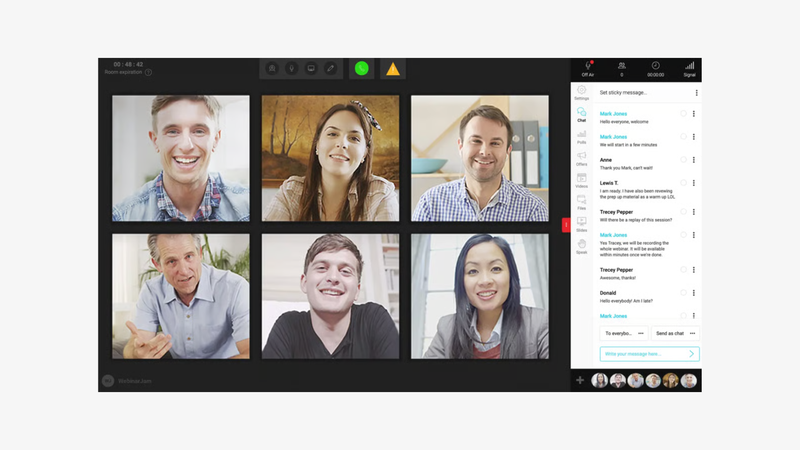
WebinarJam is particularly geared toward entrepreneurs, trainers, and consultants who use webinars as a conversion and sales tool.
The platform covers the entire journey with registration pages, automated email and SMS, polls, chat, replays, and several features designed to encourage attendees to take action during the live session.
A strong conversion focus
WebinarJam stands out mainly through features directly connected to selling.
Organizers can display a commercial offer during the webinar, add a button linking to a sales page, track clicks, and even measure sales when tracking is correctly configured.
The platform also offers A/B testing for registration pages, polls, downloadable resources, and other features that help structure the webinar around a conversion journey.
WebinarJam can also turn sessions into automated or evergreen webinars through EverWebinar.
Replays can retain elements from the live event, including polls, chat, and offers, to create an experience closer to a live webinar.
WebinarJam limitations
WebinarJam is primarily built around marketing and sales mechanics such as live offers, sales buttons, follow-up sequences, automation, and evergreen webinars.
That can be a limitation for companies looking to create a more premium, differentiated, and highly customized experience.
Its interface may also feel less modern than newer platforms.
WebinarJam therefore feels closer to a webinar sales tool than a platform designed around a highly polished brand experience.
6. ON24: for turning webinars into a demand generation channel
Pricing: No free plan. Pricing available on request.
Best for: Large B2B and demand generation teams that want to connect webinar engagement with their marketing and sales data.
Key features
- Live, simulive, and on-demand webinars
- Custom registration pages
- More than 20 engagement tools
- Individual engagement data
- Advanced analytics and first-party data
- CRM and marketing automation integrations
- Lead scoring and segmentation
- Content personalization
- Content hubs
- AI-powered webinar repurposing
- Identification of high-engagement moments
ON24 overview
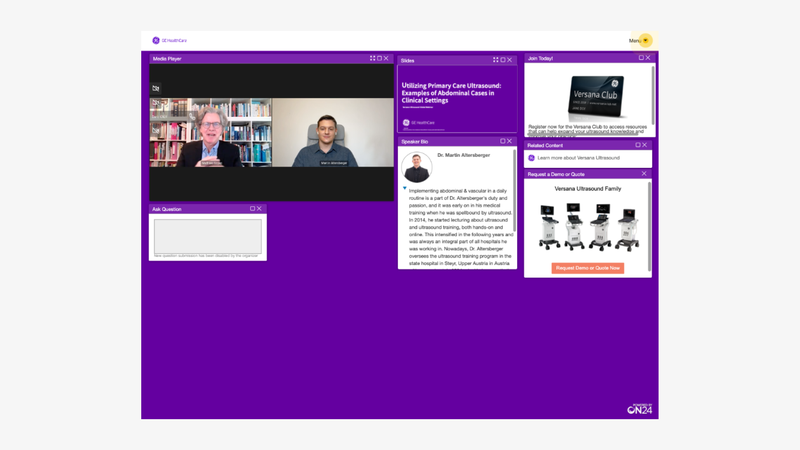
ON24 positions itself as more than just a tool for hosting webinars.
Its platform is built around using the engagement generated during and after events as marketing data.
Teams can create webinars, on-demand experiences, content hubs, landing pages, and customized virtual events.
The goal is then to bring together interactions from each prospect and account to inform marketing and sales teams.
Data as the main differentiator
ON24 tracks interactions across its experiences to build engagement profiles, identify interests, and contribute to lead scoring and nurturing.
The platform highlights analytics at attendee, event, and channel level, alongside real-time integrations with CRM and marketing platforms.
It also supports live, prerecorded, simulated, and on-demand webinars.
For companies producing dozens or hundreds of webinars and treating every interaction as a commercial signal, this depth can be particularly valuable.
ON24 limitations
ON24 is primarily designed for organizations with a relatively mature marketing operation.
A small team running four webinars a year and simply looking to create a polished live experience may not use the full value of a platform built around personalization, data, and large-scale content programs.
The platform makes the most sense when webinars are part of a broader demand generation and nurturing strategy.
7. Contrast: for HubSpot-integrated and reusable marketing webinars
Pricing: Free plan available. Paid plans start at around €60/month for a quota of 100 registrations per month.
Best for: B2B SaaS marketing teams looking for a simple webinar platform with a strong HubSpot integration.
Key features
- Browser-based studio
- Speaker backstage
- Registration pages and emails
- Branding with colors, fonts, backgrounds, and overlays
- Chat, Q&A, polls, and CTAs
- Native HubSpot integration
- Prerecorded webinars
- Replays and webinar channels
- AI-generated clips and content
Contrast overview
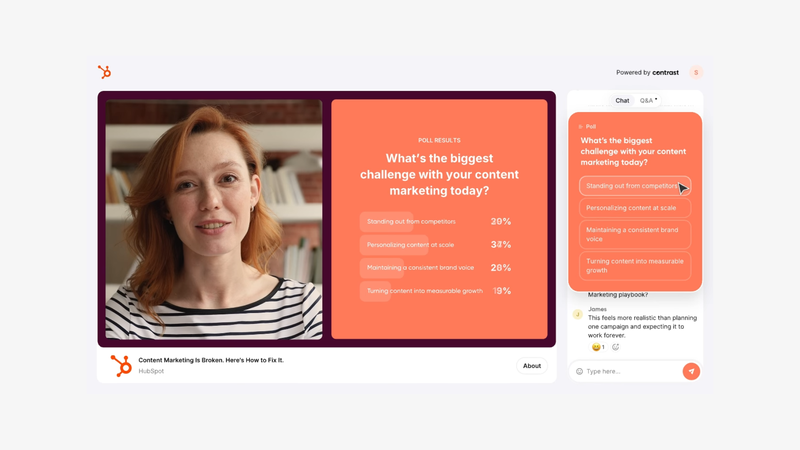
Contrast is a webinar platform designed for marketing teams that want to quickly create customized webinars, integrate them closely with HubSpot, and reuse their content afterward.
The platform brings together registration pages, emails, a browser-based studio, branding, audience interactions, replays, analytics, and content repurposing.
Its approach focuses heavily on simplicity. Speakers join a backstage directly from their browser, while teams can adjust layouts, display questions, launch polls, or customize the experience using their colors, fonts, and brand assets.
A strong focus on HubSpot and marketing data
Contrast stands out particularly through its native HubSpot integration.
Webinar data can be synced directly with the CRM, including registrations, attendance, watch time, poll responses, questions, CTA clicks, and the point at which someone left the webinar.
These signals can then be used in HubSpot to create segments, trigger workflows, enrich lead scoring, or personalize sales follow-ups.
Contrast also extends beyond the live session with tools for creating clips, chaptered replays, and other content from webinars.
Contrast limitations
Contrast is particularly relevant for marketing teams using HubSpot, which is also a major part of its positioning.
Companies working with another CRM ecosystem should look more closely at the integrations available and their level of depth.
The platform is also more geared toward marketing webinars and software teams than internal live events or larger-scale broadcasts requiring more control.
8. Demio: for marketing teams that want to keep things simple
Pricing: No free plan. Paid plans start at around €38/month, billed annually.
Best for: Marketing teams looking for a simple webinar workflow focused on lead generation.
Key features
- Registration pages
- Live webinars and event series
- Automated and on-demand webinars
- Chat, polls, and Q&A
- CTAs and Featured Actions
- Downloadable resources
- Invite attendees on stage
- Engagement analytics
- CRM and marketing automation integrations
- Custom branding and domains depending on the plan
Demio overview
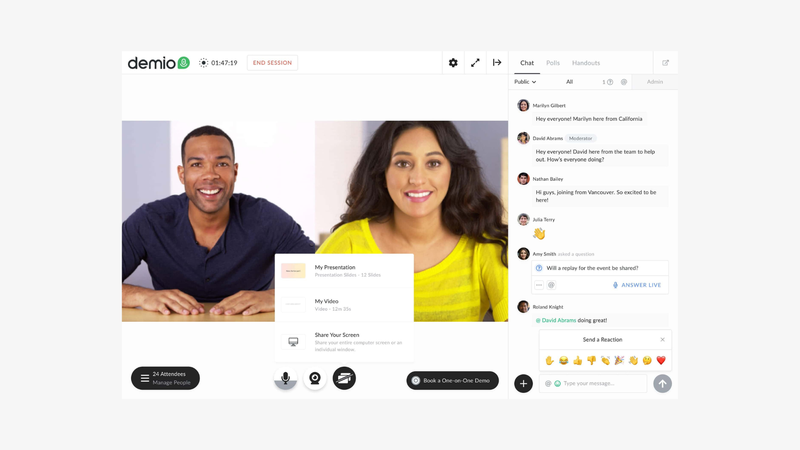
Demio positions itself clearly as a webinar platform for marketing teams.
It brings together registration pages, branding, emails, live, automated, and on-demand webinars, as well as engagement and analytics tools designed to identify the most interested attendees.
The browser-based environment places a strong emphasis on ease of preparation.
Engagement and conversion without making production complex
During a live webinar, organizers can use chat, Q&A, polls, downloadable resources, and highlighted actions.
Demio also allows attendees to be invited on stage.
After the event, engagement data helps teams identify the most active participants and can be passed into marketing automation tools or a CRM.
Automated webinars are another important part of the product.
Demio allows teams to use a prerecorded presentation while scheduling polls, resources, and CTAs, with a team member still able to join the chat live.
Demio limitations
Demio is primarily built around marketing webinars.
For teams that need more control over the visual production, branding, or audience experience, other platforms may provide a broader set of options.
For organizations looking for a more enterprise-focused platform with large-scale engagement analytics, ON24 goes further.
How to choose a webinar platform
The right webinar platform is not necessarily the one with the longest feature list.
It is the one that matches the way you produce webinars and what you want to achieve after the live session.
Before comparing feature catalogs, focus on six areas: participant experience, video production and customization, registration, data collection, integrations and analytics, audience scale, and distribution options.
Participant experience and interactivity
Chat, polls, and Q&A are now available on many webinar platforms.
The real difference lies in how these interactions are integrated into the webinar itself.
Are they hidden inside a secondary menu, or integrated directly into the video?
Do poll results appear in a pop-up that covers the speaker or presentation, or are they naturally included in the visual layout?
Can chat messages be highlighted on stage?
And beyond standard Q&A and multiple-choice polls, what tools are actually available to involve the audience?
These details have a direct impact on the pace of the webinar.
A well-integrated poll can become a real segment of the program, allowing the speaker to react to responses and naturally regain attention instead of interrupting the presentation.
Participant experience also goes beyond interactivity.
Look at how easy it is to join the webinar from a browser and any device, without downloading an application, as well as the audio and video quality offered.
The key question is therefore not simply whether a platform has a “poll” feature, but whether it can deliver a smooth, high-quality, genuinely participatory experience.
Video production and customization
Not all webinar platforms provide the same level of control over the final live experience.
Zoom remains relatively close to a video conferencing environment.
Contrast provides more customization and visual control, including the ability to customize fonts.
Sparkup goes further in staging, with banners, audience visibility, and interactions displayed directly within the video.
By contrast, platforms such as Livestorm, Demio, WebinarJam, and GoTo Webinar are more focused on the webinar workflow itself than on visual production.
The right level depends on the format.
For a presentation with two speakers and a few slides, simple production may be enough, depending on the impact you want to create and how much you want to differentiate the experience.
For a roundtable, product demo, or branded event, it may become important to easily switch layouts, display content cleanly, manage several speakers, and maintain a consistent visual identity throughout the live session.
Registration and data collection
A marketing webinar starts long before the “Go Live” button.
You need to register participants, collect useful information, send confirmations and reminders, and then connect that information to what actually happened during the event.
Look closely at the flexibility of the registration form.
Can you choose the fields? Create multiple pages? Customize emails? Distinguish between registered attendees and actual participants? Know whether someone asked a question or answered a poll?
For demand generation teams, these differences may be more important than the maximum video resolution.
Integrations and analytics
The more webinars are used as a marketing channel, the more important this becomes.
One platform may tell you that 600 people attended.
Another may help you understand who attended, how long each person stayed, what they watched, how they responded to polls, and which actions they took during the session.
The next step is sending that information into a CRM or marketing automation platform.
This is an area where tools such as ON24, Livestorm, and Demio have built a significant part of their positioning.
Audience size and scalability
A high maximum participant limit can be reassuring, but it should not automatically become a key selection criterion.
Most B2B webinars do not need to host tens of thousands of attendees.
However, a communications team organizing leadership events for several thousand employees should closely examine streaming capacity, bandwidth, video distribution, security, and licensing conditions.
It is therefore more useful to understand your typical audience size and annual peak than to automatically look for the highest capacity on the market.
Distribution and multistreaming
A webinar and a livestream do not always follow the same logic.
A traditional webinar is built around a registered audience joining a dedicated room or page.
Multistreaming sends the same live content to platforms such as LinkedIn or YouTube to reach an audience that is already there.
The two approaches can also be combined.
A company could, for example, provide the full interactive webinar experience to registered participants while broadcasting a version on LinkedIn Live to extend its reach.
If this is important to your strategy, look closely at the platform's restreaming and RTMP output capabilities.
Which webinar platform should you choose for your needs?
There is no universally best webinar platform.
The right choice depends on what you want to produce and how you plan to use the webinar before, during, and after the live session.
For marketing webinars closely connected to your stack, Livestorm and Contrast are particularly relevant. Livestorm works well for enterprise teams looking to connect webinars to their CRM and marketing automation tools, while Contrast is especially interesting for B2B SaaS teams using HubSpot.
For professional, interactive, and measurable webinars, Sparkup combines a polished experience, audience participation, and engagement data. It is particularly useful when teams want to understand who engaged, when, and around which topics without making production more complex.
For webinars focused heavily on conversion and sales, WebinarJam is designed around commercial mechanics such as live offers, CTAs, follow-ups, automation, and evergreen webinars.
For large-scale demand generation programs, ON24 goes further on data, personalization, lead scoring, and the marketing use of webinar interactions.
For teams looking for a familiar solution, Zoom Webinars remains a reassuring choice, particularly for organizations already using Zoom extensively and needing to manage large audiences.
For recurring webinars, training programs, and simulive events, GoTo Webinar provides a structured, proven approach for repeatable webinar programs.
For marketing teams that want to keep things simple, Demio offers a straightforward lead generation-focused approach with the core engagement, automation, and analytics features.
The most important thing is to start with the format, the audience, and the business objective.
A lead generation webinar, a product demo, a town hall, and a masterclass do not have the same requirements in terms of production, interactivity, data, and integrations.
FAQ
What is the best webinar platform?
There is no universally best webinar platform.
Sparkup is particularly relevant for easily producing interactive and measurable webinars with a professional visual experience. Livestorm and Contrast work well for marketing teams connected to a CRM, ON24 for large-scale demand generation programs, WebinarJam for conversion-focused webinars, Zoom for organizations looking for a familiar solution, and GoTo Webinar for recurring programs.
Which webinar platform should a business choose?
It mainly depends on the use case.
Marketing teams will often prioritize CRM integrations, analytics, and data collection.
Communications teams may care more about visual quality, branding, and participant experience.
For internal webinars or branded events, ease of production, audio and video quality, and customization can be just as important as marketing features.
Which platform is best for an interactive webinar?
Look beyond whether the platform simply offers polls or Q&A.
The real difference is how interactions are integrated into the live experience.
Can they appear directly inside the video? Can they become part of the production? Can an attendee join the stage? Can the interactions generate useful engagement data after the webinar?
Sparkup is particularly focused on this type of experience.
Which platform is best for marketing webinars?
Livestorm, Contrast, Demio, ON24, and Sparkup all address marketing needs, but in different ways.
Livestorm focuses on CRM and marketing automation integrations, Contrast on HubSpot and B2B SaaS teams, Demio on simplicity and lead generation, ON24 on large-scale demand generation, and Sparkup on live engagement and the data generated from those interactions.
Which platform is best for selling during a webinar?
WebinarJam is one of the most conversion-focused platforms, with features built around commercial offers, CTAs, follow-up sequences, and evergreen webinars.
It is particularly suited to entrepreneurs, consultants, and trainers who use webinars as a sales channel.
What is the difference between Zoom and a dedicated webinar platform?
Zoom Webinars covers the fundamentals, including registration, chat, Q&A, polls, and large audiences.
A more specialized webinar platform may go further in areas such as experience customization, CRM integrations, engagement data, or how audience interactions are integrated into the live session.
Can you run a webinar for free?
Yes. Some webinar platforms offer a free plan or free trial.
Limitations usually apply to the number of participants, session duration, features, or registration volume.
It is worth checking exactly what is included before choosing a platform based on price alone.