Webikeo combines webinar software, distribution to a professional audience to support registrations, and operational services. Comparing it with a standalone platform therefore means more than replacing a broadcasting tool. A lower software subscription does not automatically replace the lead-generation and event support purchased from Webikeo.
The right Webikeo alternative depends on what you want to own. You may already have an audience and want more control over the live experience, or you may need an international marketing workflow, evergreen campaigns or a specific CRM connection. In each case, account for the promotion and staffing that remain outside the platform.
These seven alternatives focus on webinar software. They are options for building and running your own program, with ten features and pricing conditions each. They should not be read as equivalent substitutes for Webikeo’s audience-generation service.
Features and displayed pricing reviewed on November 10, 2026, using official documentation. Supplier currencies are retained; billing commitments, taxes and temporary offers can vary.
Best Webikeo Alternatives at a Glance
- Sparkup: studio-quality live webinars with real-time participation and detailed audience engagement analysis.
- Livestorm: best for Enterprise webinar governance and integrations.
- Contrast: best for HubSpot-Connected Webinars and AI Content Reuse.
- Demio: best for Focused Marketing Webinars and Engagement Tracking.
- WebinarGeek: best for Live and Automated Webinars in One Program.
- GoTo Webinar: best for Structured training and departmental webinars.
- EasyWebinar: best for Evergreen funnels with integrated follow-up.
The order groups different use cases rather than establishing an overall performance ranking. Choose the workflow your team needs before comparing starting prices.
Why Look for a Webikeo Alternative?
You Already Have a Route to the Audience
Webikeo’s current organizer page explicitly combines software with distribution to its professional community. For a business seeking new B2B contacts, that service may be a central part of the purchase rather than an incidental extra.
If your own mailing list, partners, customer base or paid campaigns already produce the right audience, a self-service platform can be worth investigating. The trade-off is operational: somebody must plan promotion, manage registration sources and evaluate lead quality. None of the software subscriptions below should be assumed to provide Webikeo’s community distribution.
You Want to Shape the Event Experience
A team may want to experiment with a different live format, branded production, audience contributions or an international content program. Webikeo already documents live interaction, content sharing, recordings and behavioral analytics; those are not missing capabilities by default.
Compare how the event will work in practice. Decide which parts you want to control directly and which support you still need. A live studio can change the production workflow, while a content-focused platform can change recording reuse. Neither decision automatically solves audience acquisition.
You Need to Separate Service and Software Costs
Webikeo’s current organizer page directs buyers to request information rather than publishing a standard subscription amount. A numeric current list price was not verified, so a defensible comparison requires a scoped commercial proposal.
Ask for separate clarity on software access, event volume, promotion, support, contact delivery and any performance terms. Then compare that scope with the subscription, staffing and promotional spend of an independent program. Treating the whole proposal as the price of a webinar room would hide the work and services being purchased.
The 7 Best Webikeo Alternatives
1. Sparkup: Best for Branded Live Webinars With Real-Time Participation and Engagement Analytics
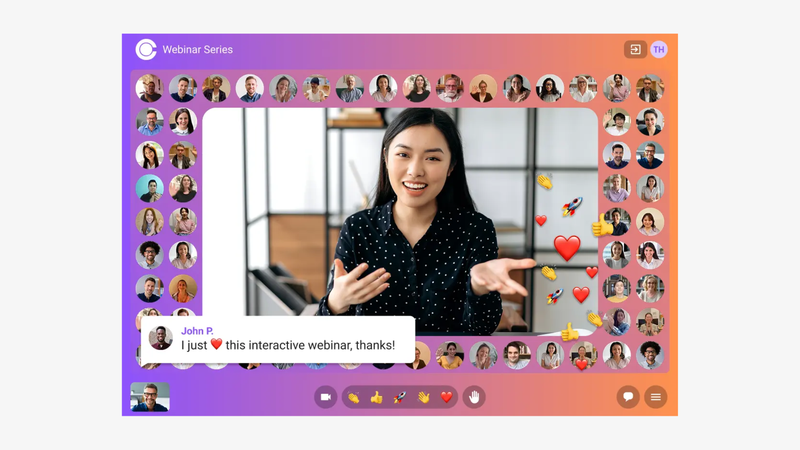
Sparkup gives teams a browser-based webinar studio for running a polished live experience, from registration and visual customization through to detailed engagement analysis. Layouts and banners shape the broadcast, while polls, selected chat messages, word clouds and audience questions can appear within the video. Organizers can bring an attendee on stage, and Events adds a participant mosaic for a shared viewing experience.
For a team moving from Webikeo, the distinction is operational: Sparkup supports the webinar experience, while audience acquisition and event assistance need their own plan and budget. If your contacts, customers or partners already bring the right audience, test a product demonstration or customer event to assess production control, participation and the engagement data available afterward.
For a Webikeo replacement, account for promotion and operational support separately. Rehearse a real live session with your producer and speakers, including attendee invitations and the Events-only Audience Mosaic. The decision should reflect the live format you want to create and the required subscription.
Key features:
- Production studio operated from a browser.
- Custom video layouts and branded overlays.
- Registration pages with customizable forms.
- Branded reminder and follow-up emails.
- Polls displayed within the video experience.
- Audience chat and question management.
- Invitations for attendees to join the stage.
- Participant camera mosaic, available on Events and higher plans.
- Webinar recordings and replays.
- Participation and engagement analytics.
Best for: Marketing and communications teams that want polished live events, real-time participation and detailed audience engagement insights.
Strengths: Studio-quality video, accessible browser-based production, interactions within the video and detailed engagement analytics.
Considerations: The participant mosaic is available on Events. If automated sales campaigns are the main requirement, compare that workflow separately.
Pricing: Sparkup’s Webinar plan starts at €99/month with monthly billing, or €79/month billed annually, for 100 concurrent participants. Events starts at €159/month monthly, or €127/month billed annually, at the same capacity and includes Audience Mosaic. Subscriptions allow unlimited webinars, with simultaneous-session limits depending on the plan. A 14-day trial is available. The free plan streams to one external destination and does not host webinar audiences on Sparkup. Compare the Events price when Mosaic is essential.
Why choose it over Webikeo? Choose Sparkup if your audience acquisition is already covered and you want direct control over a branded, participative live experience and its engagement data.
2. Livestorm: Best for Enterprise webinar governance and integrations
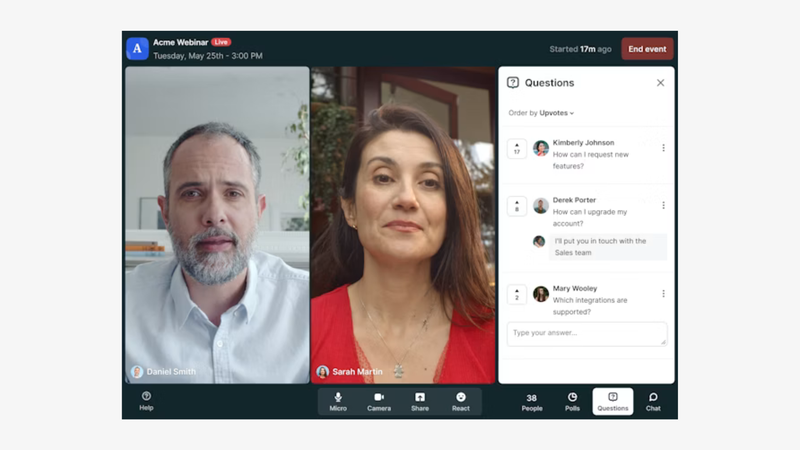
Livestorm is worth considering when webinar selection involves marketing, IT and procurement. Alongside registration, engagement and reporting, it documents security-management credentials and enterprise integrations that can matter to organizations with established approval processes.
Its browser-based workflow covers the event journey, from customized registration and email communications to audience interaction and post-event analysis. The useful question is how those capabilities fit your organization’s requirements: which CRM must receive the data, who needs access, and which security documents must a supplier provide?
Do not treat enterprise positioning as a substitute for checking the relevant offer. Integration availability varies by plan, and a supplier’s certification does not establish that another platform lacks appropriate security.
For a Webikeo replacement, account for promotion and operational support separately. Involve the people responsible for CRM data, security review and purchasing. Test the required connector and estimate attendance across sessions before committing to the credit pack or an Enterprise contract.
Key features:
- Customizable webinar registration pages.
- Additional fields for collecting registration data.
- Automated reminder and follow-up email sequences.
- Event-room branding controls.
- Live audience polls.
- A dedicated questions-and-answers area.
- Recordings and on-demand webinar access.
- Engagement reporting.
- CRM connections, with some integrations requiring Enterprise.
- ISO 27001-certified information-security management, as documented by Livestorm.
Best for: organizations whose decision depends on security review, governance and a specific marketing integration.
Strengths: documented security credentials and a webinar workflow connected to enterprise systems.
Considerations: Salesforce, Marketo and certain other integrations require Enterprise. Its credit model also needs careful budgeting: unlimited events do not mean unlimited external attendance across those events.
Pricing: the 400-credit configuration displays €2.50 per attendee, equivalent to €1,000 for that yearly pack when calculated from the displayed rate. Each external attendee uses one credit per session attended. Returning for another session uses another credit; live attendance and replay viewing of the same session count once. Internal team members do not consume credits. Events are unlimited, and Enterprise uses custom pricing. Check the rate for your actual credit pack rather than extrapolating from this configuration.
Why choose it over Webikeo? Choose Livestorm when you can manage audience acquisition separately and want a required enterprise integration and documented governance for your own webinar program.
3. Contrast: Best for HubSpot-Connected Webinars and AI Content Reuse
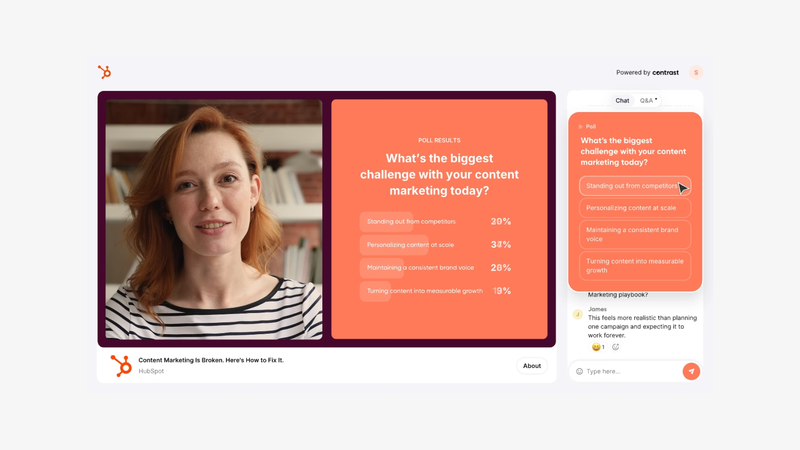
Contrast connects webinars to HubSpot and to the reuse of webinar recordings. Its native CRM integration helps teams associate contact activity with the event, while AI tools can turn the replay into draft written content and video clips. For B2B teams running a recurring content calendar, test the contact timeline and review the generated assets before publication. Audience acquisition still needs a separate plan when replacing Webikeo.
For a Webikeo replacement, account for promotion and operational support separately. Test the recording-to-content process and the contact activity that reaches HubSpot. Monthly unique registrants are a separate budget unit from live room capacity, so model sign-up volume before choosing an allowance.
Key features:
- Branded webinar registration.
- Reminder emails and calendar invitations.
- Studio branding and overlays.
- Live audience chat.
- Moderated Q&A.
- Audience polls and calls to action.
- Branded on-demand webinar channel.
- AI-assisted written content repurposing (Pro; allowances apply).
- AI-generated subtitled clips (Pro; allowances apply).
- Native HubSpot integration.
Best for: B2B content teams combining webinars, HubSpot follow-up and recording reuse.
Strengths: an integrated path from branded live delivery to CRM signals and reusable content.
Considerations: Pro uses monthly unique-registrant allowances, including people who register without attending. Advanced integrations, concurrent events and longer sessions can require a higher offer.
Pricing: Pro displays €79/month billed annually in the EUR browser configuration at 100 unique registrants per month (€948/year, calculated). The USD page displays $99/month billed annually for that allowance; currencies are separate regional offers, not conversions. Pro includes two-hour sessions and unlimited team members, webinars and hosts. The free offer allows 30 unique registrants per month and 30-minute sessions. Advanced and Enterprise use sales-led pricing. Registrants are not concurrent attendees; check monthly acquisition volume and AI allowances.
Why choose it over Webikeo? Choose Contrast when you can manage audience acquisition separately and want native HubSpot activity and AI-assisted content reuse for your own webinar program.
4. Demio: Best for Focused Marketing Webinars and Engagement Tracking
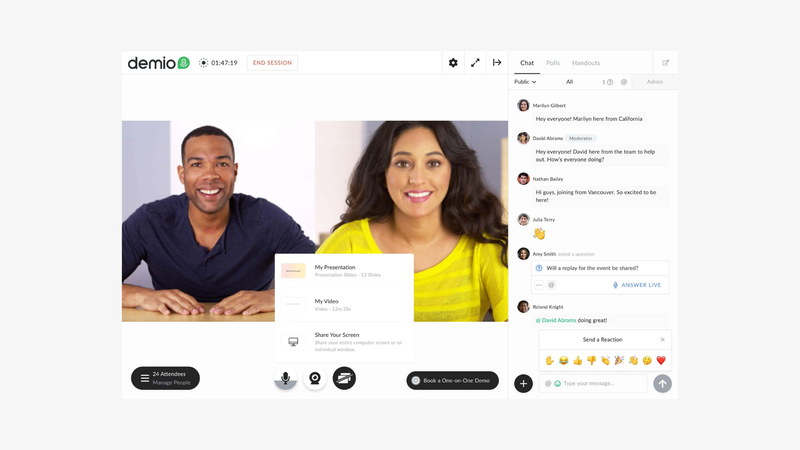
Demio puts the marketing webinar at the center of the workflow: attract registrants, deliver a presentation, capture engagement and use those signals in follow-up. It is a candidate for teams that want a dedicated event journey rather than a broader virtual-event environment. A useful evaluation should follow one prospect from sign-up through attendance and the eventual sales handoff. Its engagement tools include polls, downloadable resources and featured actions, so the comparison should consider how organizers deploy those tools during a real campaign. Teams running several programs should also check host licensing. A larger room, more simultaneous events and automated delivery are separate requirements that can change the package you need.
For a Webikeo replacement, account for promotion and operational support separately. Follow one sample registrant through reminders, attendance, an interaction and the final sales handoff. Check host requirements and room size alongside the particular automation entitlement your campaign needs.
Key features:
- Live webinars and event series (Starter+).
- Automated and on-demand sessions (plan eligibility applies).
- Audience chat (available in the platform).
- Audience Q&A (available in the platform).
- Live polls (available in the platform).
- Downloadable handouts (available in the platform).
- Featured actions / CTAs (available in the platform).
- Screen sharing and uploaded presentation media (available in the platform).
- Invite audience members on stage (stage limits depend on plan).
- Engagement analytics (Starter+).
Best for: marketing teams prioritizing webinar engagement signals and lead follow-up.
Strengths: a dedicated marketing-event workflow with practical in-session conversion tools.
Considerations: Automation entitlements and host requirements depend on the package. Starter’s 50-attendee room should not be compared directly with a larger entry room elsewhere.
Pricing: Starter is $63/month with monthly billing or $45/month billed annually ($540/year, calculated), for 50 attendees and one host. Growth starts at $117/month per host billed annually at 150 attendees. Multiple hosts are needed for simultaneous events. The 14-day trial allows 20 attendees and sessions up to one hour. Check the automation entitlement, required room size and number of hosts before comparing the total with another provider’s subscription; the advertised starting price covers a specific configuration.
Why choose it over Webikeo? Choose Demio when you can manage audience acquisition separately and want a dedicated marketing-webinar journey and engagement follow-up for your own webinar program.
5. WebinarGeek: Best for Live and Automated Webinars in One Program
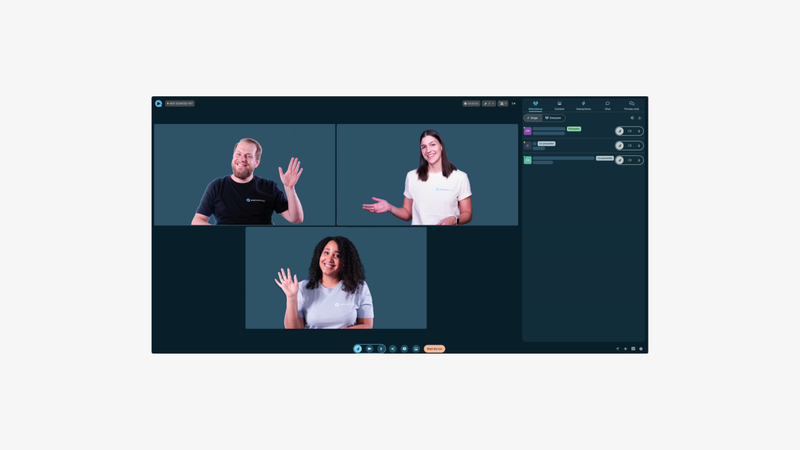
WebinarGeek brings live, automated, on-demand and hybrid delivery into one webinar program. Its appeal is the ability to choose the right format for a campaign without treating every event as a different software project. A live product discussion can sit alongside a repeat presentation and an on-demand library. The platform also documents registration, communications and interaction tools, so it is worth evaluating as a complete event workflow. Look beyond the headline bundle when connecting it to an established marketing stack. Premium’s optional CRM connectors and production extensions affect the total. Teams should test whether they need those additions or whether the included tools already cover their everyday sessions and reporting requirements.
For a Webikeo replacement, account for promotion and operational support separately. Recreate the live, automated or hybrid session you run most often. Confirm account-user needs and paid CRM or RTMP add-ons before comparing the full configuration with the reference package.
Key features:
- Live webinar delivery (Premium+).
- Automated webinar scheduling (Premium+).
- On-demand webinars (Premium+).
- Hybrid live and prerecorded sessions (Premium+).
- Custom registration pages and fields.
- Automated reminder and follow-up emails.
- Public and private chat.
- Polls, quizzes and calls to action.
- Live captions (Premium+).
- HubSpot and Salesforce connections (Premium paid add-ons; included Enterprise).
Best for: teams combining recurring live sessions with automated and on-demand content.
Strengths: several delivery formats in Premium, with a broad event-management workflow.
Considerations: Premium starts with one account user; additional users and certain integrations cost extra. RTMP production is an add-on on Premium and included with Enterprise.
Pricing: Premium is €99/month on a monthly contract, or €59/month billed yearly (€708/year, calculated), at 75 live viewers per webinar. It includes unlimited webinars and sessions up to eight hours. Enterprise starts at €349/month billed yearly at 500 viewers, with a twelve-hour session limit. Premium’s HubSpot and Salesforce connectors are separately priced add-ons; the annual configuration lists €49/month each. A 14-day Premium trial is offered. Annual commitment paid monthly is a third billing option: do not confuse it with a monthly contract.
Why choose it over Webikeo? Choose WebinarGeek when you can manage audience acquisition separately and want multiple webinar formats within one recurring program for your own webinar program.
6. GoTo Webinar: Best for Structured training and departmental webinars
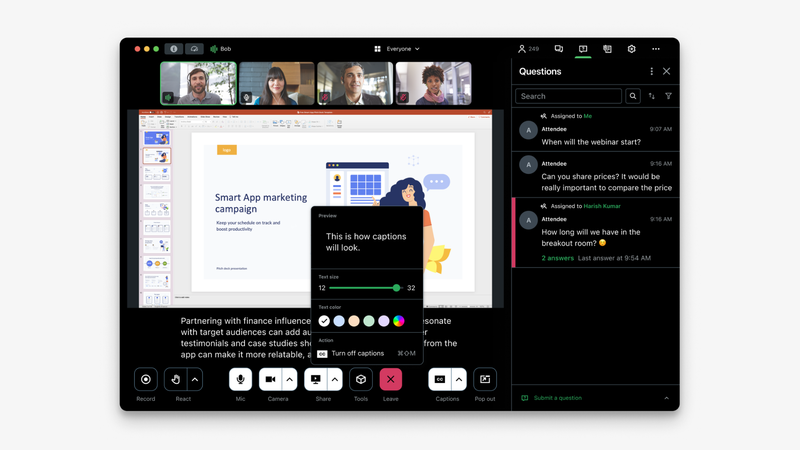
GoTo Webinar is a candidate for departments running recurring presentations, training sessions and town halls. Its current lineup separates an entry webinar package from higher offers that add branding, cloud recording, simulive delivery and breakout rooms.
Those differences matter when the event involves more than a presentation followed by questions. A training team may need smaller discussion groups, a branded participant experience or a route to certified training. Compare the relevant package against Webikeo rather than assuming that every training-related capability is included in the entry subscription.
The strongest reason to choose GoTo is a match with a defined departmental workflow. A longstanding product name alone is not proof of better reliability, simpler operation or a more effective learning experience.
For a Webikeo replacement, account for promotion and operational support separately. Use the current Reach, Elevate and Complete packages for evaluation. Training extensions, recording and branding belong to specific offers, so rehearse the workflow and budget the tier that contains it.
Key features:
- Scheduling for individual events and series.
- Custom registration forms.
- Automated reminders and follow-ups from Reach.
- Live polls from Reach.
- Audience Q&A from Reach.
- Reporting and analytics from Reach.
- Custom branding and URLs from Elevate.
- Cloud recording from Elevate.
- Simulive events listed in Elevate.
- Breakout rooms from Elevate.
Best for: departments organizing structured training, presentations and company events.
Strengths: a structured event workflow with collaboration and training options on higher tiers.
Considerations: cloud recording, branding and breakout rooms are promoted under Elevate; paid events and certified training appear under Complete. Budget for the package that includes the required workflow.
Pricing: with EUR selected, Reach is displayed at €59/month with monthly billing or €50/month billed annually, for one organizer and up to 500 participants. Elevate costs €110/month monthly or €88/month billed annually and increases capacity to 1,000 participants. It adds cloud recording, branded webinars, simulive, transcripts and breakout rooms. Complete is a tailored package for requirements such as paid events and certified training. Confirm local currency, taxes, add-ons and the final subscription total before purchase.
Why choose it over Webikeo? Choose GoTo Webinar when you can manage audience acquisition separately and want structured departmental events and higher-tier training options for your own webinar program.
7. EasyWebinar: Best for Evergreen funnels with integrated follow-up
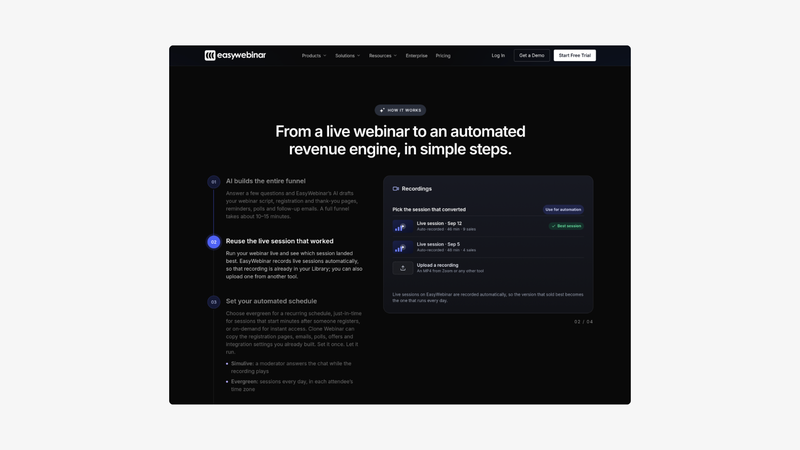
EasyWebinar is relevant when the webinar is one step in a repeatable sales or lead-generation campaign. Its higher plans bring together automated delivery, CRM follow-up and checkout, reducing the number of separate steps a team needs to coordinate.
EasyWebinar’s appeal is the combination of evergreen sessions, behavior-based sequences and selling tools within the same product. That is a software-workflow choice; it does not establish equivalence with Webikeo’s audience-generation service.
A team running a recurring demonstration can assess the full path: registration, viewing, a purchase or contact action, and the follow-up triggered afterward. Existing CRM users should check native connector availability before deciding that the bundled CRM is useful for their own setup.
For a Webikeo replacement, account for promotion and operational support separately. Build one automated selling journey rather than testing video playback alone. Check how the campaign uses the total-webinar allowance and whether native CRM synchronization makes Pro necessary.
Key features:
- Live webinar delivery from Launch.
- Automated and evergreen sessions from Growth.
- Registration and thank-you pages.
- Recording and replay delivery.
- An AI campaign builder with usage allowances.
- EasyCRM contact and lead management from Growth.
- Behavior-based follow-up sequences from Growth.
- In-webinar checkout from Growth.
- EasyCast multistreaming from Growth.
- Native HubSpot and Salesforce Pardot synchronization from Pro.
Best for: teams building recurring automated webinar campaigns with integrated sales follow-up.
Strengths: automation, CRM and checkout available together on Growth and higher plans.
Considerations: Launch does not include automated delivery, while native HubSpot and Pardot synchronization requires Pro. The published total-webinar allowances also need to be matched to your campaign structure.
Pricing: Launch starts at $44/month with monthly billing for 50 live attendees. Growth starts at $116/month for 200 live attendees and includes automated formats; Pro costs $198/month for 500. The comparison grid lists total-webinar allowances of five, ten and fifteen respectively. Confirm how those allowances apply to your account rather than interpreting them as monthly live-session quotas. A standard seven-day trial is advertised. Annual discounts and temporary offers have separate conditions and should be compared against recurring prices.
Why choose it over Webikeo? Choose EasyWebinar when you can manage audience acquisition separately and want evergreen campaigns with integrated CRM follow-up and checkout for your own webinar program.
How to Choose the Right Webikeo Alternative
Compare Total Program Cost
Use a hypothetical quarterly program of four B2B webinars. Ask Webikeo to quote the exact service scope, audience-generation activity and deliverables. For a self-service platform, budget subscription charges plus campaign planning, media or partner promotion, producer time and sales follow-up. No price advantage can be established without those inputs; the subscription is only one line of the program budget.
Agree What Counts as a Useful Contact
A registration, a live attendee, a replay viewer and a qualified sales opportunity are different outcomes. Define the information and consent your team needs, how it will assess fit and who will act on engagement. Compare both a service proposal and a software workflow against that definition rather than ranking them by the largest audience number.
Keep Audience Acquisition in the Migration Plan
Before changing providers, confirm recording access, contact-export conditions, permissions and the treatment of any existing community channel. Build the destination event and test one campaign using an audience source you control. If the pilot cannot attract appropriate attendees, changing the delivery software has not solved the acquisition problem.
Verdict: Which Webikeo Alternative Should You Choose?
Choose a self-service Webikeo alternative when your team can own audience development and wants a different production, automation or CRM workflow. Sparkup is relevant for participatory live events; Livestorm, Contrast and the other options serve different operating needs. If access to Webikeo’s professional community and support is the main value you buy, evaluate that service separately before replacing the software component.
For a production-led live format, compare Sparkup’s Webinar and Events plans and use the 14-day trial to rehearse a real event. For more context on the category, see our guide to webinar platforms.
FAQ
Is Sparkup a complete substitute for Webikeo?
Sparkup can provide the software and live-production workflow for your webinar program. It should not be assumed to replace Webikeo’s audience-generation service. Your team needs its own promotion plan or an additional service for that part of the program.
How much does Webikeo cost?
A current standard numerical subscription price was not verified on the organizer page, which invites an information request. Obtain a proposal for your event volume, promotion and support requirements rather than relying on an older third-party starting price.
Which alternative is relevant when we already have an audience?
Sparkup can suit produced live events, Contrast can suit content reuse and HubSpot workflows, and Livestorm can suit enterprise marketing requirements. Choose around the experience and operating process you need after audience acquisition is accounted for.
Does another webinar subscription include Webikeo’s audience?
Do not assume so. The platforms in this comparison primarily provide software capabilities. Audience promotion, advertising, partnerships and community distribution need their own scope and budget.
What should we check before moving data from Webikeo?
Confirm contractual export options, contact permissions, recording rights and retention arrangements. Map the data needed for follow-up and test the destination CRM. Access to a platform or a community does not automatically establish unrestricted reuse rights for every contact.