WebinarGeek covers live, automated, on-demand and hybrid webinars in Premium. That breadth is useful for a marketing team that wants several formats in one program. Looking elsewhere should start with a concrete need: a different production style, a particular integration, a sales workflow or a more suitable audience allowance.
The right WebinarGeek alternative depends on what your program actually does. A monthly product discussion, a large customer broadcast and an evergreen sales campaign require different combinations of capacity, automation and follow-up. Their starting prices do not describe comparable packages.
These seven options include Sparkup for production-led live events, alongside platforms focused on marketing, enterprise workflows and content reuse. Each profile explains ten features, pricing conditions and the specific situation in which it may be worth choosing over WebinarGeek.
Features and displayed pricing reviewed on November 10, 2026, using official documentation. Supplier currencies are retained; billing commitments, taxes and temporary offers can vary.
Best WebinarGeek Alternatives at a Glance
- Sparkup: polished live production, real-time audience participation and detailed engagement analysis.
- Demio: best for Focused Marketing Webinars and Engagement Tracking.
- Livestorm: best for Enterprise webinar governance and integrations.
- Contrast: best for HubSpot-Connected Webinars and AI Content Reuse.
- EasyWebinar: best for Evergreen funnels with integrated follow-up.
- WebinarJam: best for Sales-focused webinars.
- GoTo Webinar: best for Structured training and departmental webinars.
The order groups different use cases rather than establishing an overall performance ranking. Choose the workflow your team needs before comparing starting prices.
Why Look for a WebinarGeek Alternative?
Your Add-ons Change the Total
WebinarGeek Premium starts at €99/month on a monthly contract or €59/month billed yearly for 75 live viewers. It includes multiple webinar formats and eight-hour sessions, but the required configuration can cost more than the base subscription.
HubSpot and Salesforce are separately priced Premium add-ons; RTMP production and extra account users can also add cost. Those options are useful when needed, but a team should compare its complete configuration with another provider’s relevant package. A cheaper headline price does not establish a cheaper equivalent workflow.
Your Production Format Has Evolved
WebinarGeek offers branding, interaction and production options. The reason to investigate another platform is how you want those tools to work together during a session, especially when the audience contributes on camera or the production team manages several visual transitions.
A panel discussion and a training session may use the same basic ingredients but require different controls. Rehearse your most demanding format with the speaker and producer. Include registration, backstage coordination and the replay so the choice reflects the full event rather than a polished opening screen.
Your Program Has a Different Center of Gravity
A broad mix of webinar formats is not every team’s priority. Some want content creation and HubSpot activity in one workflow; others want in-session selling, integrated checkout, departmental training or a procurement-approved supplier.
Keep WebinarGeek’s existing strengths visible in the comparison. It already supports automation and live captions, so those features alone do not justify a switch. Identify the capability, operating model or pricing unit that would make a measurable difference to the way your team works.
The 7 Best WebinarGeek Alternatives
1. Sparkup: Best for Studio-Quality Live Experiences and Audience Engagement Analysis
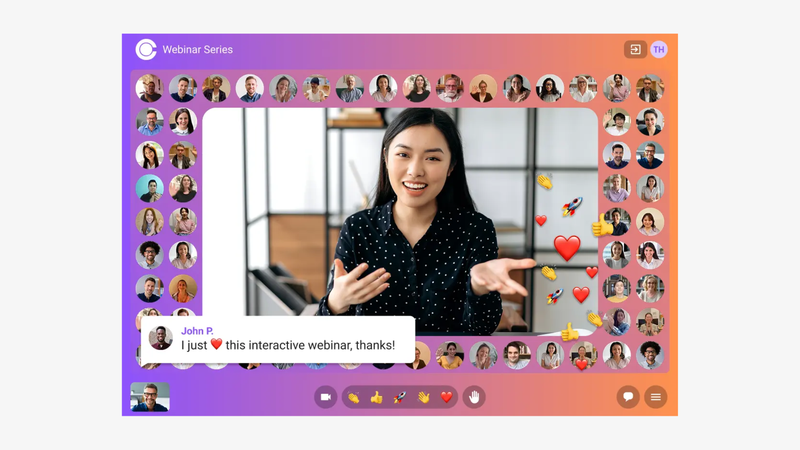
With Sparkup’s browser-based webinar studio, teams can personalize layouts, coordinate speakers and bring interactions into the video itself. Polls and selected questions become part of the live presentation, and attendees can be invited to speak. The participant mosaic on Events brings audience cameras together for a shared viewing experience. Product demonstrations, training sessions and internal announcements can all use this real-time participation.
WebinarGeek already covers several delivery formats. The reason to consider Sparkup is the live experience you want to create: studio-quality video, accessible browser controls and detailed engagement analysis. Rehearse with your presenters to compare visual transitions, audience contributions and the information available after the event.
Rehearse a real live session with your producer and speakers, including attendee invitations and the Events-only Audience Mosaic. The decision should reflect the live format you want to create and the required subscription.
Key features:
- Production studio operated from a browser.
- Custom video layouts and branded overlays.
- Registration pages with customizable forms.
- Branded reminder and follow-up emails.
- Polls displayed within the video experience.
- Audience chat and question management.
- Invitations for attendees to join the stage.
- Participant camera mosaic, available on Events and higher plans.
- Webinar recordings and replays.
- Participation and engagement analytics.
Best for: Marketing and communications teams that want polished live events, real-time participation and detailed audience engagement insights.
Strengths: Studio-quality video, accessible browser-based production, interactions within the video and detailed engagement analytics.
Considerations: The participant mosaic is available on Events. If automated sales campaigns are the main requirement, compare that workflow separately.
Pricing: Sparkup’s Webinar plan starts at €99/month with monthly billing, or €79/month billed annually, for 100 concurrent participants. Events starts at €159/month monthly, or €127/month billed annually, at the same capacity and includes Audience Mosaic. Subscriptions allow unlimited webinars, with simultaneous-session limits depending on the plan. A 14-day trial is available. The free plan streams to one external destination and does not host webinar audiences on Sparkup. Compare the Events price when Mosaic is essential.
Why choose it over WebinarGeek? Shortlist Sparkup when your main requirement is a distinctive live experience with active audience participation and detailed engagement insights.
2. Demio: Best for Focused Marketing Webinars and Engagement Tracking
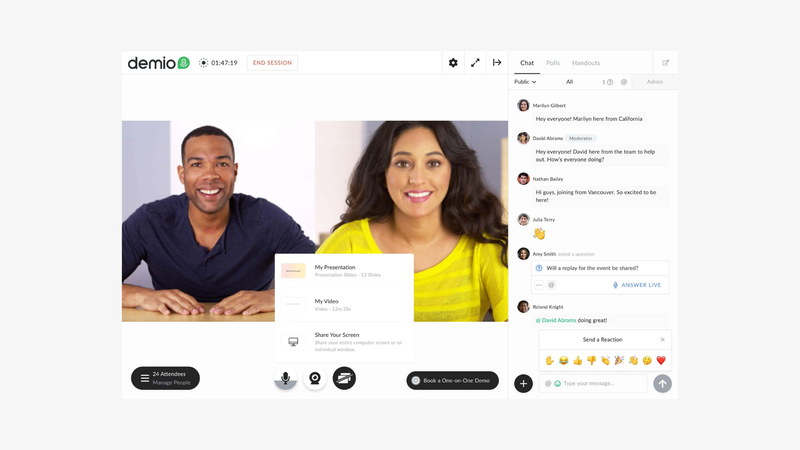
Demio puts the marketing webinar at the center of the workflow: attract registrants, deliver a presentation, capture engagement and use those signals in follow-up. It is a candidate for teams that want a dedicated event journey rather than a broader virtual-event environment. A useful evaluation should follow one prospect from sign-up through attendance and the eventual sales handoff. Its engagement tools include polls, downloadable resources and featured actions, so the comparison should consider how organizers deploy those tools during a real campaign. Teams running several programs should also check host licensing. A larger room, more simultaneous events and automated delivery are separate requirements that can change the package you need.
Follow one sample registrant through reminders, attendance, an interaction and the final sales handoff. Check host requirements and room size alongside the particular automation entitlement your campaign needs.
Key features:
- Live webinars and event series (Starter+).
- Automated and on-demand sessions (plan eligibility applies).
- Audience chat (available in the platform).
- Audience Q&A (available in the platform).
- Live polls (available in the platform).
- Downloadable handouts (available in the platform).
- Featured actions / CTAs (available in the platform).
- Screen sharing and uploaded presentation media (available in the platform).
- Invite audience members on stage (stage limits depend on plan).
- Engagement analytics (Starter+).
Best for: marketing teams prioritizing webinar engagement signals and lead follow-up.
Strengths: a dedicated marketing-event workflow with practical in-session conversion tools.
Considerations: Automation entitlements and host requirements depend on the package. Starter’s 50-attendee room should not be compared directly with a larger entry room elsewhere.
Pricing: Starter is $63/month with monthly billing or $45/month billed annually ($540/year, calculated), for 50 attendees and one host. Growth starts at $117/month per host billed annually at 150 attendees. Multiple hosts are needed for simultaneous events. The 14-day trial allows 20 attendees and sessions up to one hour. Check the automation entitlement, required room size and number of hosts before comparing the total with another provider’s subscription; the advertised starting price covers a specific configuration.
Why choose it over WebinarGeek? Choose Demio over WebinarGeek when a dedicated marketing-webinar journey and engagement follow-up is the priority and the relevant plan matches your event requirements.
3. Livestorm: Best for Enterprise webinar governance and integrations
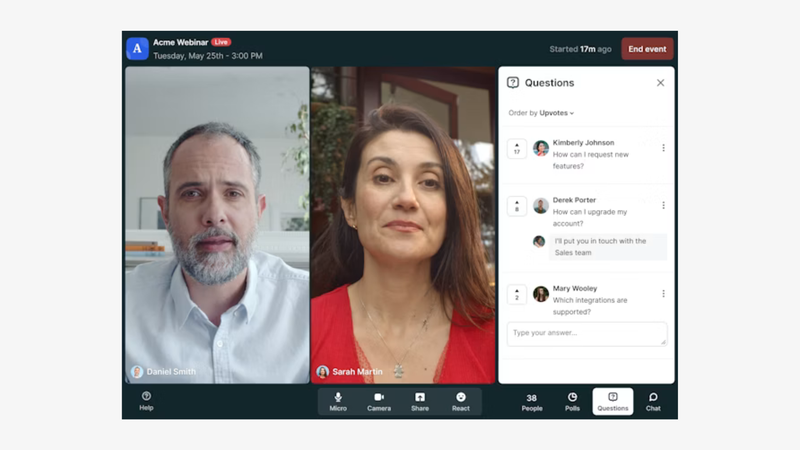
Livestorm is worth considering when webinar selection involves marketing, IT and procurement. Alongside registration, engagement and reporting, it documents security-management credentials and enterprise integrations that can matter to organizations with established approval processes.
Its browser-based workflow covers the event journey, from customized registration and email communications to audience interaction and post-event analysis. The useful question is how those capabilities fit your organization’s requirements: which CRM must receive the data, who needs access, and which security documents must a supplier provide?
Do not treat enterprise positioning as a substitute for checking the relevant offer. Integration availability varies by plan, and a supplier’s certification does not establish that another platform lacks appropriate security.
Involve the people responsible for CRM data, security review and purchasing. Test the required connector and estimate attendance across sessions before committing to the credit pack or an Enterprise contract.
Key features:
- Customizable webinar registration pages.
- Additional fields for collecting registration data.
- Automated reminder and follow-up email sequences.
- Event-room branding controls.
- Live audience polls.
- A dedicated questions-and-answers area.
- Recordings and on-demand webinar access.
- Engagement reporting.
- CRM connections, with some integrations requiring Enterprise.
- ISO 27001-certified information-security management, as documented by Livestorm.
Best for: organizations whose decision depends on security review, governance and a specific marketing integration.
Strengths: documented security credentials and a webinar workflow connected to enterprise systems.
Considerations: Salesforce, Marketo and certain other integrations require Enterprise. Its credit model also needs careful budgeting: unlimited events do not mean unlimited external attendance across those events.
Pricing: the 400-credit configuration displays €2.50 per attendee, equivalent to €1,000 for that yearly pack when calculated from the displayed rate. Each external attendee uses one credit per session attended. Returning for another session uses another credit; live attendance and replay viewing of the same session count once. Internal team members do not consume credits. Events are unlimited, and Enterprise uses custom pricing. Check the rate for your actual credit pack rather than extrapolating from this configuration.
Why choose it over WebinarGeek? Choose Livestorm over WebinarGeek when a required enterprise integration and documented governance is the priority and the relevant plan matches your event requirements.
4. Contrast: Best for HubSpot-Connected Webinars and AI Content Reuse
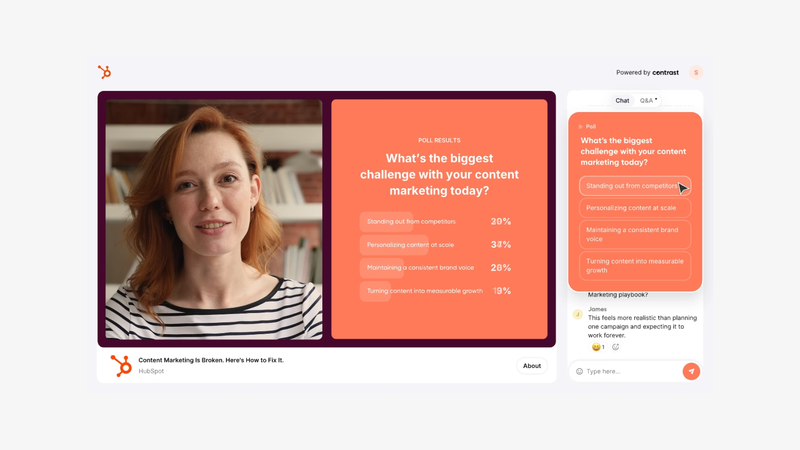
Contrast brings the webinar, HubSpot contact activity and replay reuse into one content workflow. Teams can use its native CRM integration alongside AI-assisted written drafts and subtitled clips made from recordings. Compared with a mixed-format WebinarGeek program, assess whether those post-event tasks are a priority: test contact matching, review the clips and measure the editing work still needed.
Test the recording-to-content process and the contact activity that reaches HubSpot. Monthly unique registrants are a separate budget unit from live room capacity, so model sign-up volume before choosing an allowance. WebinarGeek also supports CRM connections, but the Premium add-on structure changes the comparison.
Key features:
- Branded webinar registration.
- Reminder emails and calendar invitations.
- Studio branding and overlays.
- Live audience chat.
- Moderated Q&A.
- Audience polls and calls to action.
- Branded on-demand webinar channel.
- AI-assisted written content repurposing (Pro; allowances apply).
- AI-generated subtitled clips (Pro; allowances apply).
- Native HubSpot integration.
Best for: B2B content teams combining webinars, HubSpot follow-up and recording reuse.
Strengths: an integrated path from branded live delivery to CRM signals and reusable content.
Considerations: Pro uses monthly unique-registrant allowances, including people who register without attending. Advanced integrations, concurrent events and longer sessions can require a higher offer.
Pricing: Pro displays €79/month billed annually in the EUR browser configuration at 100 unique registrants per month (€948/year, calculated). The USD page displays $99/month billed annually for that allowance; currencies are separate regional offers, not conversions. Pro includes two-hour sessions and unlimited team members, webinars and hosts. The free offer allows 30 unique registrants per month and 30-minute sessions. Advanced and Enterprise use sales-led pricing. Registrants are not concurrent attendees; check monthly acquisition volume and AI allowances.
Why choose it over WebinarGeek? Choose Contrast over WebinarGeek when native HubSpot activity and AI-assisted content reuse is the priority and the relevant plan matches your event requirements.
5. EasyWebinar: Best for Evergreen funnels with integrated follow-up
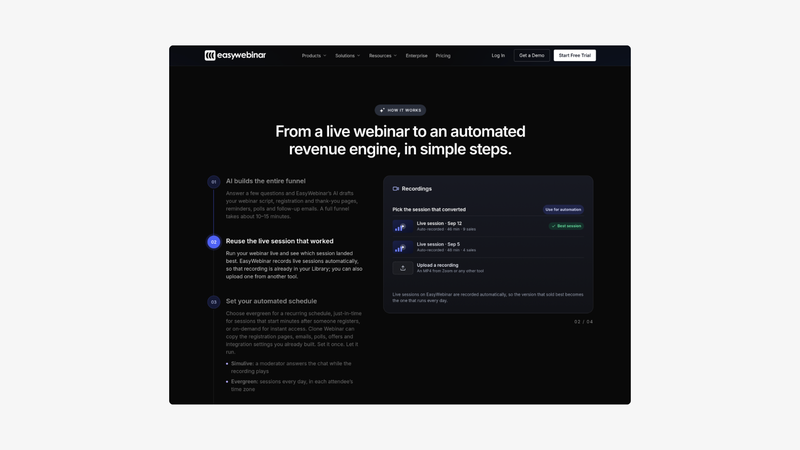
EasyWebinar is relevant when the webinar is one step in a repeatable sales or lead-generation campaign. Its higher plans bring together automated delivery, CRM follow-up and checkout, reducing the number of separate steps a team needs to coordinate.
The difference from WebinarGeek is not simply the presence of automated webinars. Both products support automated formats. EasyWebinar’s appeal is the particular combination of evergreen sessions, behavior-based sequences and selling tools within the same product.
A team running a recurring demonstration can assess the full path: registration, viewing, a purchase or contact action, and the follow-up triggered afterward. Existing CRM users should check native connector availability before deciding that the bundled CRM is useful for their own setup.
Build one automated selling journey rather than testing video playback alone. Check how the campaign uses the total-webinar allowance and whether native CRM synchronization makes Pro necessary.
Key features:
- Live webinar delivery from Launch.
- Automated and evergreen sessions from Growth.
- Registration and thank-you pages.
- Recording and replay delivery.
- An AI campaign builder with usage allowances.
- EasyCRM contact and lead management from Growth.
- Behavior-based follow-up sequences from Growth.
- In-webinar checkout from Growth.
- EasyCast multistreaming from Growth.
- Native HubSpot and Salesforce Pardot synchronization from Pro.
Best for: teams building recurring automated webinar campaigns with integrated sales follow-up.
Strengths: automation, CRM and checkout available together on Growth and higher plans.
Considerations: Launch does not include automated delivery, while native HubSpot and Pardot synchronization requires Pro. The published total-webinar allowances also need to be matched to your campaign structure.
Pricing: Launch starts at $44/month with monthly billing for 50 live attendees. Growth starts at $116/month for 200 live attendees and includes automated formats; Pro costs $198/month for 500. The comparison grid lists total-webinar allowances of five, ten and fifteen respectively. Confirm how those allowances apply to your account rather than interpreting them as monthly live-session quotas. A standard seven-day trial is advertised. Annual discounts and temporary offers have separate conditions and should be compared against recurring prices.
Why choose it over WebinarGeek? Choose EasyWebinar over WebinarGeek when evergreen campaigns with integrated CRM follow-up and checkout is the priority and the relevant plan matches your event requirements.
6. WebinarJam: Best for Sales-focused webinars
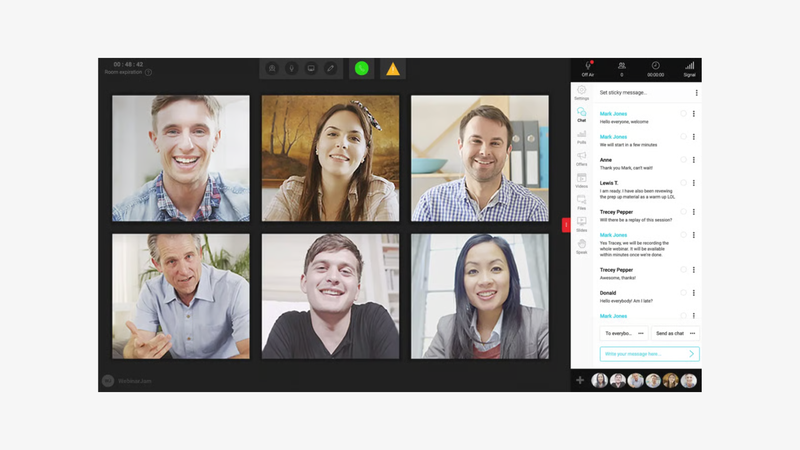
WebinarJam is aimed at businesses using a webinar to present an offer and move an audience toward a purchase. Its combination of registration tools, reminders, offer displays and presentation features makes it a candidate for coaching programs, course launches and other sales presentations.
For repeat campaigns, the distinction between live and automated delivery is useful. WebinarJam handles the live session, while its companion EverWebinar supports scheduled evergreen delivery. Current packages include EverWebinar from Basic upward, so compare the bundle you would actually buy.
Rehearse the offer timing, audience interaction and handoff to purchase. Starter’s one-hour limit and the Basic-and-above EverWebinar bundle can change which configuration fits the campaign.
Key features:
- Customizable registration-page templates.
- Email and SMS communications.
- Real-time audience chat.
- Polls and surveys.
- Offer displays during the presentation.
- An on-screen whiteboard.
- Playback of prerecorded video during live sessions.
- Custom presentation backgrounds.
- Broadcasting to Facebook and YouTube.
- Attendee spotlight from the Basic plan upward.
Best for: creators, coaches and businesses presenting products or services through webinars.
Strengths: a sales-oriented presentation workflow and a bundled evergreen option on higher plans.
Considerations: Starter has a one-hour session limit and does not include attendee spotlight or the EverWebinar bundle. Evaluate whether its selling tools fit your event rather than selecting it solely on entry price.
Pricing: Starter costs $49/month with monthly billing, or $39/month billed annually, for 100 attendees, one host and sessions up to one hour. Basic costs $99/month monthly, or $79/month billed annually, for 500 attendees, two hosts and two-hour sessions. Both allow unlimited webinars. EverWebinar is included with Basic, Professional and Enterprise, according to the current package footnote. A separate advertised 14-day trial offer costs $1; confirm the available trial route before signing up.
Why choose it over WebinarGeek? Choose WebinarJam over WebinarGeek when sales-oriented presentations with an evergreen companion bundle is the priority and the relevant plan matches your event requirements.
7. GoTo Webinar: Best for Structured training and departmental webinars
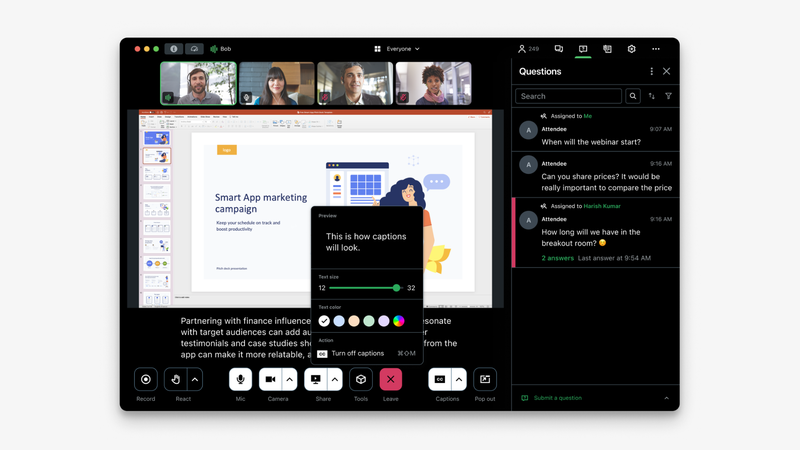
GoTo Webinar is a candidate for departments running recurring presentations, training sessions and town halls. Its current lineup separates an entry webinar package from higher offers that add branding, cloud recording, simulive delivery and breakout rooms.
Those differences matter when the event involves more than a presentation followed by questions. A training team may need smaller discussion groups, a branded participant experience or a route to certified training. Compare the relevant package against WebinarGeek rather than assuming that every training-related capability is included in the entry subscription.
The strongest reason to choose GoTo is a match with a defined departmental workflow. A longstanding product name alone is not proof of better reliability, simpler operation or a more effective learning experience.
Use the current Reach, Elevate and Complete packages for evaluation. Training extensions, recording and branding belong to specific offers, so rehearse the workflow and budget the tier that contains it.
Key features:
- Scheduling for individual events and series.
- Custom registration forms.
- Automated reminders and follow-ups from Reach.
- Live polls from Reach.
- Audience Q&A from Reach.
- Reporting and analytics from Reach.
- Custom branding and URLs from Elevate.
- Cloud recording from Elevate.
- Simulive events listed in Elevate.
- Breakout rooms from Elevate.
Best for: departments organizing structured training, presentations and company events.
Strengths: a structured event workflow with collaboration and training options on higher tiers.
Considerations: cloud recording, branding and breakout rooms are promoted under Elevate; paid events and certified training appear under Complete. Budget for the package that includes the required workflow.
Pricing: with EUR selected, Reach is displayed at €59/month with monthly billing or €50/month billed annually, for one organizer and up to 500 participants. Elevate costs €110/month monthly or €88/month billed annually and increases capacity to 1,000 participants. It adds cloud recording, branded webinars, simulive, transcripts and breakout rooms. Complete is a tailored package for requirements such as paid events and certified training. Confirm local currency, taxes, add-ons and the final subscription total before purchase.
Why choose it over WebinarGeek? Choose GoTo Webinar over WebinarGeek when structured departmental events and higher-tier training options is the priority and the relevant plan matches your event requirements.
How to Choose the Right WebinarGeek Alternative
Compare the Required Configuration
For a hypothetical 75-viewer webinar requiring HubSpot, the yearly Premium configuration is €59/month plus the displayed €49/month HubSpot add-on: €108/month equivalent or €1,296/year, calculated before taxes. This is a deliberately narrow scenario, not a universal price comparison. It excludes extra account users, other add-ons and any audience increase.
Keep Audience and User Counts Separate
Do not confuse WebinarGeek’s 100 presenters on stage with the number of included account users or live viewers. Premium starts with one account user, while the entry audience configuration is 75 live viewers. Ask who needs to create events, who only presents and whether simultaneous sessions are required. Other suppliers define hosts and team members differently.
Rebuild One Automated Journey
If automated webinars matter, recreate one representative campaign before migration: registration, scheduling, timed interactions, replay access and the final CRM update. If you mainly run live events, rehearse audience contributions and production changes instead. The best trial uses your actual workflow rather than every feature in the vendor’s demo.
Verdict: Which WebinarGeek Alternative Should You Choose?
Choose an alternative only when it improves the part of WebinarGeek that constrains your program. Sparkup is worth testing for produced live events and audience participation; Contrast for HubSpot-connected content reuse; EasyWebinar or WebinarJam for specific selling workflows. If Premium’s mix of formats and included tools already covers your needs, remaining with WebinarGeek can be the sensible choice.
For a production-led live format, compare Sparkup’s Webinar and Events plans and use the 14-day trial to rehearse a real event. For more context on the category, see our guide to webinar platforms.
FAQ
Which WebinarGeek alternative suits interactive live events?
Sparkup combines a browser-based webinar studio, polls within the video, invitations for attendees to speak and detailed engagement analytics. The participant mosaic is available on Events. Rehearse your actual format when comparing it with WebinarGeek: evaluate the visual result and how easily participants can contribute.
Is WebinarGeek Premium an all-inclusive price?
Premium includes several webinar formats, but certain capabilities are add-ons. HubSpot, Salesforce, additional account users and RTMP production can change the total. Enterprise includes some of these capabilities under a different annual package.
Which alternative should I consider for HubSpot?
Contrast includes a native HubSpot integration in its published Pro offer. Livestorm also lists HubSpot among its integrations. Compare which contact properties and activity signals your team requires, together with the provider’s audience pricing model.
Are there free WebinarGeek alternatives?
Trials let you evaluate software without representing a permanent hosted-webinar plan. Contrast has a limited free allowance, while Sparkup offers a 14-day trial. A free streaming plan that sends video to another destination does not supply the same webinar-management service.
Can I move automated webinars to another platform?
You can rebuild campaigns where the destination supports the required formats, but do not assume schedules, interactions, email sequences or CRM mappings transfer automatically. Confirm export options, preserve required recordings and test one campaign before moving the rest.